
 QmcFootballPluginy · 1.21
A Customizable Minecraft Football Minigame with Multiple Arenas, GUI, Live Scoreboards, and Player S
Za darmoPobrania: 17
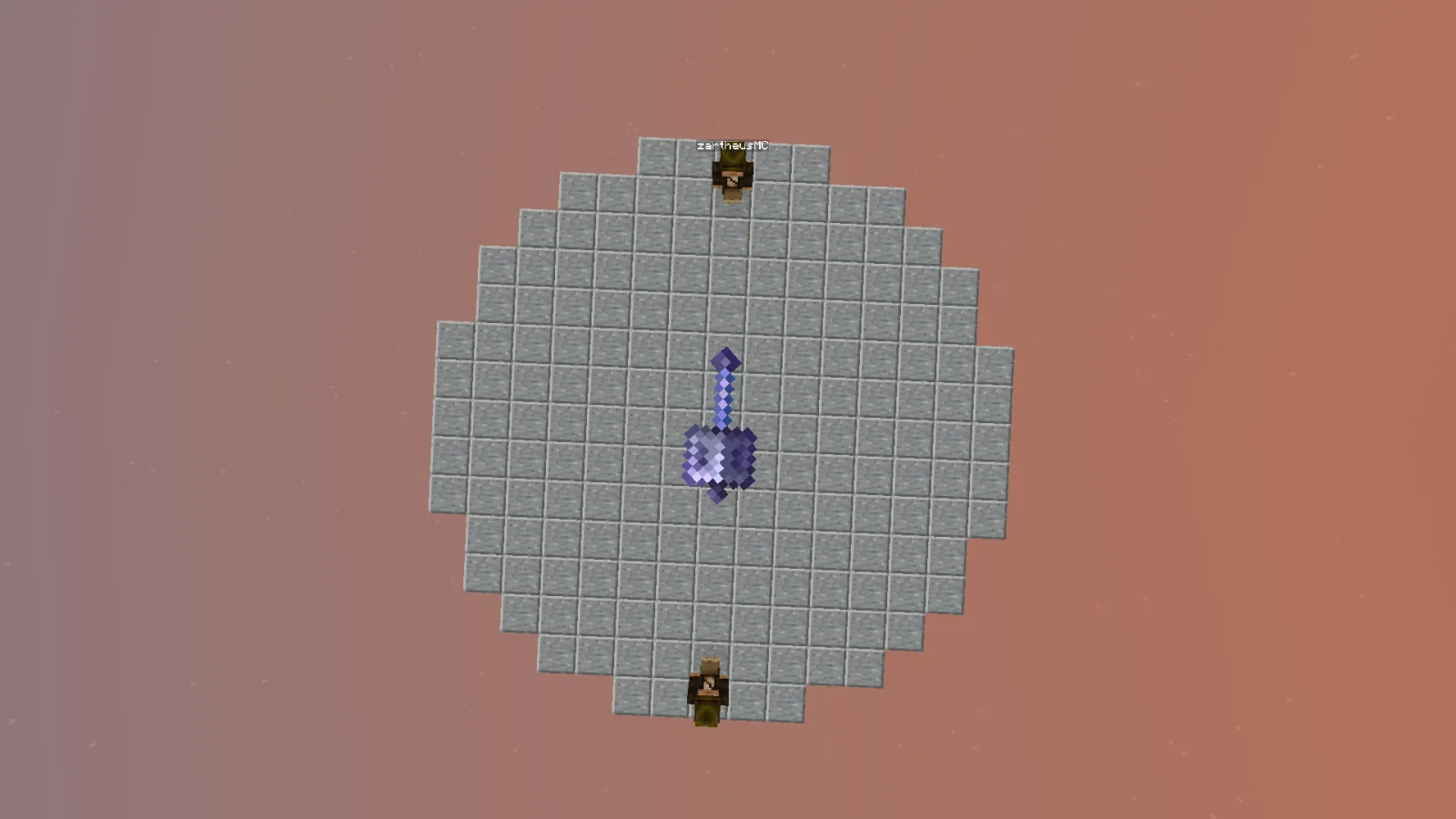
Mace Roulette Plugin to plugin do serwerów Paper / Spigot, autor: zartheus. A ten-room Mace Roulette minigame with a spinning Mace selector, queues, round events, and a GUI.
Obsługiwane wersje: Minecraft 1.21. Liczba pobrań w serwisie Modrinth: 2. Zajmuje 98. miejsce w kategorii „pluginy minigier” (łącznie: 104). Ostatnia aktualizacja: 10.11.2026.
Najnowsza to 0.2.0, wydana 10.11.2026. Jest zrobiona dla Minecraft 1.21.11. Działa na Bukkit, Paper i Spigot. Plik ma 34 KB.
| Wersja | Wydano | Minecraft | Typ |
|---|---|---|---|
0.2.0 | 10.11.2026 | 1.21.11 | Wydanie |
Komendy wymienione na stronie Mace Roulette Plugin w Modrinth:
/heusThe Mace spins. The arena waits. One player walks away.
A multiplayer Mace Roulette minigame for Minecraft Java 1.21.11.
10 independent rooms · 2–12 players per room · Spinning Mace selection · Optional round events
This is a fresh server-plugin version of the original Mace Roulette datapack. It keeps the roulette match at the center of the experience while making the lobby and controls feel more like a multiplayer server minigame:
The plugin is installed as a JAR and does not require the datapack.
The queue starts counting down when 2 players join. At 4 players, the remaining wait drops to at most 15 seconds. Joining a room that is already playing lets you spectate it.
Feature · In game
10 separate rooms · Multiple matches can run without sharing their queues.
Spinning Mace selector · A physical Mace display spins in the arena before each selection.
Lightweight lobby · A circular iron-block floor within 20×20 blocks, surrounded by tall barrier walls.
Chest-style room menu · Click an item to queue for a room or watch a live match.
Admin settings GUI · Change time, Mace count, Wind Charges, arena rules, and events by clicking items.
English and Turkish · Players can choose their message language.
Anvil Rain · Glowing Silverfish · Safe Color · Crumbling Floor · Slime Floor · Ice Floor · Broken Arena
Turn events on or off from /heus settings. The same menu also controls safe borders, Mace-holder-only PvP, and arena shrinking.
Requires Java 21 and Minecraft Java 1.21.11. The plugin is built against the Spigot API and tested on Paper 1.21.11. It runs server-side; players do not need a client mod or resource pack. Spigot and CraftBukkit runtime testing has not been completed.
Important: This is a plugin JAR, not a datapack ZIP. Install it in plugins/, not in a world's datapacks/ folder. Do not run the datapack edition alongside the plugin in the same world.
Command · What it does
/heus menu · Open the room menu without using the compass.
/heus join · Join or leave a room queue; spectate if the room is live.
/heus watch · Watch an active match.
/heus leave · Leave a queue or spectator view.
/heus lobby · Return to the lobby when available.
/heus lang en / /heus lang tr · Change message language.
Command · What it does
/heus world · Enable or disable the lobby mode.
/heus settings · Open the clickable settings menu.
/heus setup · Prepare a room manually.
/heus start · Start a prepared room.
/heus stop · Stop one room.
/heus stopall · Stop all rooms.
Command · Range / effect
/heus set time 10 · Mace round time: 1–300 seconds; default 5.
/heus set maces 2 · Mace holders per round: 1–12.
/heus set wind 3 · Wind Charges per holder: 0–64.
/heus set shrinkafter 3 · Rounds before shrinking: 1–100.
/heus toggle border · Toggle the arena's safe border.
/heus toggle maceonly · Toggle Mace-holder-only PvP.
/heus toggle shrink · Toggle arena shrinking.
/heus toggle addons · Toggle random round events.
Operator permissions: heus.admin is granted to server operators by default.
Heus Mace Roulette, 10 ayrı odada oynanan çok oyunculu bir Mace minigame'idir. Lobideki pusulaya sağ tıkla, sandık menüsünden bir odaya katıl ve ortadaki Mace'in kimi seçeceğini izle. Elenenler Spectator olur; son kalan kazanır.
Kurulum: JAR dosyasını sunucunun plugins/ klasörüne koy, sunucuyu yeniden başlat ve OP olarak /heus world yaz. Ayarları /heus settings menüsünden değiştirebilirsin. İstemcide mod veya resource pack gerekmez.
0.1.x sürümünden geçiyorsan: Eski plugin JAR'ını kaldır. Büyük yapı tabanlı lobi artık yüklenmez; oyuncular yeni demir lobiye taşınır. Eski lobi blokları veri güvenliği için dünya dosyasından otomatik silinmez.
Autor: zartheus. Z obrazkami na Modrinth.
Upewnij się, że twój serwer działa na Paper i Spigot w Minecraft 1.21.
Pobierz plik .jar z Modrinth i wrzuć go do folderu plugins na serwerze.
Zrestartuj serwer. Unikaj /reload, wiele pluginów źle to znosi.
Wpisz /plugins w konsoli: Mace Roulette Plugin powinien być na zielono. Pliki konfiguracyjne tworzą się w folderze plugins przy pierwszym starcie.
Pełny poradnik: Jak zainstalować pluginy na serwerze Minecraft
| Zasób | Pobrania | Ocena | Wersje | Aktualizacja | Cena |
|---|---|---|---|---|---|
 Mace Roulette Pluginten, który oglądałeś | 2 | – | 1.21 | 4 d. temu | Za darmo |
| QmcFootballAvesta12345 | 17 | – | 1.21 | 28 d. temu | Za darmo |
 Screaming BedWarsScreamingSandals | 506K | 4.4 | 1.8 – 26.x | 19 cze 2026 | Za darmo |
 ajParkourajgeiss0702 | 135K | 4.8 | 1.8 – 26.x | 25 kwi 2026 | Za darmo |
Jeszcze nie. Najnowsza obsługiwana wersja to Minecraft 1.21.
Tak. Mace Roulette Plugin można pobrać za darmo z serwisu Modrinth.
Mace Roulette Plugin działa na serwerach Paper i Spigot.
Tak. Ostatnia aktualizacja wyszła w ciągu ostatniej doby.
Najbliższe to QmcFootball, Screaming BedWars i ajParkour. Porównaj wszystkie alternatywy
QmcFootballPluginy · 1.21A Customizable Minecraft Football Minigame with Multiple Arenas, GUI, Live Scoreboards, and Player S
Screaming BedWarsPluginy · 1.8 – 26.xBedWars/EggWars/AnchorWars/CakeWars minigame compatible with all versions since 1.8+
ajParkourPluginy · 1.8 – 26.xRandomly generated parkour minigame. Great for any kind of server! Jump and Run!
 Murder MysteryPluginy · 1.8 – 26.x
[MINIGAME] Addictive Gameplay | MySQL/YAML | BungeeCord/Multi Arena | Placeholders | Many Languages
 ScreamingBedWarsPluginy · 1.8 – 26.x
BedWars/EggWars/AnchorWars/CakeWars minigame compatible with all versions since 1.8.8
 ExcellentCratesPluginy · 1.21 – 26.x
A modern, feature-rich, modular crate & lootbox plugin with an intuitive in-game GUI editor and smooth animations.
Zaloguj się, aby wystawić opinię.