
 Create: Interactive pantographsMody · 1.21
Makes CEE pantographs interactable even when assembled on trains
Za darmoPobrania: 290
Circuit boards for Create: Electro Energetics. Draw schematics on a design table, etch and assemble PCBs with Create machines, and build working circuits from…
Bezpośrednie pobieranie z Modrinth · 5 pobrań
Źródło i własność. Ta strona została wygenerowana automatycznie z publicznych danych, które Modrinth udostępnia przez swoje publiczne API. Nazwa, opisy, obrazy, znaki towarowe i wszelkie inne treści tego projektu należą do sjzeero i ich odpowiednich właścicieli. CraftRank nie jest autorem tego projektu i nie jest powiązany z jego autorem ani z Modrinth, ani przez nich popierany lub sponsorowany.
Hosting i dystrybucja. CraftRank nie hostuje, nie przechowuje, nie wgrywa i nie rozpowszechnia plików do pobrania tego projektu, a na serwerach CraftRank nie jest przechowywany żaden taki plik. Każde pobranie jest udostępniane bezpośrednio przez Modrinth z jego własnych serwerów; przycisk Pobierz jedynie prowadzi do pliku tam. Licencja podana na Modrinth to Apache-2.0.
Korzystanie z publicznych API. Modrinth, Hangar (PaperMC) i SpigotMC (przez API Spiget) udostępniają publicznie swoje API zewnętrznym stronom i aplikacjom. Warunki korzystania z Modrinth dają użytkownikom API licencję na pobieranie, wyświetlanie i odpytywanie treści przez ich własne usługi (sekcja „API Usage”), a twórcy publikujący na Modrinth udzielają Modrinth i jego licencjobiorcom prawa do wyświetlania i rozpowszechniania ich treści osobom trzecim (sekcja „User Contributions”). CraftRank korzysta z tych API zgodnie z opublikowanymi zasadami platform: przedstawia się w każdym zapytaniu i przestrzega limitów.
Brak gwarancji. Informacje na tej stronie są udostępniane „tak jak są”, bez żadnej gwarancji. Pobieranie i używanie tego projektu odbywa się na własne ryzyko i podlega licencji oraz warunkom jego autora.
Zgłoszenia naruszeń praw autorskich (DMCA). Zgłoszenie może złożyć wyłącznie właściciel praw autorskich lub osoba upoważniona do działania w jego imieniu, a musi ono pochodzić od osoby pełnoletniej albo jej rodzica lub opiekuna prawnego. Ważne zgłoszenie wysłane na abuse@craftrank.org musi zawierać: link do tej strony; utwór, którego naruszenie się zarzuca; Twoje imię i nazwisko, adres pocztowy, numer telefonu i e-mail; oświadczenie, że w dobrej wierze uważasz, iż korzystanie nie jest dozwolone przez właściciela, jego przedstawiciela ani prawo; oświadczenie, złożone pod rygorem odpowiedzialności za fałszywe zeznania, że zgłoszenie jest prawdziwe i że jesteś właścicielem lub osobą upoważnioną; oraz Twój podpis fizyczny lub elektroniczny. Niekompletne zgłoszenia nie są rozpatrywane. Ważne zgłoszenia są obsługiwane w ciągu 48 godzin, bez potrzeby zgłaszania przez Google.
Fałszywe zgłoszenia. Kto świadomie i nieprawdziwie twierdzi, że materiał narusza prawa, odpowiada za wyrządzone szkody, w tym koszty i honoraria prawników (17 U.S.C. § 512(f)). Zgłoszenia składane w złej wierze lub przez osoby, którym nie przysługują prawa, są rejestrowane i będą kwestionowane.
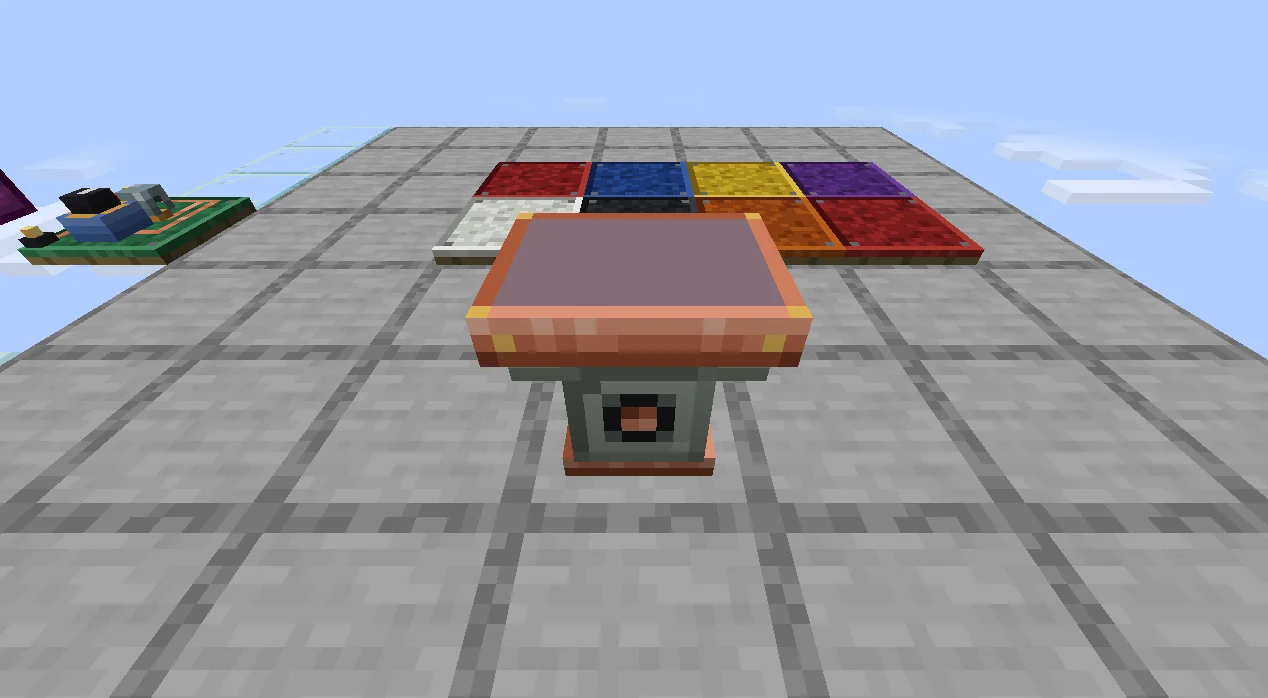
CEE: Voltworks to mod, autor: sjzeero. Circuit boards for Create: Electro Energetics. Draw schematics on a design table, etch and assemble PCBs with Create machines, and build working circuits from…
Obsługiwane wersje: Minecraft 1.21. Liczba pobrań w serwisie Modrinth: 5. Ostatnia aktualizacja: 28.09.2026.
Najnowsza to 1.0.0, wydana 28.09.2026. Jest zrobiona dla Minecraft 1.21.1. Działa na NeoForge. Plik ma 1.4 MB.
| Wersja | Wydano | Minecraft | Typ |
|---|---|---|---|
1.0.0 | 28.09.2026 | 1.21.1 | Wydanie |
Voltworks is an addon for Create: Electro Energetics that adds real circuit boards you design yourself and then run on EE's electrical network.
Place a Circuit Design Table, give it power (it draws about 30 W, roughly 150 V across its two nodes) and put an empty schematic in. Clicking the canvas opens the schematic editor, where you place parts from your inventory, route traces on the top and bottom layers and confirm. The table writes the design onto the schematic item. Schematics can also be saved to and loaded from files in the circuits folder, so you can share them.
Don't overdo the voltage though. The table heats up with the power it takes and will blow up if you push it too hard.
Boards are made with Create machines, no magic crafting:
A deployer holding a written schematic copies it onto empty ones, which helps if you want to mass produce a design.
Around 30 parts, each simulated as a real component:
Parts heat up with the current through them and burn out if you overload them. An encased fan blowing through a board cools it down. With engineer's goggles you can read gauges and bulbs, and sneaking shows the part name, its temperature and the hottest part on the board.
In the world you can flip switches, press buttons, adjust potentiometers and reset blown fuses with an iron nugget. Bulbs actually light up the area and gauges put out a redstone signal.
Every board connector is a pin on the EE network. Wire a board to batteries, generators or other EE machines with normal EE wires and it just works. Boards placed next to or on top of each other can be linked through vias.
The mod also adds blank, copper and golden circuits, and some EE machines (motors, relays, transformers, voltage regulator, energy meters, SF6 breaker) need them in their recipes.
Hold any EE wire spool and press V to switch to wall mode. The wire then lies flat on floors, walls and ceilings instead of hanging in the air. It snaps to the pixel grid, runs straight, turns corners and wraps around blocks. Otherwise it is a normal EE wire with the same resistance, current limits and drops. The key can be rebound in the controls menu.
Boards come in green, white, black, orange, red, blue, yellow and purple. Right-click a placed board with a dye or craft the board with one.
EJML (the math library used by the circuit solver) is bundled in the jar, you don't need to install it.
Needed on both the client and the server.
The board and circuit system (schematics, editor, parts and solver) is ported from Create: Power Grid by patryk3211, licensed under Apache-2.0. The ported files keep their original license and are marked as modified, see NOTICE in the jar. Thanks to patryk3211 for a great mod and for making this possible.
The circuit item idea comes from Create: New Age.
All textures in Voltworks are original.
Voltworks is licensed under the Apache License 2.0. The code ported from Power Grid stays under its original Apache-2.0 license and attribution.
Autor: sjzeero. Z obrazkami na Modrinth.
Ten mod jest potrzebny na serwerze i u każdego gracza, który dołącza.
Zainstaluj NeoForge dla Minecraft 1.21.
Dodaj potrzebne mody: Create i Create: Electro Energetics.
Pobierz plik .jar z Modrinth i wrzuć go do folderu mods w katalogu .minecraft.
Uruchom Minecraft z profilem NeoForge.
Prościej: w Prism Launcher lub Modrinth App wyszukaj CEE: Voltworks w modach swojej instancji i kliknij Install. Loader i potrzebne mody zostaną dodane za ciebie.
| Zasób | Pobrania | Wersje | Aktualizacja | Cena |
|---|---|---|---|---|
| CEE: Voltworksten, który oglądałeś | 5 | 1.21 | 28 wrz 2026 | Za darmo |
| Create: Interactive pantographsFake_enderpro | 290 | 1.21 | 3 d. temu | Za darmo |
 Create: Better SchematicsOurCreation | 164 | 1.21 | 15 d. temu | Za darmo |
 Storage DrawersTexelsaur | 4.4M | 1.8 – 26.x | 11 paź 2026 | Za darmo |
Jeszcze nie. Najnowsza obsługiwana wersja to Minecraft 1.21.
Tak. CEE: Voltworks można pobrać za darmo z serwisu Modrinth.
Obie. Serwer i każdy gracz muszą mieć zainstalowany CEE: Voltworks.
Tak: Create, Create: Electro Energetics. Zainstaluj to przed CEE: Voltworks.
Tak. Ostatnia aktualizacja wyszła w ciągu ostatniej doby.
Najbliższe to Create: Interactive pantographs, Create: Better Schematics i Storage Drawers. Porównaj wszystkie alternatywy
Create: Interactive pantographsMody · 1.21Makes CEE pantographs interactable even when assembled on trains
Create: Better SchematicsMody · 1.21Adds in many fixes and new features to Create’s schematic system.
Storage DrawersMody · 1.8 – 26.xInteractive bulk storage solution
 Extended DrawersMody · 1.18 – 26.x
Adds drawers and more
 Building WandsMody · 1.16 – 26.x
Building wands with different modes
 Not Enough Game DesignsMody · 1.20
Not Enough Game Designs is a mod that extensively modifies the original Minecraft game design, altering numerous features.
Zaloguj się, aby wystawić opinię.