
 Sodium Fps+Modpacks · 1.18 – 1.21
This mod pack contains Sodium for a FPS boost, it also has Xaeros minimap and world map to help you get lost in the Minecraft world. It doesn't really change…
Grátis53,710 downloads
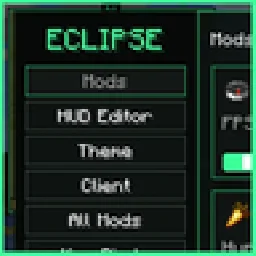
Black + green Fabric client modpack: minimap, world map, waypoints, custom HUD, crosshair, zoom, freecam, chest finder, librarian reroll, Litematica printer…
Opens Modrinth · 61 downloads there
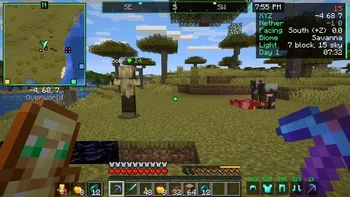
Black + green Fabric client modpack: minimap, world map, waypoints, custom HUD, crosshair, zoom, freecam, chest finder, librarian reroll, Litematica printer…
Eclipse Client (modpack) é obra de nobub. É compatível com o Minecraft 26.x. Tem 61 downloads em Modrinth. A última atualização saiu em 10/11/2026.
Eclipse Client teve 4 versões no Modrinth desde 07/11/2026. 4 saíram no último ano. A mais recente é 1.1.0, lançada em 08/11/2026. Ela é feita para o Minecraft 26.2. Ela roda em Fabric. O download tem 25 KB.
| Versão | Lançado | Minecraft | Tipo |
|---|---|---|---|
1.1.0 | 08/11/2026 | 26.2 | Estável |
1.0.2 | 08/11/2026 | 26.2 | Estável |
1.0.1 | 07/11/2026 | 26.2 | Estável |
1.0.0 | 07/11/2026 | 26.2 | Estável |
💬 Join the Eclipse Discord for help, updates and to share your setups.
A black + green Minecraft client modpack for Fabric 26.2. Map, HUD, tools, visuals and a schematic printer, all made to look and work together, and all set up from one menu (press Backspace).
No more 40 config screens that all look different. Every Eclipse feature has its own page with a live preview, a search box finds any setting in a second, and one click on a preset sets everything up for how you play.
💻 Weak laptop? Get Eclipse Client Lite: the same Eclipse mods without shaders and Distant Horizons.
Mod · What it does
**Eclipse Core** · The Eclipse menu, theme, HUD editor, presets, key binds, settings search
**Eclipse HUD** · Info lines, compass, looking-at box, food & saturation, armor, effects, clock and more
**Eclipse Map** · Minimap, world map, waypoints with beams, cave mode, mob radar
**Eclipse Tools** · Zoom, freecam, inventory tools, chest finder, better chat, librarian reroll
**Eclipse Visuals** · Custom crosshair, fancy tooltips, particles, dynamic lights, item physics
**Eclipse Printer** · Litematica add-on that builds your schematics for you
Category · Mods
⚡ Performance · Sodium, Sodium Extra, Lithium, FerriteCore, ModernFix, ImmediatelyFast, Entity Culling
🎨 Looks · Iris (shaders), Continuity (connected textures), Distant Horizons (see much further)
🏗️ Building · Litematica, MaLiLib, Axiom, WorldEdit, Carpet
🎥 Other · Replay Mod, Fabric API, Cloth Config, YACL
Press Backspace anywhere. Every feature is a card with an on/off switch and a Settings button. The sidebar has HUD Editor, Theme, Client, All Mods, Key Binds, Worlds, Presets and Screenshots.
Type in the search box and every matching setting shows up, with where it lives. Click one to jump straight to it.
The crosshair page shows your crosshair on night, snow and grass backgrounds, at real size, and how it looks when you aim at a mob.
Move every HUD element anywhere. Right click to hide one, middle click to reset it.
Pick an accent color (or type any hex color) and every Eclipse mod changes with it.
Preset · Best for
Survival · Everything useful for normal play: map, HUD, tools and nice visuals
Building · Bright world, fast placing and freecam. Fewer effects so building stays smooth
PvP · Combat info up front: armor, effects, auto totem
Max FPS · Turns off everything heavy for the most FPS
Pretty · All the visuals on, plus shaders
Key · Does
Backspace · Eclipse menu (all settings)
M · World map + seed map
C (hold) · Zoom
F4 · Freecam
F8 · Fullbright
F11 · Borderless fullscreen
J · Chest finder
Mouse 4 (hold) · Mob radar on the minimap
Caps Lock · Schematic printer on/off
Change any key in Eclipse menu > Key Binds. It shows key clashes too.
The first time you start, a welcome screen shows the main keys and lets you pick a preset.
Put **Eclipse Server** on your server (Paper plugin or Fabric mod):
Features that give an edge in multiplayer (auto hit, auto totem, mob radar, cave mode, freecam, full auto walking) only work in singleplayer, or on servers running Eclipse Server that allow them.
Join the Eclipse Discord for help, update news, feature requests and to show off your setup.
Can I add my own mods? Yes. Add them in the Modrinth App like any other instance. They show up in Eclipse menu > All Mods.
Where is Mod Menu? Eclipse Core replaces it. Use Eclipse menu > All Mods to open any mod's settings.
My FPS is low. Pick the Max FPS preset, or turn down Distant Horizons in its settings.
Can I turn off the Eclipse title screen? Yes: Eclipse menu > Client.
Made by Max. Black + green, all the way down. 🌑
Escrita por nobub. Leia com imagens no Modrinth.
Este modpack roda com Fabric for Minecraft 26.x. O launcher com que você o instala prepara isso.
Baixe o arquivo .mrpack pelo Modrinth.
Abra com um launcher que leia .mrpack, como o Modrinth App ou o Prism Launcher: ele cria uma instância nova com todos os mods e configurações.
Dê memória suficiente à instância: a maioria pede de 4 a 8 GB.
Para jogar com amigos em um servidor, use os arquivos de servidor do modpack se houver; senão, instale os mesmos mods no servidor.
| Recurso | Downloads | Versões | Última atualização | Preço |
|---|---|---|---|---|
| Eclipse Cliento que você estava vendo | 61 | 26.x | há 11 horas | Grátis |
| Sodium Fps+exincz404 | 54K | 1.18 – 1.21 | 3 out 2026 | Grátis |
 The FarmDaemon | 163K | 1.19 – 1.21 | 4 jun 2026 | Grátis |
 Noyan ModPackNoyan | 52K | 1.20 – 26.x | 1 out 2026 | Grátis |
Sim. Eclipse Client é compatível com o Minecraft 26.x. Todas as versões compatíveis: 26.x.
Sim. Você pode baixar Eclipse Client de graça em Modrinth.
Sim. A última atualização saiu no último dia.
Os mais parecidos são Sodium Fps+, The Farm e Noyan ModPack. Comparar todas as alternativas
Sodium Fps+Modpacks · 1.18 – 1.21This mod pack contains Sodium for a FPS boost, it also has Xaeros minimap and world map to help you get lost in the Minecraft world. It doesn't really change…
The FarmModpacks · 1.19 – 1.21A cozy Fabric farming modpack for Minecraft 1.21.1 with seasons, Farmer's Delight cooking, animals, beautiful countryside terrain and smooth performance.
Noyan ModPackModpacks · 1.20 – 26.x| All maps made by Noyan | Try our latest map: Sonic Map
 Nvidium PerformanceModpacks · 1.20 – 26.x
ModPack mainly for Nvidia GPUs to give better Chunk times and Higher Render Distance. This uses Fabric as a base to load the Mods.
 COBBLEVERSEModpacks · 1.21
Start a true Pokémon adventure in Minecraft: Cobblemon 1.7.3 | ALL 1025 Pokémon! | Mega Evolutions | Gyms & Badges | Starter Kit | Unique Structures | Custom…
 UndertaleModpacks · 1.21
Minecraft Full Undertale map Experience (Part 1-2)
Entre para deixar uma avaliação.