
 Inventory Profiles NextMods · 1.16 – 26.x
Take control over your inventory. Sort. Move matching Items. Throw all. Locked slots. Gear sets! And much more.
Grátis42,236,339 downloads

Zoom, freecam, fullbright, inventory sort, item lock, chest finder, better chat, auto tool and an automatic librarian reroller.
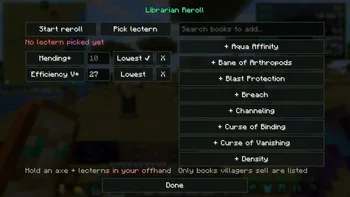
Zoom, freecam, fullbright, inventory sort, item lock, chest finder, better chat, auto tool and an automatic librarian reroller.
Eclipse Tools (recurso) é obra de nobub. É compatível com o Minecraft 26.x. Tem 65 downloads em Modrinth. A última atualização saiu em 09/11/2026.
Eclipse Tools teve 4 versões no Modrinth desde 07/11/2026. 4 saíram no último ano. A mais recente é 1.1.2, lançada em 08/11/2026. Ela é feita para o Minecraft 26.2. Ela roda em Fabric. O download tem 140 KB.
| Versão | Lançado | Minecraft | Tipo |
|---|---|---|---|
1.1.2 | 08/11/2026 | 26.2 | Estável |
1.0.2 | 08/11/2026 | 26.2 | Estável |
1.0.1 | 08/11/2026 | 26.2 | Estável |
1.0.0 | 07/11/2026 | 26.2 | Estável |
💬 Join the Eclipse Discord for help, updates and to share your setups.
Lots of small tools that make the game nicer, all in one mod and all set up from the Eclipse menu.
Remembers what's in every chest you open. Type an item and it shows which chest has it, with a marker on your compass.
Feature · What it does
Zoom (C) · Smooth zoom, scroll to zoom more, slower mouse when zoomed
Fullbright (F8) · See in the dark
Freecam (F4) · Fly the camera around while you stay put
Borderless fullscreen (F11) · Fullscreen without the black flicker
Feature · What it does
Inventory sort · Middle click a chest or your inventory to sort it
Item lock (`) · Lock a slot so you can't drop it by accident
Inventory search · A search box on chests that highlights what you type
Stack refill · Refills your hotbar when a stack runs out
Auto totem · Keeps a totem in your offhand
Mouse tweaks · Scroll or shift-drag to move stacks
XP clumping · Pick up all XP at once (singleplayer)
Hold use, hold attack, auto hit, fast place and auto tool (switches to the best tool and back).
Timestamps (click to copy a message), (x3) instead of the same message spam, and a longer chat history.
Auto reconnect, auto eat, auto sprint and auto fish.
Auto Raid: when a raid ends in Victory, it drinks an Ominous Bottle so the next raid starts (off by default).
Auto hit, auto totem and freecam only work in singleplayer, or on servers running Eclipse Server that allow them.
Part of the **Eclipse Client** modpack.
💬 Questions or ideas? Join the Eclipse Discord
Escrita por nobub. Leia com imagens no Modrinth.
Este mod roda só no seu jogo. Os servidores não precisam dele, então você pode usar em qualquer servidor.
Instale Fabric para o Minecraft 26.x.
Adicione os mods que ele precisa: API do Fabric.
Baixe o arquivo .jar pelo Modrinth e coloque na pasta mods do seu diretório .minecraft.
Abra o Minecraft com o perfil Fabric.
Com o CraftRank Launcher você pula esses passos: abra Mods, procure Eclipse Tools e clique em Instalar.
| Recurso | Downloads | Versões | Última atualização | Preço |
|---|---|---|---|---|
| Eclipse Toolso que você estava vendo | 65 | 26.x | há 1 dia | Grátis |
| Inventory Profiles Nextblackd | 42.2M | 1.16 – 26.x | 27 set 2026 | Grátis |
 Chat Tools70CentsApple | 5.3M | 1.16 – 26.x | há 28 dias | Grátis |
 Difficulty LockSerilum | 7.1M | 1.16 – 26.x | há 12 dias | Grátis |
Sim. Eclipse Tools é compatível com o Minecraft 26.x. Todas as versões compatíveis: 26.x.
Sim. Você pode baixar Eclipse Tools de graça em Modrinth.
Do lado do cliente. Eclipse Tools vai na sua própria pasta mods e funciona em qualquer servidor, inclusive sem mods.
Sim: Fabric API. Instale antes de Eclipse Tools.
Sim. A última atualização saiu no último dia.
Os mais parecidos são Inventory Profiles Next, Chat Tools e Difficulty Lock. Comparar todas as alternativas
Inventory Profiles NextMods · 1.16 – 26.xTake control over your inventory. Sort. Move matching Items. Throw all. Locked slots. Gear sets! And much more.
Chat ToolsMods · 1.16 – 26.xTimestamp, translators, notifier, macros, chat bubbles, chat filter; everything you need is here!
Difficulty LockMods · 1.16 – 26.x🔒 Sets a difficulty in any world, optionally locked, or force a hardcore mode requirement.
 Client SortMods · 1.20 – 26.x
Versatile and easy inventory sorting.
 Inventory ManagementMods · 1.18 – 26.x
Sort and transfer items with the click of a button.
 No Chat ReportsMods · 1.19 – 26.x
Makes chat unreportable (where possible)
Entre para deixar uma avaliação.