
 Inventory Profiles NextMods · 1.16 – 26.x
Take control over your inventory. Sort. Move matching Items. Throw all. Locked slots. Gear sets! And much more.
Kostenlos42,236,339 Downloads

Zoom, freecam, fullbright, inventory sort, item lock, chest finder, better chat, auto tool and an automatic librarian reroller.
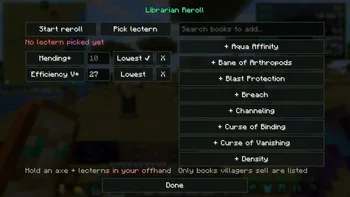
Zoom, freecam, fullbright, inventory sort, item lock, chest finder, better chat, auto tool and an automatic librarian reroller.
Eclipse Tools (Ressource) stammt von nobub. Unterstützt wird Minecraft 26.x. Auf Modrinth gibt es 65 Downloads. Das letzte Update erschien am 09.11.2026.
Eclipse Tools hat seit 07.11.2026 4 Versionen auf Modrinth veröffentlicht. 4 davon erschienen im letzten Jahr. Die neueste ist 1.1.2, erschienen am 08.11.2026. Sie ist für Minecraft 26.2 gemacht. Sie läuft auf Fabric. Der Download ist 140 KB groß.
| Version | Veröffentlicht | Minecraft | Typ |
|---|---|---|---|
1.1.2 | 08.11.2026 | 26.2 | Release |
1.0.2 | 08.11.2026 | 26.2 | Release |
1.0.1 | 08.11.2026 | 26.2 | Release |
1.0.0 | 07.11.2026 | 26.2 | Release |
💬 Join the Eclipse Discord for help, updates and to share your setups.
Lots of small tools that make the game nicer, all in one mod and all set up from the Eclipse menu.
Remembers what's in every chest you open. Type an item and it shows which chest has it, with a marker on your compass.
Feature · What it does
Zoom (C) · Smooth zoom, scroll to zoom more, slower mouse when zoomed
Fullbright (F8) · See in the dark
Freecam (F4) · Fly the camera around while you stay put
Borderless fullscreen (F11) · Fullscreen without the black flicker
Feature · What it does
Inventory sort · Middle click a chest or your inventory to sort it
Item lock (`) · Lock a slot so you can't drop it by accident
Inventory search · A search box on chests that highlights what you type
Stack refill · Refills your hotbar when a stack runs out
Auto totem · Keeps a totem in your offhand
Mouse tweaks · Scroll or shift-drag to move stacks
XP clumping · Pick up all XP at once (singleplayer)
Hold use, hold attack, auto hit, fast place and auto tool (switches to the best tool and back).
Timestamps (click to copy a message), (x3) instead of the same message spam, and a longer chat history.
Auto reconnect, auto eat, auto sprint and auto fish.
Auto Raid: when a raid ends in Victory, it drinks an Ominous Bottle so the next raid starts (off by default).
Auto hit, auto totem and freecam only work in singleplayer, or on servers running Eclipse Server that allow them.
Part of the **Eclipse Client** modpack.
💬 Questions or ideas? Join the Eclipse Discord
Geschrieben von nobub. Mit Bildern auf Modrinth lesen.
Diese Mod läuft nur in deinem eigenen Spiel. Server brauchen sie nicht, du kannst sie also auf jedem Server nutzen.
Installiere Fabric für Minecraft 26.x.
Füge die benötigten Mods hinzu: Fabric API.
Lade die .jar-Datei von Modrinth herunter und lege sie in den mods-Ordner deines .minecraft-Verzeichnisses.
Starte Minecraft mit dem Fabric-Profil.
Mit dem CraftRank Launcher sparst du dir diese Schritte: Öffne Mods, suche nach Eclipse Tools und klicke auf Installieren.
| Ressource | Downloads | Versionen | Letztes Update | Preis |
|---|---|---|---|---|
| Eclipse Toolsdie du angesehen hast | 65 | 26.x | vor 1 Tag | Kostenlos |
| Inventory Profiles Nextblackd | 42.2M | 1.16 – 26.x | 27. Sept. 2026 | Kostenlos |
 Chat Tools70CentsApple | 5.3M | 1.16 – 26.x | vor 27 Tagen | Kostenlos |
 Difficulty LockSerilum | 7.1M | 1.16 – 26.x | vor 12 Tagen | Kostenlos |
Ja. Eclipse Tools unterstützt Minecraft 26.x. Alle unterstützten Versionen: 26.x.
Ja. Eclipse Tools kannst du kostenlos bei Modrinth herunterladen.
Clientseitig. Eclipse Tools kommt in deinen eigenen mods-Ordner und funktioniert auf jedem Server, auch auf Servern ohne Mods.
Ja: Fabric API. Installiere es vor Eclipse Tools.
Ja. Das letzte Update kam innerhalb des letzten Tages.
Am ähnlichsten sind Inventory Profiles Next, Chat Tools und Difficulty Lock. Alle Alternativen vergleichen
Inventory Profiles NextMods · 1.16 – 26.xTake control over your inventory. Sort. Move matching Items. Throw all. Locked slots. Gear sets! And much more.
Chat ToolsMods · 1.16 – 26.xTimestamp, translators, notifier, macros, chat bubbles, chat filter; everything you need is here!
Difficulty LockMods · 1.16 – 26.x🔒 Sets a difficulty in any world, optionally locked, or force a hardcore mode requirement.
 Client SortMods · 1.20 – 26.x
Versatile and easy inventory sorting.
 Inventory ManagementMods · 1.18 – 26.x
Sort and transfer items with the click of a button.
 No Chat ReportsMods · 1.19 – 26.x
Makes chat unreportable (where possible)
Logg dich ein, um eine Bewertung zu schreiben.