
 Inventory Profiles NextMods · 1.16 – 26.x
Take control over your inventory. Sort. Move matching Items. Throw all. Locked slots. Gear sets! And much more.
Gratis42,236,339 descargas

Zoom, freecam, fullbright, inventory sort, item lock, chest finder, better chat, auto tool and an automatic librarian reroller.
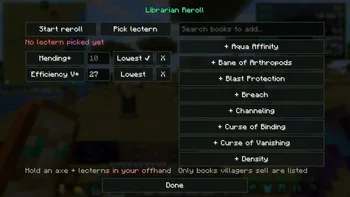
Zoom, freecam, fullbright, inventory sort, item lock, chest finder, better chat, auto tool and an automatic librarian reroller.
Eclipse Tools (recurso) es obra de nobub. Es compatible con Minecraft 26.x. Se ha descargado 65 veces en Modrinth. La última actualización salió el 09/11/2026.
Eclipse Tools ha publicado 4 versiones en Modrinth desde el 07/11/2026. 4 salieron en el último año. La más reciente es 1.1.2, publicada el 08/11/2026. Está hecha para Minecraft 26.2. Funciona en Fabric. La descarga ocupa 140 KB.
| Versión | Publicado | Minecraft | Tipo |
|---|---|---|---|
1.1.2 | 08/11/2026 | 26.2 | Estable |
1.0.2 | 08/11/2026 | 26.2 | Estable |
1.0.1 | 08/11/2026 | 26.2 | Estable |
1.0.0 | 07/11/2026 | 26.2 | Estable |
💬 Join the Eclipse Discord for help, updates and to share your setups.
Lots of small tools that make the game nicer, all in one mod and all set up from the Eclipse menu.
Remembers what's in every chest you open. Type an item and it shows which chest has it, with a marker on your compass.
Feature · What it does
Zoom (C) · Smooth zoom, scroll to zoom more, slower mouse when zoomed
Fullbright (F8) · See in the dark
Freecam (F4) · Fly the camera around while you stay put
Borderless fullscreen (F11) · Fullscreen without the black flicker
Feature · What it does
Inventory sort · Middle click a chest or your inventory to sort it
Item lock (`) · Lock a slot so you can't drop it by accident
Inventory search · A search box on chests that highlights what you type
Stack refill · Refills your hotbar when a stack runs out
Auto totem · Keeps a totem in your offhand
Mouse tweaks · Scroll or shift-drag to move stacks
XP clumping · Pick up all XP at once (singleplayer)
Hold use, hold attack, auto hit, fast place and auto tool (switches to the best tool and back).
Timestamps (click to copy a message), (x3) instead of the same message spam, and a longer chat history.
Auto reconnect, auto eat, auto sprint and auto fish.
Auto Raid: when a raid ends in Victory, it drinks an Ominous Bottle so the next raid starts (off by default).
Auto hit, auto totem and freecam only work in singleplayer, or on servers running Eclipse Server that allow them.
Part of the **Eclipse Client** modpack.
💬 Questions or ideas? Join the Eclipse Discord
Escrita por nobub. Léela con imágenes en Modrinth.
Este mod funciona solo en tu propio juego. Los servidores no lo necesitan, así que puedes usarlo en cualquier servidor.
Instala Fabric para Minecraft 26.x.
Añade los mods que necesita: API de Fabric.
Descarga el archivo .jar desde Modrinth y ponlo en la carpeta mods de tu directorio .minecraft.
Inicia Minecraft con el perfil de Fabric.
Con el CraftRank Launcher te saltas estos pasos: abre Mods, busca Eclipse Tools y pulsa Instalar.
| Recurso | Descargas | Versiones | Última actualización | Precio |
|---|---|---|---|---|
| Eclipse Toolsel que estabas viendo | 65 | 26.x | hace 1 día | Gratis |
| Inventory Profiles Nextblackd | 42.2M | 1.16 – 26.x | 27 sept 2026 | Gratis |
 Chat Tools70CentsApple | 5.3M | 1.16 – 26.x | hace 27 días | Gratis |
 Difficulty LockSerilum | 7.1M | 1.16 – 26.x | hace 12 días | Gratis |
Sí. Eclipse Tools es compatible con Minecraft 26.x. Todas las versiones compatibles: 26.x.
Sí. Eclipse Tools se puede descargar gratis desde Modrinth.
Del lado del cliente. Eclipse Tools va en tu propia carpeta mods y funciona en cualquier servidor, incluso en servidores sin mods.
Sí: Fabric API. Instálalo antes de Eclipse Tools.
Sí. La última actualización salió en el último día.
Los más parecidos son Inventory Profiles Next, Chat Tools y Difficulty Lock. Comparar todas las alternativas
Inventory Profiles NextMods · 1.16 – 26.xTake control over your inventory. Sort. Move matching Items. Throw all. Locked slots. Gear sets! And much more.
Chat ToolsMods · 1.16 – 26.xTimestamp, translators, notifier, macros, chat bubbles, chat filter; everything you need is here!
Difficulty LockMods · 1.16 – 26.x🔒 Sets a difficulty in any world, optionally locked, or force a hardcore mode requirement.
 Client SortMods · 1.20 – 26.x
Versatile and easy inventory sorting.
 Inventory ManagementMods · 1.18 – 26.x
Sort and transfer items with the click of a button.
 No Chat ReportsMods · 1.19 – 26.x
Makes chat unreportable (where possible)
Inicia sesión para dejar una reseña.