
 TalkBubblesMods · 1.19 – 26.x
adds bubbles above your head when you chat
Gratis4,014,395 descargas

Timestamp, translators, notifier, macros, chat bubbles, chat filter; everything you need is here!
Descarga directa desde Modrinth · 5,264,295 descargas


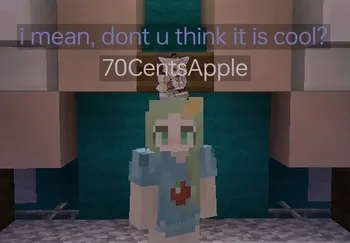
Chat Tools (mod) es obra de 70CentsApple. Timestamp, translators, notifier, macros, chat bubbles, chat filter; everything you need is here!
Es compatible con Minecraft 1.16 – 26.x. Se ha descargado 5,264,295 veces en Modrinth. La última actualización salió el 13/10/2026.
Chat Tools ha publicado 564 versiones en Modrinth desde el 07/06/2023. 297 salieron en el último año. La más reciente es 2.4.5, publicada el 13/10/2026. Está hecha para Minecraft 1.16 – 1.16.5. Funciona en Fabric. La descarga ocupa 654 KB.
| Versión | Publicado | Minecraft | Tipo |
|---|---|---|---|
2.4.5 | 13/10/2026 | 1.16 – 1.16.5 | Estable |
2.4.5 | 13/10/2026 | 1.17, 1.17.1 | Estable |
2.4.5 | 13/10/2026 | 1.18, 1.18.1, 1.18.2 | Estable |
2.4.5 | 13/10/2026 | 1.19 – 1.19.4 | Estable |
2.4.5 | 13/10/2026 | 1.20, 1.20.1 | Estable |
Chat Tools es de código abierto. Su última versión en GitHub es v2.4.5, publicada el 13/10/2026.
Full Changelog: v2.4.4...v2.4.5
Antes: v2.4.4 (24/09/2026), v2.4.3.1 (08/07/2026).
Feel free to make a PR on Github.
Chat Tools is a highly customizable Minecraft client mod that supports various features, allowing them to interoperate through commands and more.
For elaborate descriptions and examples, please see **[>>FAQ
Escrita por 70CentsApple. Léela con imágenes en Modrinth.
Este mod funciona solo en tu propio juego. Los servidores no lo necesitan, así que puedes usarlo en cualquier servidor.
Instala Fabric y NeoForge para Minecraft 1.16 – 26.x.
Añade los mods que necesita: API de Cloth Config.
Descarga el archivo .jar desde Modrinth y ponlo en la carpeta mods de tu directorio .minecraft.
Inicia Minecraft con el perfil de Fabric.
Con el CraftRank Launcher te saltas estos pasos: abre Mods, busca Chat Tools y pulsa Instalar.
| Recurso | Descargas | Versiones | Última actualización | Precio |
|---|---|---|---|---|
| Chat Toolsel que estabas viendo | 5.3M | 1.16 – 26.x | hace 28 días | Gratis |
| TalkBubblesGlobox1997 | 4M | 1.19 – 26.x | 18 sept 2026 | Gratis |
 No Chat ReportsAizistral | 62M | 1.19 – 26.x | 30 sept 2026 | Gratis |
 Essential ModSparkUniverse | 48.4M | 1.8 – 26.x | hace 8 días | Gratis |
Sí. Chat Tools es compatible con Minecraft 26.x. Todas las versiones compatibles: 26.x, 1.21, 1.20, 1.19, 1.18, 1.17, 1.16.
Sí. Chat Tools se puede descargar gratis desde Modrinth.
Del lado del cliente. Chat Tools va en tu propia carpeta mods y funciona en cualquier servidor, incluso en servidores sin mods.
Sí: Cloth Config API. Instálalo antes de Chat Tools.
Sí. La última actualización salió en el último día.
Los más parecidos son TalkBubbles, No Chat Reports y Essential Mod. Comparar todas las alternativas
TalkBubblesMods · 1.19 – 26.xadds bubbles above your head when you chat
No Chat ReportsMods · 1.19 – 26.xMakes chat unreportable (where possible)
Essential ModMods · 1.8 – 26.xEnhance your Minecraft with one simple mod. Host worlds for free, chat with friends, and so much more!
 More Chat HistoryMods · 1.16 – 26.x
Increases the maximum length of chat history.
 Chat PatchesMods · 1.18 – 26.x
A Minecraft Fabric client-side mod that touches up a few aspects of Minecraft's mundane chat, with as much configurability as possible!
 Longer Chat HistoryMods · 1.19 – 26.x
Makes chat history much longer
Inicia sesión para dejar una reseña.