
 TalkBubblesModlar · 1.19 – 26.x
adds bubbles above your head when you chat
Ücretsiz4,014,395 indirme

Timestamp, translators, notifier, macros, chat bubbles, chat filter; everything you need is here!


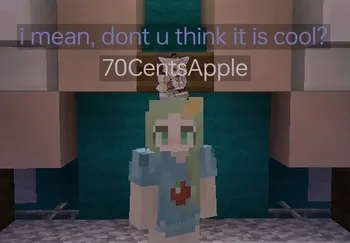
Timestamp, translators, notifier, macros, chat bubbles, chat filter; everything you need is here!
Chat Tools, 70CentsApple tarafından yapılmış bir kaynak. Desteklediği sürümler: Minecraft 1.16 – 26.x. Modrinth üzerinde 5,264,295 kez indirildi. Son güncelleme 13.10.2026 tarihinde çıktı.
Chat Tools, 07.06.2023 tarihinden beri Modrinth üzerinde 564 sürüm yayınladı. Bunların 297 tanesi son bir yılda çıktı. En yenisi 13.10.2026 tarihinde çıkan 2.4.5. Minecraft 1.16 – 1.16.5 için yapıldı. Fabric üzerinde çalışır. İndirme boyutu 654 KB.
| Sürüm | Yayın tarihi | Minecraft | Tür |
|---|---|---|---|
2.4.5 | 13.10.2026 | 1.16 – 1.16.5 | Kararlı |
2.4.5 | 13.10.2026 | 1.17, 1.17.1 | Kararlı |
2.4.5 | 13.10.2026 | 1.18, 1.18.1, 1.18.2 | Kararlı |
2.4.5 | 13.10.2026 | 1.19 – 1.19.4 | Kararlı |
2.4.5 | 13.10.2026 | 1.20, 1.20.1 | Kararlı |
Chat Tools açık kaynaklıdır. GitHub'daki en yeni sürümü 13.10.2026 tarihinde yayınlanan v2.4.5.
Full Changelog: v2.4.4...v2.4.5
Öncekiler: v2.4.4 (24.09.2026), v2.4.3.1 (08.07.2026).
Feel free to make a PR on Github.
Chat Tools is a highly customizable Minecraft client mod that supports various features, allowing them to interoperate through commands and more.
For elaborate descriptions and examples, please see **[>>FAQ
Yazan: 70CentsApple. Resimli halini Modrinth sayfasında oku.
Bu mod yalnızca senin oyununda çalışır. Sunucuların buna ihtiyacı yok, bu yüzden her sunucuda kullanabilirsin.
Minecraft 1.16 – 26.x için Fabric ve NeoForge kur.
İhtiyaç duyduğu modları ekle: Cloth Config API.
.jar dosyasını Modrinth üzerinden indir ve .minecraft klasöründeki mods klasörüne koy.
Minecraft'ı Fabric profiliyle başlat.
CraftRank Launcher ile bu adımları atlayabilirsin: Modlar'ı aç, Chat Tools ara ve Kur'a tıkla.
| Kaynak | İndirmeler | Sürümler | Son güncelleme | Fiyat |
|---|---|---|---|---|
| Chat Toolsbaktığın | 5.3M | 1.16 – 26.x | 28 gün önce | Ücretsiz |
| TalkBubblesGlobox1997 | 4M | 1.19 – 26.x | 18 Eyl 2026 | Ücretsiz |
 No Chat ReportsAizistral | 62M | 1.19 – 26.x | 30 Eyl 2026 | Ücretsiz |
 Essential ModSparkUniverse | 48.4M | 1.8 – 26.x | 8 gün önce | Ücretsiz |
Evet. Chat Tools, Minecraft 26.x sürümünü destekliyor. Desteklenen tüm sürümler: 26.x, 1.21, 1.20, 1.19, 1.18, 1.17, 1.16.
Evet. Chat Tools, Modrinth üzerinden ücretsiz indirilebilir.
İstemci tarafı. Chat Tools kendi mods klasörüne kurulur ve modsuz sunucular dahil her sunucuda çalışır.
Evet: Cloth Config API. Bunu Chat Tools öncesinde kur.
Evet. Son güncelleme son 24 saat içinde çıktı.
En yakın olanlar TalkBubbles, No Chat Reports ve Essential Mod. Tüm alternatifleri karşılaştır
TalkBubblesModlar · 1.19 – 26.xadds bubbles above your head when you chat
No Chat ReportsModlar · 1.19 – 26.xMakes chat unreportable (where possible)
Essential ModModlar · 1.8 – 26.xEnhance your Minecraft with one simple mod. Host worlds for free, chat with friends, and so much more!
 More Chat HistoryModlar · 1.16 – 26.x
Increases the maximum length of chat history.
 Chat PatchesModlar · 1.18 – 26.x
A Minecraft Fabric client-side mod that touches up a few aspects of Minecraft's mundane chat, with as much configurability as possible!
 Longer Chat HistoryModlar · 1.19 – 26.x
Makes chat history much longer
Yorum yazmak için giriş yap.