
 TalkBubblesMods · 1.19 – 26.x
adds bubbles above your head when you chat
Gratuit4,014,395 téléchargements

Timestamp, translators, notifier, macros, chat bubbles, chat filter; everything you need is here!
Téléchargement direct depuis Modrinth · 5,264,295 téléchargements


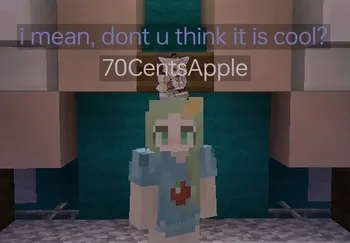
Chat Tools (ressource) est une création de 70CentsApple. Timestamp, translators, notifier, macros, chat bubbles, chat filter; everything you need is here!
Versions prises en charge : Minecraft 1.16 – 26.x. On compte 5,264,295 téléchargements sur Modrinth. La dernière mise à jour date du 13/10/2026.
Chat Tools a publié 564 versions sur Modrinth depuis le 07/06/2023. 297 sont sorties au cours de l'année passée. La plus récente est 2.4.5, sortie le 13/10/2026. Elle est faite pour Minecraft 1.16 – 1.16.5. Elle fonctionne sur Fabric. Le téléchargement fait 654 KB.
| Version | Publié | Minecraft | Type |
|---|---|---|---|
2.4.5 | 13/10/2026 | 1.16 – 1.16.5 | Stable |
2.4.5 | 13/10/2026 | 1.17, 1.17.1 | Stable |
2.4.5 | 13/10/2026 | 1.18, 1.18.1, 1.18.2 | Stable |
2.4.5 | 13/10/2026 | 1.19 – 1.19.4 | Stable |
2.4.5 | 13/10/2026 | 1.20, 1.20.1 | Stable |
Chat Tools est open source. Sa dernière version sur GitHub est v2.4.5, publiée le 13/10/2026.
Full Changelog: v2.4.4...v2.4.5
Avant : v2.4.4 (24/09/2026), v2.4.3.1 (08/07/2026).
Feel free to make a PR on Github.
Chat Tools is a highly customizable Minecraft client mod that supports various features, allowing them to interoperate through commands and more.
For elaborate descriptions and examples, please see **[>>FAQ
Écrite par 70CentsApple. À lire avec les images sur Modrinth.
Ce mod fonctionne uniquement dans ton jeu. Les serveurs n'en ont pas besoin, tu peux donc l'utiliser sur n'importe quel serveur.
Installe Fabric et NeoForge pour Minecraft 1.16 – 26.x.
Ajoute les mods dont il a besoin : API Cloth Config.
Télécharge le fichier .jar depuis Modrinth et place-le dans le dossier mods de ton répertoire .minecraft.
Lance Minecraft avec le profil Fabric.
Avec le CraftRank Launcher, tu peux sauter ces étapes : ouvre Mods, cherche Chat Tools et clique sur Installer.
| Ressource | Téléchargements | Versions | Mise à jour | Prix |
|---|---|---|---|---|
| Chat Toolscelle que tu regardais | 5.3M | 1.16 – 26.x | il y a 28 jours | Gratuit |
| TalkBubblesGlobox1997 | 4M | 1.19 – 26.x | 18 sept. 2026 | Gratuit |
 No Chat ReportsAizistral | 62M | 1.19 – 26.x | 30 sept. 2026 | Gratuit |
 Essential ModSparkUniverse | 48.4M | 1.8 – 26.x | il y a 8 jours | Gratuit |
Oui. Chat Tools prend en charge Minecraft 26.x. Toutes les versions prises en charge : 26.x, 1.21, 1.20, 1.19, 1.18, 1.17, 1.16.
Oui. Chat Tools se télécharge gratuitement sur Modrinth.
Côté client. Chat Tools se place dans ton propre dossier mods et fonctionne sur n'importe quel serveur, même sans mods.
Oui : Cloth Config API. Installe-le avant Chat Tools.
Oui. La dernière mise à jour date des dernières 24 heures.
Les plus proches sont TalkBubbles, No Chat Reports et Essential Mod. Comparer toutes les alternatives
TalkBubblesMods · 1.19 – 26.xadds bubbles above your head when you chat
No Chat ReportsMods · 1.19 – 26.xMakes chat unreportable (where possible)
Essential ModMods · 1.8 – 26.xEnhance your Minecraft with one simple mod. Host worlds for free, chat with friends, and so much more!
 More Chat HistoryMods · 1.16 – 26.x
Increases the maximum length of chat history.
 Chat PatchesMods · 1.18 – 26.x
A Minecraft Fabric client-side mod that touches up a few aspects of Minecraft's mundane chat, with as much configurability as possible!
 Longer Chat HistoryMods · 1.19 – 26.x
Makes chat history much longer
Connecte-toi pour laisser un avis.