
 TalkBubblesMody · 1.19 – 26.x
adds bubbles above your head when you chat
Za darmoPobrania: 4,014,395

Timestamp, translators, notifier, macros, chat bubbles, chat filter; everything you need is here!


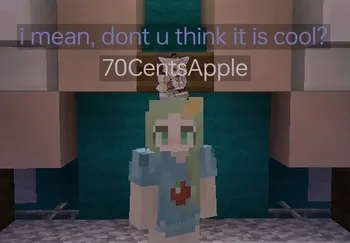
Timestamp, translators, notifier, macros, chat bubbles, chat filter; everything you need is here!
Chat Tools to zasób, autor: 70CentsApple. Obsługiwane wersje: Minecraft 1.16 – 26.x. Liczba pobrań w serwisie Modrinth: 5,259,120. Ostatnia aktualizacja: 13.10.2026.
Chat Tools ma 564 wydań na Modrinth od 07.06.2023. 297 z nich wyszło w ostatnim roku. Najnowsza to 2.4.5, wydana 13.10.2026. Jest zrobiona dla Minecraft 1.16 – 1.16.5. Działa na Fabric. Plik ma 654 KB.
| Wersja | Wydano | Minecraft | Typ |
|---|---|---|---|
2.4.5 | 13.10.2026 | 1.16 – 1.16.5 | Wydanie |
2.4.5 | 13.10.2026 | 1.17, 1.17.1 | Wydanie |
2.4.5 | 13.10.2026 | 1.18, 1.18.1, 1.18.2 | Wydanie |
2.4.5 | 13.10.2026 | 1.19 – 1.19.4 | Wydanie |
2.4.5 | 13.10.2026 | 1.20, 1.20.1 | Wydanie |
Chat Tools ma otwarty kod. Najnowsze wydanie na GitHubie to v2.4.5, opublikowane 13.10.2026.
Full Changelog: v2.4.4...v2.4.5
Wcześniej: v2.4.4 (24.09.2026), v2.4.3.1 (08.07.2026).
Feel free to make a PR on Github.
Chat Tools is a highly customizable Minecraft client mod that supports various features, allowing them to interoperate through commands and more.
For elaborate descriptions and examples, please see **[>>FAQ
Autor: 70CentsApple. Z obrazkami na Modrinth.
Ten mod działa tylko w twojej grze. Serwery go nie potrzebują, więc możesz go używać na każdym serwerze.
Zainstaluj Fabric i NeoForge dla Minecraft 1.16 – 26.x.
Dodaj potrzebne mody: API Cloth Config.
Pobierz plik .jar z Modrinth i wrzuć go do folderu mods w katalogu .minecraft.
Uruchom Minecraft z profilem Fabric.
Z CraftRank Launcherem pominiesz te kroki: otwórz Mody, wyszukaj Chat Tools i kliknij Zainstaluj.
| Zasób | Pobrania | Wersje | Aktualizacja | Cena |
|---|---|---|---|---|
| Chat Toolsten, który oglądałeś | 5.3M | 1.16 – 26.x | 28 d. temu | Za darmo |
| TalkBubblesGlobox1997 | 4M | 1.19 – 26.x | 18 wrz 2026 | Za darmo |
 No Chat ReportsAizistral | 62M | 1.19 – 26.x | 30 wrz 2026 | Za darmo |
 Essential ModSparkUniverse | 48.4M | 1.8 – 26.x | 8 d. temu | Za darmo |
Tak. Chat Tools działa w wersji Minecrafta 26.x. Wszystkie obsługiwane wersje: 26.x, 1.21, 1.20, 1.19, 1.18, 1.17, 1.16.
Tak. Chat Tools można pobrać za darmo z serwisu Modrinth.
Po stronie klienta. Chat Tools trafia do twojego folderu mods i działa na każdym serwerze, także bez modów.
Tak: Cloth Config API. Zainstaluj to przed Chat Tools.
Tak. Ostatnia aktualizacja wyszła w ciągu ostatniej doby.
Najbliższe to TalkBubbles, No Chat Reports i Essential Mod. Porównaj wszystkie alternatywy
TalkBubblesMody · 1.19 – 26.xadds bubbles above your head when you chat
No Chat ReportsMody · 1.19 – 26.xMakes chat unreportable (where possible)
Essential ModMody · 1.8 – 26.xEnhance your Minecraft with one simple mod. Host worlds for free, chat with friends, and so much more!
 More Chat HistoryMody · 1.16 – 26.x
Increases the maximum length of chat history.
 Chat PatchesMody · 1.18 – 26.x
A Minecraft Fabric client-side mod that touches up a few aspects of Minecraft's mundane chat, with as much configurability as possible!
 Longer Chat HistoryMody · 1.19 – 26.x
Makes chat history much longer
Zaloguj się, aby wystawić opinię.