
 TalkBubblesMods · 1.19 – 26.x
adds bubbles above your head when you chat
Grátis4,017,135 downloads


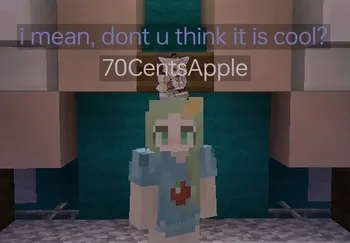
Chat Tools (mod) é obra de 70CentsApple. Timestamp, translators, notifier, macros, chat bubbles, chat filter; everything you need is here!
É compatível com o Minecraft 1.16 – 26.x. Tem 5,269,118 downloads em Modrinth. A última atualização saiu em 13/10/2026.
Chat Tools teve 564 versões no Modrinth desde 07/06/2023. 297 saíram no último ano. A mais recente é 2.4.5, lançada em 13/10/2026. Ela é feita para o Minecraft 1.16 – 1.16.5. Ela roda em Fabric. O download tem 654 KB.
| Versão | Lançado | Minecraft | Tipo |
|---|---|---|---|
2.4.5 | 13/10/2026 | 1.16 – 1.16.5 | Estável |
2.4.5 | 13/10/2026 | 1.17, 1.17.1 | Estável |
2.4.5 | 13/10/2026 | 1.18, 1.18.1, 1.18.2 | Estável |
2.4.5 | 13/10/2026 | 1.19 – 1.19.4 | Estável |
2.4.5 | 13/10/2026 | 1.20, 1.20.1 | Estável |
Chat Tools é de código aberto. A versão mais recente no GitHub é v2.4.5, publicada em 13/10/2026.
Full Changelog: v2.4.4...v2.4.5
Antes: v2.4.4 (24/09/2026), v2.4.3.1 (08/07/2026).
Feel free to make a PR on Github.
Chat Tools is a highly customizable Minecraft client mod that supports various features, allowing them to interoperate through commands and more.
For elaborate descriptions and examples, please see **[>>FAQ
Escrita por 70CentsApple. Leia com imagens no Modrinth.
Este mod roda só no seu jogo. Os servidores não precisam dele, então você pode usar em qualquer servidor.
Instale Fabric e NeoForge para o Minecraft 1.16 – 26.x.
Adicione os mods que ele precisa: API do Cloth Config.
Baixe o arquivo .jar pelo Modrinth e coloque na pasta mods do seu diretório .minecraft.
Abra o Minecraft com o perfil Fabric.
Mais fácil: no Prism Launcher ou no Modrinth App, procure Chat Tools nos mods da sua instância e clique em Install. Ele adiciona o loader e os mods necessários para você.
| Recurso | Downloads | Versões | Última atualização | Preço |
|---|---|---|---|---|
 Chat Toolso que você estava vendo | 5.3M | 1.16 – 26.x | há 29 dias | Grátis |
| TalkBubblesGlobox1997 | 4M | 1.19 – 26.x | 18 set 2026 | Grátis |
 No Chat ReportsAizistral | 62M | 1.19 – 26.x | 30 set 2026 | Grátis |
 Essential ModSparkUniverse | 48.5M | 1.8 – 26.x | há 9 dias | Grátis |
Sim. Chat Tools é compatível com o Minecraft 26.x. Todas as versões compatíveis: 26.x, 1.21, 1.20, 1.19, 1.18, 1.17, 1.16.
Sim. Você pode baixar Chat Tools de graça em Modrinth.
Do lado do cliente. Chat Tools vai na sua própria pasta mods e funciona em qualquer servidor, inclusive sem mods.
Sim: Cloth Config API. Instale antes de Chat Tools.
Sim. A última atualização saiu no último dia.
Os mais parecidos são TalkBubbles, No Chat Reports e Essential Mod. Comparar todas as alternativas
TalkBubblesMods · 1.19 – 26.xadds bubbles above your head when you chat
No Chat ReportsMods · 1.19 – 26.xMakes chat unreportable (where possible)
Essential ModMods · 1.8 – 26.xEnhance your Minecraft with one simple mod. Host worlds for free, chat with friends, and so much more!
 More Chat HistoryMods · 1.16 – 26.x
Increases the maximum length of chat history.
 Chat PatchesMods · 1.18 – 26.x
A Minecraft Fabric client-side mod that touches up a few aspects of Minecraft's mundane chat, with as much configurability as possible!
 Longer Chat HistoryMods · 1.19 – 26.x
Makes chat history much longer
Entre para deixar uma avaliação.