
 Inventory Profiles NextМоды · 1.16 – 26.x
Take control over your inventory. Sort. Move matching Items. Throw all. Locked slots. Gear sets! And much more.
БесплатноЗагрузок: 42,236,339

Versatile and easy inventory sorting.
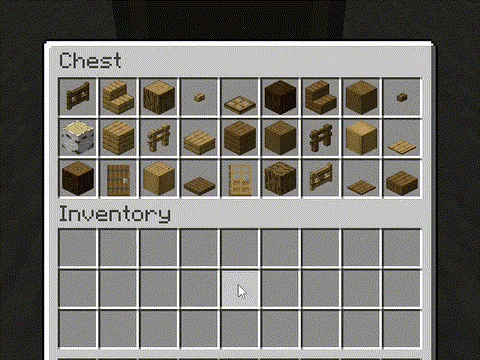
Versatile and easy inventory sorting.
Client Sort — ресурс от NotRyken. Поддерживаемые версии: Minecraft 1.20 – 26.x. Скачиваний на Modrinth: 6,437,393. Последнее обновление: 26.09.2026.
С 19.06.2024 у Client Sort вышло 509 версий на Modrinth. 171 из них вышли за последний год. Новейшая — 3.104.1+26.3, вышла 26.09.2026. Она сделана для Minecraft 26.3. Работает на NeoForge. Размер файла — 347 KB.
| Версия | Выпущен | Minecraft | Тип |
|---|---|---|---|
3.104.1+26.3 | 26.09.2026 | 26.3 | Релиз |
3.104.1+26.3 | 26.09.2026 | 26.3 | Релиз |
3.103.4+26.2 | 26.09.2026 | 26.2 | Релиз |
3.103.4+26.2 | 26.09.2026 | 26.2 | Релиз |
3.102.8+26.1.2 | 26.09.2026 | 26.1, 26.1.1, 26.1.2 | Релиз |
Client Sort — проект с открытым кодом. Новейший релиз на GitHub — v3.104.1+26.3-NeoForge, вышел 26.09.2026.
Changelog
До этого: v3.104.1+26.3-Fabric (26.09.2026), v3.103.4+26.2-NeoForge (26.09.2026).
Versatile and easy inventory sorting.
Sort
your mouse and press the keybind (default: middle mouse button).
Alternative sort orders can be used by holding down a modifier key while sorting.
Fill Stacks
the inventory that you want to move items out of and press the keybind (default: unbound).
inventory.
below).
Restock
hover over the inventory that you want to move items out of and press the keybind (default:
unbound).
types are added to the other inventory.
Transfer
inventory that you want to move items out of and press the keybind (default: unbound).
inventory.
Other Options
Editor Screen
inventory.
the container, so you can easily hide them everywhere by hiding them on just the player inventory.
Client-Side Policies
buttons, and when to ignore slots. The policy can be configured either via the editor screen or via
the Policies tab of the mod options.
Server-Side Policies
server-accelerated operations when it detects an incorrect state (such as item duplication).
edited and reloaded using the /clientsort reload command.
Serverside policies are not synced to clients, so if a client attempts to perform a
server-accelerated operation that the server does not allow, a warning message will be shown to the
client. The player can then opt to add a client-side policy to disable the operation entirely,
disable server acceleration, or enable automatically falling back to client operations.
Serverside Config File
{
"options": {
// Whether validation and automatic blacklisting should be enabled when the mod is used on a
// dedicated server.
"validationActiveServer": false,
// Whether inventories should be blacklisted when the wrong type of item is found in a slot.
"validateItemType": true,
// Whether inventories should be blacklisted when the wrong number of items is found in a slot.
"validateStackSize": true,
// The minimum difference between expected and actual which should be considered invalid.
"validateStackSizeThreshold": 32,
// Whether to always log a message when the result is not exactly as expected (even if
// validation is disabled, the difference is less than the threshold, etc.)
"alwaysLogUnexpectedResults": true,
// The list of policies for different inventory and container types.
"classPolicies": {
// An example entry.
"com.simibubi.create.content.equipment.toolbox.ToolboxMenu": {
"className": "com.simibubi.create.content.equipment.toolbox.ToolboxMenu",
"sortEnabled": false,
"stackFillEnabled": true,
"transferEnabled": true,
// Updated automatically when an inventory is blacklisted.
"lastAutoEditTime": "2025-09-20T14:58:41.1620876+08:00",
"lastAutoEditReason": "Sort operation failed at slot mapping 12->5: Expected '2 minecraft:spruce_slab' in destination after set, got '0 minecraft:air'!"
}
}
}
}
However, if it is also installed on a server, connected clients with the mod will be able to use
server-accelerated (near-instant) operations instead of the normal rate-limited operations.
ClientSort uses code from the following mods, in both modified and unmodified form, in accordance
with their respective licenses.
by Siphalor (Apache-2.0
license)
Roundaround (MIT
license)
quick-move and quick-drop.
prevention and more.
Автор: NotRyken. С картинками — на Modrinth.
Этот мод работает только в твоей игре. Серверам он не нужен, так что его можно использовать на любом сервере.
Установи Fabric, Quilt, Forge и NeoForge для Minecraft 1.20 – 26.x.
Добавь нужные ему моды: API Cloth Config.
Скачай .jar-файл с Modrinth и положи его в папку mods в каталоге .minecraft.
Запусти Minecraft с профилем Fabric.
С CraftRank Launcher эти шаги не нужны: открой Моды, найди Client Sort и нажми Установить.
| Ресурс | Загрузки | Версии | Обновление | Цена |
|---|---|---|---|---|
| Client Sortтот, что ты смотрел | 6.4M | 1.20 – 26.x | 26 сент. 2026 | Бесплатно |
| Inventory Profiles Nextblackd | 42.2M | 1.16 – 26.x | 27 сент. 2026 | Бесплатно |
 Inventory ManagementRoundaround | 3.8M | 1.18 – 26.x | 20 сент. 2026 | Бесплатно |
 Inventory Sortingkyrptonaught | 3.7M | 1.19 – 26.x | 17 сент. 2026 | Бесплатно |
Да. Client Sort поддерживает Minecraft 26.x. Все поддерживаемые версии: 26.x, 1.21, 1.20.
Да. Client Sort можно бесплатно скачать на Modrinth.
На клиенте. Client Sort кладётся в твою папку mods и работает на любом сервере, даже без модов.
Да: Cloth Config API. Установи это до Client Sort.
Да. Последнее обновление вышло за последние сутки.
Ближе всего к нему Inventory Profiles Next, Inventory Management и Inventory Sorting. Сравнить все альтернативы
Inventory Profiles NextМоды · 1.16 – 26.xTake control over your inventory. Sort. Move matching Items. Throw all. Locked slots. Gear sets! And much more.
Inventory ManagementМоды · 1.18 – 26.xSort and transfer items with the click of a button.
Inventory SortingМоды · 1.19 – 26.xQuick, simple, and lightweight inventory sorting
 Eclipse ToolsМоды · 26.x
Zoom, freecam, fullbright, inventory sort, item lock, chest finder, better chat, auto tool and an automatic librarian reroller.
 StashifyМоды · 1.21
Sort your inventory into nearby chests, barrels and shulker boxes with a single key.
 Mouse TweaksМоды · 1.16 – 26.x
Enhances inventory management by adding various functions to the mouse buttons.
Войди, чтобы оставить отзыв.