
 Inventory Profiles NextModlar · 1.16 – 26.x
Take control over your inventory. Sort. Move matching Items. Throw all. Locked slots. Gear sets! And much more.
Ücretsiz42,236,339 indirme

Versatile and easy inventory sorting.
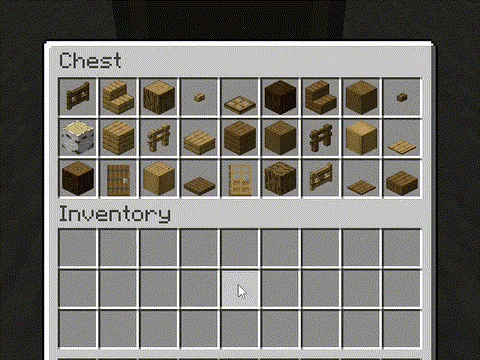
Versatile and easy inventory sorting.
Client Sort, NotRyken tarafından yapılmış bir kaynak. Desteklediği sürümler: Minecraft 1.20 – 26.x. Modrinth üzerinde 6,437,393 kez indirildi. Son güncelleme 26.09.2026 tarihinde çıktı.
Client Sort, 19.06.2024 tarihinden beri Modrinth üzerinde 509 sürüm yayınladı. Bunların 171 tanesi son bir yılda çıktı. En yenisi 26.09.2026 tarihinde çıkan 3.104.1+26.3. Minecraft 26.3 için yapıldı. NeoForge üzerinde çalışır. İndirme boyutu 347 KB.
| Sürüm | Yayın tarihi | Minecraft | Tür |
|---|---|---|---|
3.104.1+26.3 | 26.09.2026 | 26.3 | Kararlı |
3.104.1+26.3 | 26.09.2026 | 26.3 | Kararlı |
3.103.4+26.2 | 26.09.2026 | 26.2 | Kararlı |
3.103.4+26.2 | 26.09.2026 | 26.2 | Kararlı |
3.102.8+26.1.2 | 26.09.2026 | 26.1, 26.1.1, 26.1.2 | Kararlı |
Client Sort açık kaynaklıdır. GitHub'daki en yeni sürümü 26.09.2026 tarihinde yayınlanan v3.104.1+26.3-NeoForge.
Changelog
Öncekiler: v3.104.1+26.3-Fabric (26.09.2026), v3.103.4+26.2-NeoForge (26.09.2026).
Versatile and easy inventory sorting.
Sort
your mouse and press the keybind (default: middle mouse button).
Alternative sort orders can be used by holding down a modifier key while sorting.
Fill Stacks
the inventory that you want to move items out of and press the keybind (default: unbound).
inventory.
below).
Restock
hover over the inventory that you want to move items out of and press the keybind (default:
unbound).
types are added to the other inventory.
Transfer
inventory that you want to move items out of and press the keybind (default: unbound).
inventory.
Other Options
Editor Screen
inventory.
the container, so you can easily hide them everywhere by hiding them on just the player inventory.
Client-Side Policies
buttons, and when to ignore slots. The policy can be configured either via the editor screen or via
the Policies tab of the mod options.
Server-Side Policies
server-accelerated operations when it detects an incorrect state (such as item duplication).
edited and reloaded using the /clientsort reload command.
Serverside policies are not synced to clients, so if a client attempts to perform a
server-accelerated operation that the server does not allow, a warning message will be shown to the
client. The player can then opt to add a client-side policy to disable the operation entirely,
disable server acceleration, or enable automatically falling back to client operations.
Serverside Config File
{
"options": {
// Whether validation and automatic blacklisting should be enabled when the mod is used on a
// dedicated server.
"validationActiveServer": false,
// Whether inventories should be blacklisted when the wrong type of item is found in a slot.
"validateItemType": true,
// Whether inventories should be blacklisted when the wrong number of items is found in a slot.
"validateStackSize": true,
// The minimum difference between expected and actual which should be considered invalid.
"validateStackSizeThreshold": 32,
// Whether to always log a message when the result is not exactly as expected (even if
// validation is disabled, the difference is less than the threshold, etc.)
"alwaysLogUnexpectedResults": true,
// The list of policies for different inventory and container types.
"classPolicies": {
// An example entry.
"com.simibubi.create.content.equipment.toolbox.ToolboxMenu": {
"className": "com.simibubi.create.content.equipment.toolbox.ToolboxMenu",
"sortEnabled": false,
"stackFillEnabled": true,
"transferEnabled": true,
// Updated automatically when an inventory is blacklisted.
"lastAutoEditTime": "2025-09-20T14:58:41.1620876+08:00",
"lastAutoEditReason": "Sort operation failed at slot mapping 12->5: Expected '2 minecraft:spruce_slab' in destination after set, got '0 minecraft:air'!"
}
}
}
}
However, if it is also installed on a server, connected clients with the mod will be able to use
server-accelerated (near-instant) operations instead of the normal rate-limited operations.
ClientSort uses code from the following mods, in both modified and unmodified form, in accordance
with their respective licenses.
by Siphalor (Apache-2.0
license)
Roundaround (MIT
license)
quick-move and quick-drop.
prevention and more.
Yazan: NotRyken. Resimli halini Modrinth sayfasında oku.
Bu mod yalnızca senin oyununda çalışır. Sunucuların buna ihtiyacı yok, bu yüzden her sunucuda kullanabilirsin.
Minecraft 1.20 – 26.x için Fabric, Quilt, Forge ve NeoForge kur.
İhtiyaç duyduğu modları ekle: Cloth Config API.
.jar dosyasını Modrinth üzerinden indir ve .minecraft klasöründeki mods klasörüne koy.
Minecraft'ı Fabric profiliyle başlat.
CraftRank Launcher ile bu adımları atlayabilirsin: Modlar'ı aç, Client Sort ara ve Kur'a tıkla.
| Kaynak | İndirmeler | Sürümler | Son güncelleme | Fiyat |
|---|---|---|---|---|
| Client Sortbaktığın | 6.4M | 1.20 – 26.x | 26 Eyl 2026 | Ücretsiz |
| Inventory Profiles Nextblackd | 42.2M | 1.16 – 26.x | 27 Eyl 2026 | Ücretsiz |
 Inventory ManagementRoundaround | 3.8M | 1.18 – 26.x | 20 Eyl 2026 | Ücretsiz |
 Inventory Sortingkyrptonaught | 3.7M | 1.19 – 26.x | 17 Eyl 2026 | Ücretsiz |
Evet. Client Sort, Minecraft 26.x sürümünü destekliyor. Desteklenen tüm sürümler: 26.x, 1.21, 1.20.
Evet. Client Sort, Modrinth üzerinden ücretsiz indirilebilir.
İstemci tarafı. Client Sort kendi mods klasörüne kurulur ve modsuz sunucular dahil her sunucuda çalışır.
Evet: Cloth Config API. Bunu Client Sort öncesinde kur.
Evet. Son güncelleme son 24 saat içinde çıktı.
En yakın olanlar Inventory Profiles Next, Inventory Management ve Inventory Sorting. Tüm alternatifleri karşılaştır
Inventory Profiles NextModlar · 1.16 – 26.xTake control over your inventory. Sort. Move matching Items. Throw all. Locked slots. Gear sets! And much more.
Inventory ManagementModlar · 1.18 – 26.xSort and transfer items with the click of a button.
Inventory SortingModlar · 1.19 – 26.xQuick, simple, and lightweight inventory sorting
 Eclipse ToolsModlar · 26.x
Zoom, freecam, fullbright, inventory sort, item lock, chest finder, better chat, auto tool and an automatic librarian reroller.
 StashifyModlar · 1.21
Sort your inventory into nearby chests, barrels and shulker boxes with a single key.
 Mouse TweaksModlar · 1.16 – 26.x
Enhances inventory management by adding various functions to the mouse buttons.
Yorum yazmak için giriş yap.