
 Easy SubtitleMods · 1.20
Easy Subtitle adds support for synchronized subtitles in Minecraft, allowing dialogue and spoken audio to be displayed on screen at the right time. It makes…
Kostenlos7 Downloads
adds a backlog to cinematic subtitles
Direkter Download von Modrinth · 300 Downloads
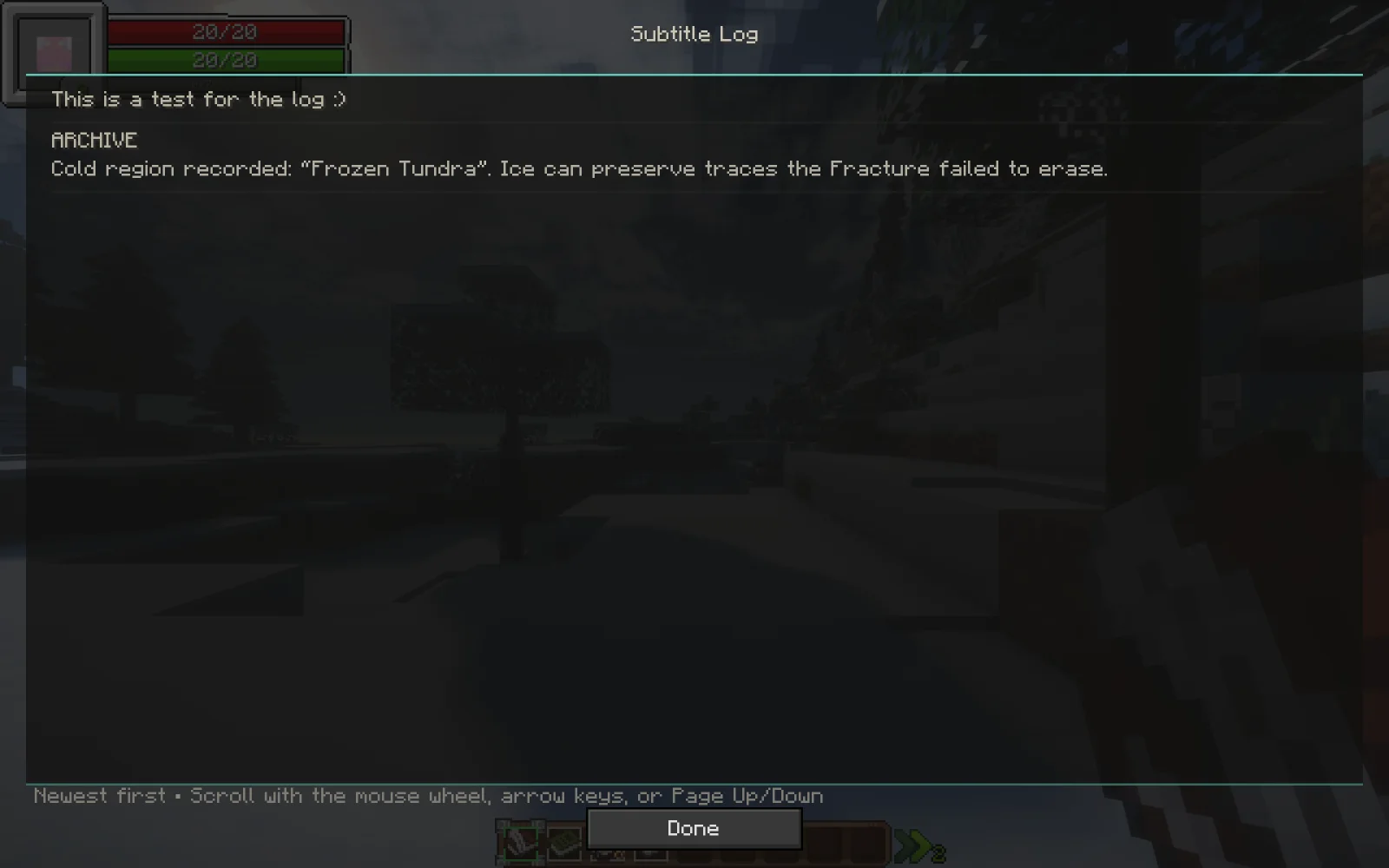
Cinematic Subtitles Log (Mod) stammt von pr1xv3e.jar. adds a backlog to cinematic subtitles.
Unterstützt wird Minecraft 1.20. Auf Modrinth gibt es 300 Downloads. Das letzte Update erschien am 30.10.2026.
Cinematic Subtitles Log hat seit 29.08.2026 2 Versionen auf Modrinth veröffentlicht. 2 davon erschienen im letzten Jahr. Die neueste ist 1.3.0, erschienen am 30.10.2026. Sie ist für Minecraft 1.20.1 gemacht. Sie läuft auf Forge. Der Download ist 8.6 MB groß.
| Version | Veröffentlicht | Minecraft | Typ |
|---|---|---|---|
1.3.0 | 30.10.2026 | 1.20.1 | Release |
1.0.0 | 29.08.2026 | 1.20.1 | Release |
Revisit the conversation, and hear the Archive speak.
This client extension for Cinematic Subtitles adds a readable subtitle history and synchronized recordings for The Quest's authored dialogue.
If you only require the log, use version 1.0.0
Version 1.3.0 includes all 64 reviewed Archive recordings, the requested pause edits on 12 lines and the removal of the preceding-line residue at the start of line 47. The other 52 Archive clips and all 55 Player clips retain their approved audio bytes.
With The Quest integration scripts installed, /archivevoice 1 through /archivevoice 64 and /playervoice 1 through /playervoice 55 preview individual lines without advancing story progress.
Recordings match the speaker and authored subtitle text. The JAR includes audio and playback support; The Quest's story triggers and server timing are supplied by its KubeJS scripts in the optional integration archive. Arbitrary new text does not receive synthesized speech.
The historical installed filename was cinematic_subtitles_log-1.0.0.jar; the exported filename correctly identifies its internal 1.3.0 version. Replace the older copy rather than keeping both.
Geschrieben von pr1xv3e.jar. Mit Bildern auf Modrinth lesen.
Diese Mod wird auf dem Server und bei jedem Spieler gebraucht.
Installiere Forge für Minecraft 1.20.
Lade die .jar-Datei von Modrinth herunter und lege sie in den mods-Ordner deines .minecraft-Verzeichnisses.
Starte Minecraft mit dem Forge-Profil.
Einfacher: Suche in Prism Launcher oder der Modrinth App in den Mods deiner Instanz nach Cinematic Subtitles Log und klicke auf Install. Loader und benötigte Mods werden für dich hinzugefügt.
| Ressource | Downloads | Versionen | Letztes Update | Preis |
|---|---|---|---|---|
| Cinematic Subtitles Logdie du angesehen hast | 300 | 1.20 | vor 15 Tagen | Kostenlos |
| Easy SubtitleGYPSTUDIOS | 7 | 1.20 | 15. Okt. 2026 | Kostenlos |
 Log Stairs & SlabsKukiz | 72 | 26.x | vor 27 Tagen | Kostenlos |
 Cinematic Zoom Inelgen86611 | 19 | 1.21 | 12. Okt. 2026 | Kostenlos |
Noch nicht. Die neueste unterstützte Version ist Minecraft 1.20.
Ja. Cinematic Subtitles Log kannst du kostenlos bei Modrinth herunterladen.
Beides. Der Server und jeder Spieler brauchen Cinematic Subtitles Log.
Ja. Das letzte Update kam innerhalb des letzten Tages.
Am ähnlichsten sind Easy Subtitle, Log Stairs & Slabs und Cinematic Zoom In. Alle Alternativen vergleichen
Easy SubtitleMods · 1.20Easy Subtitle adds support for synchronized subtitles in Minecraft, allowing dialogue and spoken audio to be displayed on screen at the right time. It makes…
Log Stairs & SlabsMods · 26.xAdds log stairs and slabs for all 12 wood types, including stripped variants.
Cinematic Zoom InMods · 1.21Adds a smooth cinematic zoom to Minecraft, with black bars at the top and bottom of the screen. Perfect for making gameplay look more like a movie.
Logg dich ein, um eine Bewertung zu schreiben.