
 Easy SubtitleMods · 1.20
Easy Subtitle adds support for synchronized subtitles in Minecraft, allowing dialogue and spoken audio to be displayed on screen at the right time. It makes…
Gratis7 descargas
adds a backlog to cinematic subtitles
Descarga directa desde Modrinth · 300 descargas
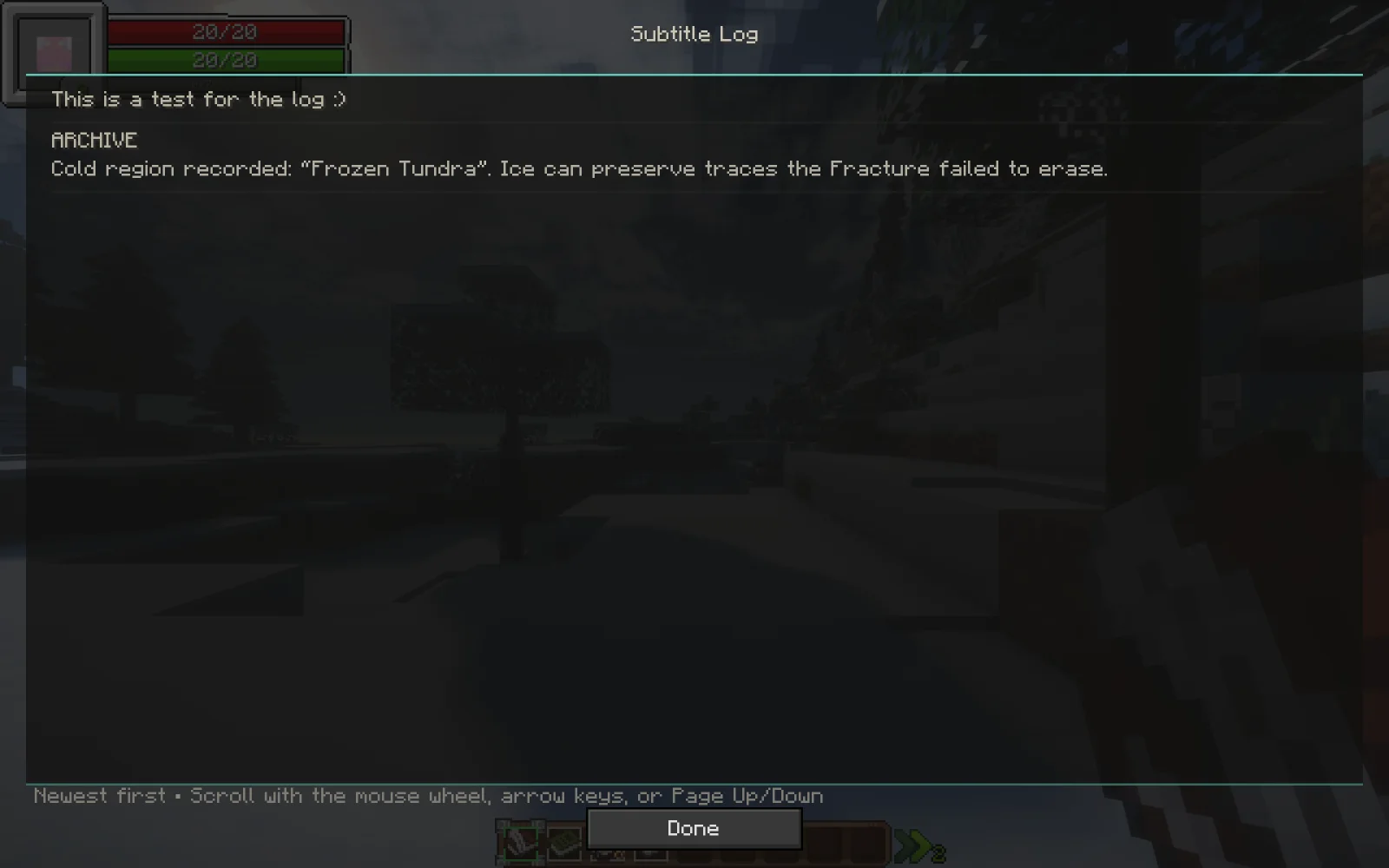
Cinematic Subtitles Log (mod) es obra de pr1xv3e.jar. adds a backlog to cinematic subtitles.
Es compatible con Minecraft 1.20. Se ha descargado 300 veces en Modrinth. La última actualización salió el 30/10/2026.
Cinematic Subtitles Log ha publicado 2 versiones en Modrinth desde el 29/08/2026. 2 salieron en el último año. La más reciente es 1.3.0, publicada el 30/10/2026. Está hecha para Minecraft 1.20.1. Funciona en Forge. La descarga ocupa 8.6 MB.
| Versión | Publicado | Minecraft | Tipo |
|---|---|---|---|
1.3.0 | 30/10/2026 | 1.20.1 | Estable |
1.0.0 | 29/08/2026 | 1.20.1 | Estable |
Revisit the conversation, and hear the Archive speak.
This client extension for Cinematic Subtitles adds a readable subtitle history and synchronized recordings for The Quest's authored dialogue.
If you only require the log, use version 1.0.0
Version 1.3.0 includes all 64 reviewed Archive recordings, the requested pause edits on 12 lines and the removal of the preceding-line residue at the start of line 47. The other 52 Archive clips and all 55 Player clips retain their approved audio bytes.
With The Quest integration scripts installed, /archivevoice 1 through /archivevoice 64 and /playervoice 1 through /playervoice 55 preview individual lines without advancing story progress.
Recordings match the speaker and authored subtitle text. The JAR includes audio and playback support; The Quest's story triggers and server timing are supplied by its KubeJS scripts in the optional integration archive. Arbitrary new text does not receive synthesized speech.
The historical installed filename was cinematic_subtitles_log-1.0.0.jar; the exported filename correctly identifies its internal 1.3.0 version. Replace the older copy rather than keeping both.
Escrita por pr1xv3e.jar. Léela con imágenes en Modrinth.
Este mod hace falta en el servidor y en cada jugador que entra.
Instala Forge para Minecraft 1.20.
Descarga el archivo .jar desde Modrinth y ponlo en la carpeta mods de tu directorio .minecraft.
Inicia Minecraft con el perfil de Forge.
Más fácil: en Prism Launcher o la Modrinth App, busca Cinematic Subtitles Log en los mods de tu instancia y haz clic en Install. Añade el loader y los mods que necesita por ti.
| Recurso | Descargas | Versiones | Última actualización | Precio |
|---|---|---|---|---|
| Cinematic Subtitles Logel que estabas viendo | 300 | 1.20 | hace 15 días | Gratis |
| Easy SubtitleGYPSTUDIOS | 7 | 1.20 | 15 oct 2026 | Gratis |
 Log Stairs & SlabsKukiz | 72 | 26.x | hace 28 días | Gratis |
 Cinematic Zoom Inelgen86611 | 19 | 1.21 | 12 oct 2026 | Gratis |
Todavía no. La versión más reciente que admite es Minecraft 1.20.
Sí. Cinematic Subtitles Log se puede descargar gratis desde Modrinth.
Ambos. El servidor y cada jugador necesitan Cinematic Subtitles Log instalado.
Sí. La última actualización salió en el último día.
Los más parecidos son Easy Subtitle, Log Stairs & Slabs y Cinematic Zoom In. Comparar todas las alternativas
Easy SubtitleMods · 1.20Easy Subtitle adds support for synchronized subtitles in Minecraft, allowing dialogue and spoken audio to be displayed on screen at the right time. It makes…
Log Stairs & SlabsMods · 26.xAdds log stairs and slabs for all 12 wood types, including stripped variants.
Cinematic Zoom InMods · 1.21Adds a smooth cinematic zoom to Minecraft, with black bars at the top and bottom of the screen. Perfect for making gameplay look more like a movie.
Inicia sesión para dejar una reseña.