
 Smooth ScrollingMods · 1.20 – 26.x
Customize the scrolling smoothness or speed in various places like chat, hotbar, creative screen...
Kostenlos13,360,613 Downloads
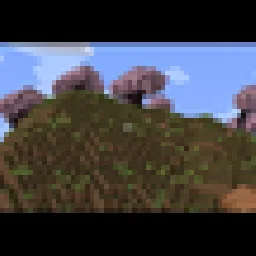
Adds a smooth cinematic zoom to Minecraft, with black bars at the top and bottom of the screen. Perfect for making gameplay look more like a movie.
Direkter Download von Modrinth · 19 Downloads
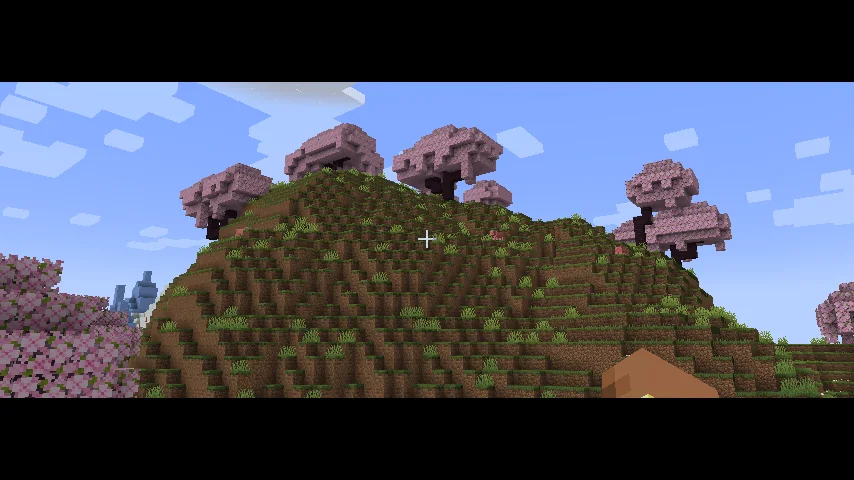
Cinematic Zoom In (Mod) stammt von elgen86611. Adds a smooth cinematic zoom to Minecraft, with black bars at the top and bottom of the screen. Perfect for making gameplay look more like a movie.
Unterstützt wird Minecraft 1.21. Auf Modrinth gibt es 19 Downloads. Das letzte Update erschien am 12.10.2026.
Die neueste ist 1.0.0, erschienen am 12.10.2026. Sie ist für Minecraft 1.21.1 gemacht. Sie läuft auf NeoForge. Der Download ist 9 KB groß.
| Version | Veröffentlicht | Minecraft | Typ |
|---|---|---|---|
1.0.0 | 12.10.2026 | 1.21.1 | Release |
Cinematic Zoom In adds a smooth zoom feature to Minecraft, along with cinematic black bars at the top and bottom of the screen.
Press C to zoom in and get a closer look at things in your world. The zoom moves smoothly instead of instantly snapping in and out. The black bars give your gameplay a more cinematic look.
You can change the mod's settings by opening Mod Config and finding Cinematic Zoom In. There you can adjust settings like zoom strength and other options to make it work the way you want.
Whether you're recording videos, taking screenshots, or just exploring, this mod gives you an easy way to make your gameplay look more cinematic.
Geschrieben von elgen86611. Mit Bildern auf Modrinth lesen.
Diese Mod läuft nur in deinem eigenen Spiel. Server brauchen sie nicht, du kannst sie also auf jedem Server nutzen.
Installiere NeoForge für Minecraft 1.21.
Lade die .jar-Datei von Modrinth herunter und lege sie in den mods-Ordner deines .minecraft-Verzeichnisses.
Starte Minecraft mit dem NeoForge-Profil.
Einfacher: Suche in Prism Launcher oder der Modrinth App in den Mods deiner Instanz nach Cinematic Zoom In und klicke auf Install. Loader und benötigte Mods werden für dich hinzugefügt.
| Ressource | Downloads | Versionen | Letztes Update | Preis |
|---|---|---|---|---|
| Cinematic Zoom Indie du angesehen hast | 19 | 1.21 | 12. Okt. 2026 | Kostenlos |
| Smooth ScrollingSmajloSlovakian | 13.4M | 1.20 – 26.x | vor 28 Tagen | Kostenlos |
 Advanced ZoomMr_Lan123 | 205 | 1.21 – 26.x | vor 5 Tagen | Kostenlos |
 letterblockKaianGuedes | 95 | 1.20 – 26.x | 5. Okt. 2026 | Kostenlos |
Noch nicht. Die neueste unterstützte Version ist Minecraft 1.21.
Ja. Cinematic Zoom In kannst du kostenlos bei Modrinth herunterladen.
Clientseitig. Cinematic Zoom In kommt in deinen eigenen mods-Ordner und funktioniert auf jedem Server, auch auf Servern ohne Mods.
Ja. Das letzte Update kam innerhalb des letzten Tages.
Am ähnlichsten sind Smooth Scrolling, Advanced Zoom und letterblock. Alle Alternativen vergleichen
Smooth ScrollingMods · 1.20 – 26.xCustomize the scrolling smoothness or speed in various places like chat, hotbar, creative screen...
Advanced ZoomMods · 1.21 – 26.xA smooth, borderless spyglass-like zoom for Minecraft. Hold or press a key to zoom in, use the mouse wheel to fine-tune the zoom level, and configure…
letterblockMods · 1.20 – 26.xCinematic black bars in Minecraft
 CraftwebsMods · 26.x
this adds craftable cobwebs. I made this since like no one was making 26.2 fabric craftable webs
 Xaero's World MapMods · 1.8 – 26.x
Adds a full screen world map which shows you what you have explored in the world. Works great together with Xaero's Minimap.
 Sodium Shadowy Path BlocksMods · 1.16 – 26.x
Reintroduces vanilla-like smooth lighting to non-full blocks (e.g. dirt paths and how they have dark shading when directly next to a full block) when using…
Logg dich ein, um eine Bewertung zu schreiben.