
 Mini's Cobblemon IconsRessourcenpakete · 1.21
Shuffle Style Cobblemon Icons for xearo's minimap that combine's my favorite features of Keice's Icons, E19' Icons, and over 1000 Custom Shiny Icons.
Kostenlos152,268 Downloads
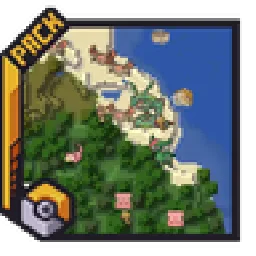
Adds entity icons of Pokémon found in the Cobblemon Mod to JourneyMap in Pixel or Shuffle style!
Direkter Download von Modrinth · 394,474 Downloads
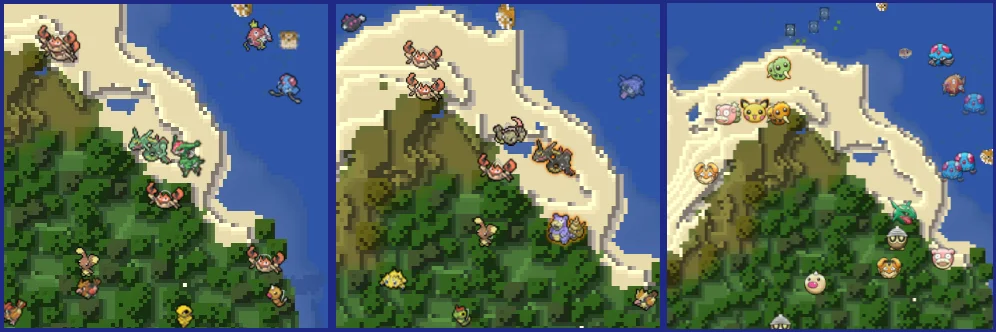
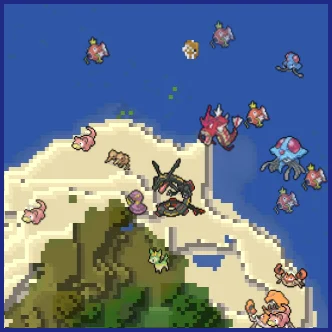
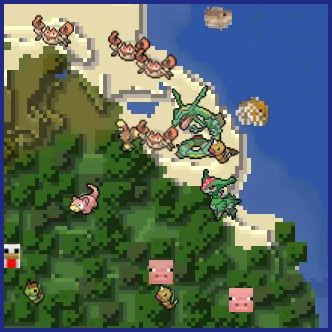
Maxi's JourneyMap Cobblemon Minimap Icons (Ressourcenpaket) stammt von Maxitotito. Adds entity icons of Pokémon found in the Cobblemon Mod to JourneyMap in Pixel or Shuffle style!
Unterstützt wird Minecraft 1.19 – 1.21. Auf Modrinth gibt es 394,474 Downloads. Das letzte Update erschien am 21.03.2026.
Maxi's JourneyMap Cobblemon Minimap Icons hat seit 04.04.2023 18 Versionen auf Modrinth veröffentlicht. 4 davon erschienen im letzten Jahr. Die neueste ist U11, erschienen am 21.03.2026. Sie ist für Minecraft 1.21.1 gemacht. Sie läuft auf Minecraft. Der Download ist 2.7 MB groß.
| Version | Veröffentlicht | Minecraft | Typ |
|---|---|---|---|
U11 | 21.03.2026 | 1.21.1 | Release |
U10 | 13.02.2026 | 1.21.1 | Release |
U9 | 07.02.2026 | 1.21.1 | Release |
U8 | 26.11.2025 | 1.21.1 | Release |
U7 | 15.06.2025 | 1.21.1 | Release |
No matter the dimension nor form (regional, normal & shiny), you will see your Pokémon!
This resource pack adds entity icons of Pokémon found in the Cobblemon Mod to JourneyMap' minimap and fullscreen map, in pixel-art style. Supports up-to-date Cobblemon version.
Pixel Icons & Shinier Shinies: For those who want an old style and also want to spot Shinies slightly easier.
Shuffle Icons: For those who want a fun style while searching for those Pokémon.
-
I can't see any Pokémon on my map
For you to see Pokémon on your minimap/fullscreen map, you have to set Mob Display to Icons in your JourneyMap options. You have to set this for both presets and fullscreen map options.
-
I've set Mob Display to Icons but I still can't see any Pokémon
You have to make sure to, at least, have the version 5.9.5 of JourneyMap for the resourcepack to work.
-
I have the correct JM version but I still don't see my Pokémon
Remember to Select (move to the right column) the correct resourcepack from your Available list on your game Options → Resource Packs.
-
How can I make the icons bigger?
Just as seen above, aside from the Mob Display option is Mob Display Scale, you can set this number to your preference. Remember to set this number on the preset you will be using and/or on the fullscreen map.
[](modrinth.com/resourcepack/maxis-journeymap-natu…)
[](modrinth.com/resourcepack/maxis-journeymap-cobb…)
Geschrieben von Maxitotito. Mit Bildern auf Modrinth lesen.
Lade die .zip-Datei von Modrinth herunter. Entpacke sie nicht.
Öffne in Minecraft Optionen, dann Ressourcenpakete, dann Paketordner öffnen.
Lege die .zip-Datei in diesen Ordner und gehe zurück ins Spiel.
Schiebe Maxi's JourneyMap Cobblemon Minimap Icons in die rechte Liste und klicke auf Fertig.
Es ist für Minecraft 1.19 – 1.21 gemacht. Auf anderen Versionen markiert Minecraft es als inkompatibel, oft funktioniert es aber trotzdem.
| Ressource | Downloads | Versionen | Letztes Update | Preis |
|---|---|---|---|---|
| Maxi's JourneyMap Cobblemon Minimap Iconsdie du angesehen hast | 394K | 1.19 – 1.21 | 21. März 2026 | Kostenlos |
| Mini's Cobblemon Iconsminiwheatsmc | 152K | 1.21 | vor 22 Tagen | Kostenlos |
 Cobblemon Interface: RecoloredVinnyStalck | 603K | 1.20 – 1.21 | 8. Apr. 2025 | Kostenlos |
 XaerosCobblemonAccieo | 727K | 1.19 – 1.21 | 21. Dez. 2025 | Kostenlos |
Noch nicht. Die neueste unterstützte Version ist Minecraft 1.21.
Ja. Maxi's JourneyMap Cobblemon Minimap Icons kannst du kostenlos bei Modrinth herunterladen.
Ja. Das letzte Update kam innerhalb des letzten Tages.
Am ähnlichsten sind Mini's Cobblemon Icons, Cobblemon Interface: Recolored und XaerosCobblemon. Alle Alternativen vergleichen
Mini's Cobblemon IconsRessourcenpakete · 1.21Shuffle Style Cobblemon Icons for xearo's minimap that combine's my favorite features of Keice's Icons, E19' Icons, and over 1000 Custom Shiny Icons.
Cobblemon Interface: RecoloredRessourcenpakete · 1.20 – 1.21Changes the colors of the Cobblemon Interface resoucepack to match the Pokémon health and exp bar colors from Cobblemon.
XaerosCobblemonRessourcenpakete · 1.19 – 1.21Adds Pokémon icons to Xaero's Minimap
 Canon PC WallpapersRessourcenpakete · 1.21
This addon adds a variety of wallpapers from Generations 3 through 9 to Cobblemon, via the new Wallpaper Addon Systems.
 OdysseyMonsRessourcenpakete · 1.19 – 1.20
OdysseyMons adds Pokémon that aren't in the initial Cobblemon mod Yet.
 Isle of Berk Xaero's Minimap IconsRessourcenpakete · 1.18
Adds minimap icons for the Isle of Berk Dragons & Eggs with support for various Addons.
Logg dich ein, um eine Bewertung zu schreiben.