
 Mini's Cobblemon IconsResource packs · 1.21
Shuffle Style Cobblemon Icons for xearo's minimap that combine's my favorite features of Keice's Icons, E19' Icons, and over 1000 Custom Shiny Icons.
Free152,081 downloads
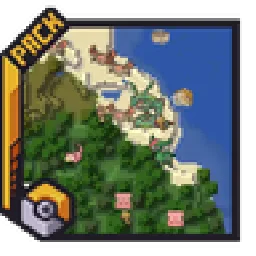
Adds entity icons of Pokémon found in the Cobblemon Mod to JourneyMap in Pixel or Shuffle style!
Direct download from Modrinth · 394,474 downloads
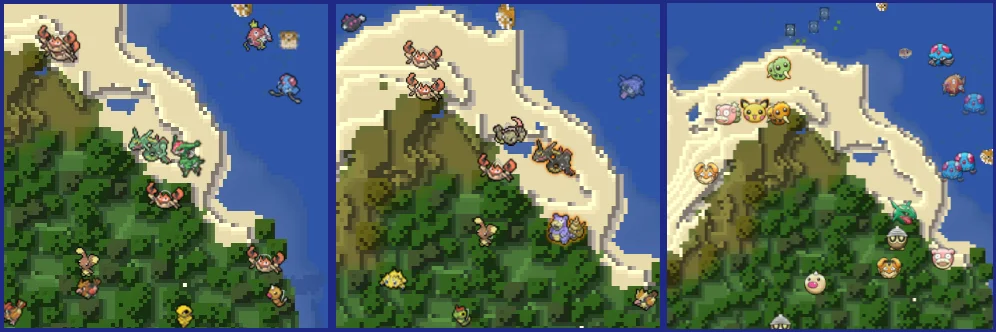
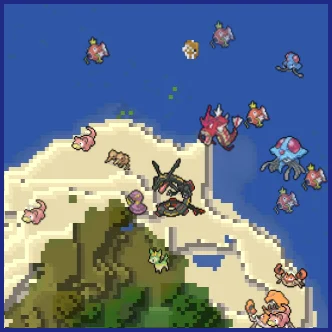
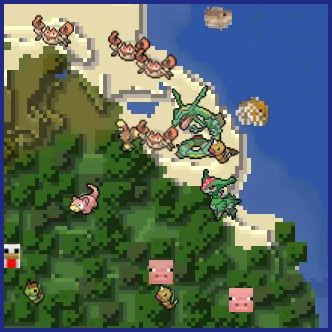
Maxi's JourneyMap Cobblemon Minimap Icons is a resource pack made by Maxitotito. Adds entity icons of Pokémon found in the Cobblemon Mod to JourneyMap in Pixel or Shuffle style!
It supports Minecraft 1.19 – 1.21. It has been downloaded 394,474 times on Modrinth. The last update came out on Mar 21, 2026.
Maxi's JourneyMap Cobblemon Minimap Icons has had 18 releases on Modrinth since Apr 4, 2023. 4 of them came out in the past year. The newest is U11, released on Mar 21, 2026. It is made for Minecraft 1.21.1. It runs on Minecraft. The download is 2.7 MB.
| Version | Released | Minecraft | Type |
|---|---|---|---|
U11 | Mar 21, 2026 | 1.21.1 | Release |
U10 | Feb 13, 2026 | 1.21.1 | Release |
U9 | Feb 7, 2026 | 1.21.1 | Release |
U8 | Nov 26, 2025 | 1.21.1 | Release |
U7 | Jun 15, 2025 | 1.21.1 | Release |
No matter the dimension nor form (regional, normal & shiny), you will see your Pokémon!
This resource pack adds entity icons of Pokémon found in the Cobblemon Mod to JourneyMap' minimap and fullscreen map, in pixel-art style. Supports up-to-date Cobblemon version.
Pixel Icons & Shinier Shinies: For those who want an old style and also want to spot Shinies slightly easier.
Shuffle Icons: For those who want a fun style while searching for those Pokémon.
-
I can't see any Pokémon on my map
For you to see Pokémon on your minimap/fullscreen map, you have to set Mob Display to Icons in your JourneyMap options. You have to set this for both presets and fullscreen map options.
-
I've set Mob Display to Icons but I still can't see any Pokémon
You have to make sure to, at least, have the version 5.9.5 of JourneyMap for the resourcepack to work.
-
I have the correct JM version but I still don't see my Pokémon
Remember to Select (move to the right column) the correct resourcepack from your Available list on your game Options → Resource Packs.
-
How can I make the icons bigger?
Just as seen above, aside from the Mob Display option is Mob Display Scale, you can set this number to your preference. Remember to set this number on the preset you will be using and/or on the fullscreen map.
[](modrinth.com/resourcepack/maxis-journeymap-natu…)
[](modrinth.com/resourcepack/maxis-journeymap-cobb…)
Written by Maxitotito. Read it with pictures on Modrinth.
Download the .zip file from Modrinth. Do not unzip it.
In Minecraft, open Options, then Resource Packs, then Open Pack Folder.
Drop the .zip file into that folder and go back to the game.
Move Maxi's JourneyMap Cobblemon Minimap Icons to the right-hand list and click Done.
It is made for Minecraft 1.19 – 1.21. On other versions Minecraft marks it as incompatible, but it often still works.
Full guide: How to install Minecraft resource packs
| Resource | Downloads | Versions | Last update | Price |
|---|---|---|---|---|
| Maxi's JourneyMap Cobblemon Minimap Iconsthe one you looked at | 394K | 1.19 – 1.21 | Mar 21, 2026 | Free |
| Mini's Cobblemon Iconsminiwheatsmc | 152K | 1.21 | 22 days ago | Free |
 Cobblemon Interface: RecoloredVinnyStalck | 603K | 1.20 – 1.21 | Apr 8, 2025 | Free |
 XaerosCobblemonAccieo | 727K | 1.19 – 1.21 | Dec 21, 2025 | Free |
Not yet. The newest version it supports is Minecraft 1.21.
Yes. Maxi's JourneyMap Cobblemon Minimap Icons is free to download from Modrinth.
Yes. The last update came out in the past day.
The closest ones are Mini's Cobblemon Icons, Cobblemon Interface: Recolored and XaerosCobblemon. Compare all alternatives
Mini's Cobblemon IconsResource packs · 1.21Shuffle Style Cobblemon Icons for xearo's minimap that combine's my favorite features of Keice's Icons, E19' Icons, and over 1000 Custom Shiny Icons.
Cobblemon Interface: RecoloredResource packs · 1.20 – 1.21Changes the colors of the Cobblemon Interface resoucepack to match the Pokémon health and exp bar colors from Cobblemon.
XaerosCobblemonResource packs · 1.19 – 1.21Adds Pokémon icons to Xaero's Minimap
 Canon PC WallpapersResource packs · 1.21
This addon adds a variety of wallpapers from Generations 3 through 9 to Cobblemon, via the new Wallpaper Addon Systems.
 OdysseyMonsResource packs · 1.19 – 1.20
OdysseyMons adds Pokémon that aren't in the initial Cobblemon mod Yet.
 Isle of Berk Xaero's Minimap IconsResource packs · 1.18
Adds minimap icons for the Isle of Berk Dragons & Eggs with support for various Addons.
Log in to leave a review.