
 Mini's Cobblemon IconsPacks de ressources · 1.21
Shuffle Style Cobblemon Icons for xearo's minimap that combine's my favorite features of Keice's Icons, E19' Icons, and over 1000 Custom Shiny Icons.
Gratuit152,268 téléchargements
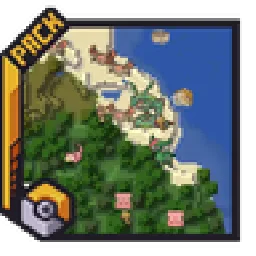
Adds entity icons of Pokémon found in the Cobblemon Mod to JourneyMap in Pixel or Shuffle style!
Téléchargement direct depuis Modrinth · 394,474 téléchargements
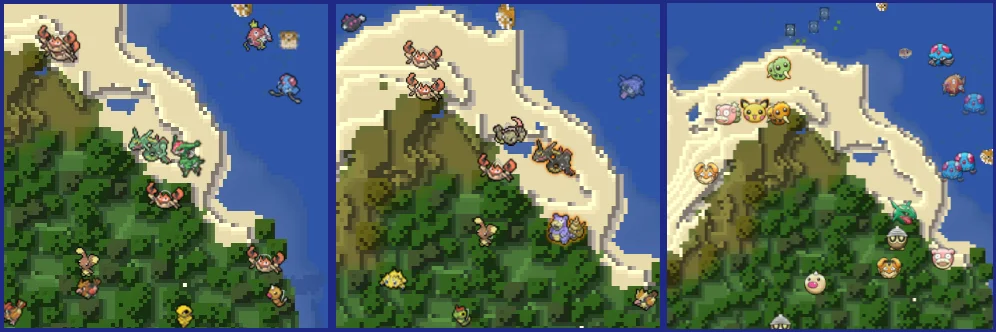
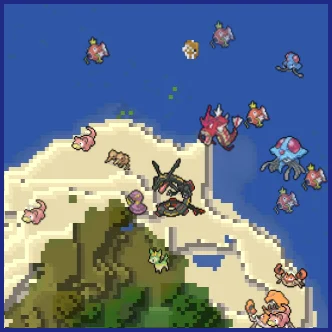
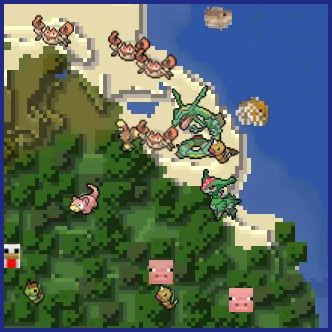
Maxi's JourneyMap Cobblemon Minimap Icons (pack de ressources) est une création de Maxitotito. Adds entity icons of Pokémon found in the Cobblemon Mod to JourneyMap in Pixel or Shuffle style!
Versions prises en charge : Minecraft 1.19 – 1.21. On compte 394,474 téléchargements sur Modrinth. La dernière mise à jour date du 21/03/2026.
Maxi's JourneyMap Cobblemon Minimap Icons a publié 18 versions sur Modrinth depuis le 04/04/2023. 4 sont sorties au cours de l'année passée. La plus récente est U11, sortie le 21/03/2026. Elle est faite pour Minecraft 1.21.1. Elle fonctionne sur Minecraft. Le téléchargement fait 2.7 MB.
| Version | Publié | Minecraft | Type |
|---|---|---|---|
U11 | 21/03/2026 | 1.21.1 | Stable |
U10 | 13/02/2026 | 1.21.1 | Stable |
U9 | 07/02/2026 | 1.21.1 | Stable |
U8 | 26/11/2025 | 1.21.1 | Stable |
U7 | 15/06/2025 | 1.21.1 | Stable |
No matter the dimension nor form (regional, normal & shiny), you will see your Pokémon!
This resource pack adds entity icons of Pokémon found in the Cobblemon Mod to JourneyMap' minimap and fullscreen map, in pixel-art style. Supports up-to-date Cobblemon version.
Pixel Icons & Shinier Shinies: For those who want an old style and also want to spot Shinies slightly easier.
Shuffle Icons: For those who want a fun style while searching for those Pokémon.
-
I can't see any Pokémon on my map
For you to see Pokémon on your minimap/fullscreen map, you have to set Mob Display to Icons in your JourneyMap options. You have to set this for both presets and fullscreen map options.
-
I've set Mob Display to Icons but I still can't see any Pokémon
You have to make sure to, at least, have the version 5.9.5 of JourneyMap for the resourcepack to work.
-
I have the correct JM version but I still don't see my Pokémon
Remember to Select (move to the right column) the correct resourcepack from your Available list on your game Options → Resource Packs.
-
How can I make the icons bigger?
Just as seen above, aside from the Mob Display option is Mob Display Scale, you can set this number to your preference. Remember to set this number on the preset you will be using and/or on the fullscreen map.
[](modrinth.com/resourcepack/maxis-journeymap-natu…)
[](modrinth.com/resourcepack/maxis-journeymap-cobb…)
Écrite par Maxitotito. À lire avec les images sur Modrinth.
Télécharge le fichier .zip depuis Modrinth. Ne le décompresse pas.
Dans Minecraft, ouvre Options, puis Packs de ressources, puis Ouvrir le dossier des packs.
Dépose le fichier .zip dans ce dossier et retourne au jeu.
Déplace Maxi's JourneyMap Cobblemon Minimap Icons dans la liste de droite et clique sur Terminé.
Il est fait pour Minecraft 1.19 – 1.21. Sur d'autres versions, Minecraft l'indique comme incompatible, mais il fonctionne souvent quand même.
| Ressource | Téléchargements | Versions | Mise à jour | Prix |
|---|---|---|---|---|
| Maxi's JourneyMap Cobblemon Minimap Iconscelle que tu regardais | 394K | 1.19 – 1.21 | 21 mars 2026 | Gratuit |
| Mini's Cobblemon Iconsminiwheatsmc | 152K | 1.21 | il y a 22 jours | Gratuit |
 XaerosCobblemonAccieo | 727K | 1.19 – 1.21 | 21 déc. 2025 | Gratuit |
 Icon Xaero'sgodkyo98 | 5.8M | 1.8 – 1.21 | 12 mars 2026 | Gratuit |
Pas encore. La version la plus récente prise en charge est Minecraft 1.21.
Oui. Maxi's JourneyMap Cobblemon Minimap Icons se télécharge gratuitement sur Modrinth.
Oui. La dernière mise à jour date des dernières 24 heures.
Les plus proches sont Mini's Cobblemon Icons, XaerosCobblemon et Icon Xaero's. Comparer toutes les alternatives
Mini's Cobblemon IconsPacks de ressources · 1.21Shuffle Style Cobblemon Icons for xearo's minimap that combine's my favorite features of Keice's Icons, E19' Icons, and over 1000 Custom Shiny Icons.
XaerosCobblemonPacks de ressources · 1.19 – 1.21Adds Pokémon icons to Xaero's Minimap
Icon Xaero'sPacks de ressources · 1.8 – 1.21Icon mod for xaero's map and minimap Many icon mod
 Cobblemon Interface: RecoloredPacks de ressources · 1.20 – 1.21
Changes the colors of the Cobblemon Interface resoucepack to match the Pokémon health and exp bar colors from Cobblemon.
 Isle of Berk Xaero's Minimap IconsPacks de ressources · 1.18
Adds minimap icons for the Isle of Berk Dragons & Eggs with support for various Addons.
 Jakotens' Pokémon Trainer CosmeticsPacks de ressources · 1.20 – 1.21
This resource pack includes custom hats and player skins for most playable characters from the main series Pokémon games from generations 1-8, perfect for…
Connecte-toi pour laisser un avis.