
 CleanUIMods · 26.x
Removes the chat reporting and feedback buttons from the escape menu in 26.2+.
Kostenlos9 Downloads

Removes the chat report button from the game menu screen
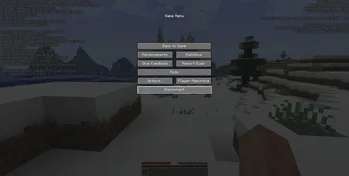

No Report Button (Ressource) stammt von Lucaslah. Removes the chat report button from the game menu screen.
Unterstützt wird Minecraft 1.19 – 26.x. Auf Modrinth gibt es 3,717,146 Downloads. Das letzte Update erschien am 02.10.2026.
No Report Button hat seit 12.08.2022 30 Versionen auf Modrinth veröffentlicht. 12 davon erschienen im letzten Jahr. Die neueste ist 1.9.0, erschienen am 01.10.2026. Sie ist für Minecraft 26.3 gemacht. Sie läuft auf NeoForge. Der Download ist 8 KB groß.
| Version | Veröffentlicht | Minecraft | Typ |
|---|---|---|---|
1.9.0 | 01.10.2026 | 26.3 | Release |
1.9.0 | 01.10.2026 | 26.3 | Release |
1.9.0 | 01.10.2026 | 26.3 | Release |
1.8.0 | 26.06.2026 | 26.2 | Release |
1.8.0 | 26.06.2026 | 26.2 | Release |
No Report Button ist Open Source. Die neueste Version auf GitHub ist v1.9.0 for Minecraft 26.3, veröffentlicht am 01.10.2026.
Full Changelog: v1.8.0...v1.9.0
Davor: v1.8.0 for Minecraft 26.2 (26.06.2026), v1.7.1 for Minecraft 26.1 (03.04.2026).
This mod simply removes the new 1.19.1+ chat report button from the game pause menu screen and replaces it with a disabled open to LAN button (when on a multiplayer server) like was done before 1.19.1.
Supports fabric, forge and quilt 1.19.1+
Should be compatible with any mods, but if you do find a mod that is not please open an issue.
Fabric API not required.
See here for what version to use, or check the files tab and download the latest NRB version that supports the version of Minecraft you are on.
Mod is only supported on the client side, the mod will do nothing if used on the server
Geschrieben von Lucaslah. Mit Bildern auf Modrinth lesen.
Diese Mod läuft nur in deinem eigenen Spiel. Server brauchen sie nicht, du kannst sie also auf jedem Server nutzen.
Installiere Fabric, Quilt, Forge und NeoForge für Minecraft 1.19 – 26.x.
Lade die .jar-Datei von Modrinth herunter und lege sie in den mods-Ordner deines .minecraft-Verzeichnisses.
Starte Minecraft mit dem Fabric-Profil.
Mit dem CraftRank Launcher sparst du dir diese Schritte: Öffne Mods, suche nach No Report Button und klicke auf Installieren.
| Ressource | Downloads | Versionen | Letztes Update | Preis |
|---|---|---|---|---|
| No Report Buttondie du angesehen hast | 3.7M | 1.19 – 26.x | 2. Okt. 2026 | Kostenlos |
| CleanUIPigly3 | 9 | 26.x | 5. Okt. 2026 | Kostenlos |
 StendhalNebSpacefarer | 9.3M | 1.16 – 26.x | 20. Sept. 2026 | Kostenlos |
 No Chat RestrictionsAizistral | 4.2M | 1.16 – 26.x | 30. Sept. 2026 | Kostenlos |
Ja. No Report Button unterstützt Minecraft 26.x. Alle unterstützten Versionen: 26.x, 1.21, 1.20, 1.19.
Ja. No Report Button kannst du kostenlos bei Modrinth herunterladen.
Clientseitig. No Report Button kommt in deinen eigenen mods-Ordner und funktioniert auf jedem Server, auch auf Servern ohne Mods.
Ja. Das letzte Update kam innerhalb des letzten Tages.
Am ähnlichsten sind CleanUI, Stendhal und No Chat Restrictions. Alle Alternativen vergleichen
CleanUIMods · 26.xRemoves the chat reporting and feedback buttons from the escape menu in 26.2+.
StendhalMods · 1.16 – 26.xStendhal is a client-side Fabric mod offering new and enhanced visual utilities for books, signs, anvil and the in-game chat.
No Chat RestrictionsMods · 1.16 – 26.xRestores access to game chat for all accounts
 Smooth ScrollingMods · 1.20 – 26.x
Customize the scrolling smoothness or speed in various places like chat, hotbar, creative screen...
 w1xdsT9Mods · 26.x
Offline chat spell checker that underlines spelling errors in the game chat input, with support for Russian and English.
 No Chat ReportsMods · 1.19 – 26.x
Makes chat unreportable (where possible)
Logg dich ein, um eine Bewertung zu schreiben.