
 CleanUIMods · 26.x
Removes the chat reporting and feedback buttons from the escape menu in 26.2+.
Free9 downloads

Removes the chat report button from the game menu screen
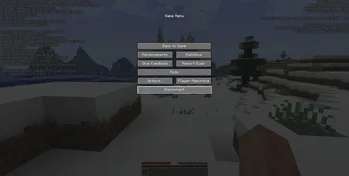

Removes the chat report button from the game menu screen
No Report Button is a resource made by Lucaslah. It supports Minecraft 1.19 – 26.x. It has been downloaded 3,717,146 times on Modrinth. The last update came out on Oct 2, 2026.
No Report Button has had 30 releases on Modrinth since Aug 12, 2022. 12 of them came out in the past year. The newest is 1.9.0, released on Oct 1, 2026. It is made for Minecraft 26.3. It runs on NeoForge. The download is 8 KB.
| Version | Released | Minecraft | Type |
|---|---|---|---|
1.9.0 | Oct 1, 2026 | 26.3 | Release |
1.9.0 | Oct 1, 2026 | 26.3 | Release |
1.9.0 | Oct 1, 2026 | 26.3 | Release |
1.8.0 | Jun 26, 2026 | 26.2 | Release |
1.8.0 | Jun 26, 2026 | 26.2 | Release |
No Report Button is open source. Its newest release on GitHub is v1.9.0 for Minecraft 26.3, published on Oct 1, 2026.
Full Changelog: v1.8.0...v1.9.0
Before that: v1.8.0 for Minecraft 26.2 (Jun 26, 2026), v1.7.1 for Minecraft 26.1 (Apr 3, 2026).
This mod simply removes the new 1.19.1+ chat report button from the game pause menu screen and replaces it with a disabled open to LAN button (when on a multiplayer server) like was done before 1.19.1.
Supports fabric, forge and quilt 1.19.1+
Should be compatible with any mods, but if you do find a mod that is not please open an issue.
Fabric API not required.
See here for what version to use, or check the files tab and download the latest NRB version that supports the version of Minecraft you are on.
Mod is only supported on the client side, the mod will do nothing if used on the server
Written by Lucaslah. Read it with pictures on Modrinth.
This mod runs only on your own game. Servers do not need it, so you can use it on any server.
Install Fabric, Quilt, Forge and NeoForge for Minecraft 1.19 – 26.x.
Download the .jar file from Modrinth and put it in the mods folder of your .minecraft directory.
Start Minecraft with the Fabric profile.
With the CraftRank Launcher you can skip these steps: open Mods, search for No Report Button and click Install.
| Resource | Downloads | Versions | Last update | Price |
|---|---|---|---|---|
| No Report Buttonthe one you looked at | 3.7M | 1.19 – 26.x | Oct 2, 2026 | Free |
| CleanUIPigly3 | 9 | 26.x | Oct 5, 2026 | Free |
 StendhalNebSpacefarer | 9.3M | 1.16 – 26.x | Sep 20, 2026 | Free |
 No Chat RestrictionsAizistral | 4.2M | 1.16 – 26.x | Sep 30, 2026 | Free |
Yes. No Report Button supports Minecraft 26.x. All supported versions: 26.x, 1.21, 1.20, 1.19.
Yes. No Report Button is free to download from Modrinth.
Client-side. No Report Button goes in your own mods folder and works on any server, including servers without mods.
Yes. The last update came out in the past day.
The closest ones are CleanUI, Stendhal and No Chat Restrictions. Compare all alternatives
CleanUIMods · 26.xRemoves the chat reporting and feedback buttons from the escape menu in 26.2+.
StendhalMods · 1.16 – 26.xStendhal is a client-side Fabric mod offering new and enhanced visual utilities for books, signs, anvil and the in-game chat.
No Chat RestrictionsMods · 1.16 – 26.xRestores access to game chat for all accounts
 Smooth ScrollingMods · 1.20 – 26.x
Customize the scrolling smoothness or speed in various places like chat, hotbar, creative screen...
 w1xdsT9Mods · 26.x
Offline chat spell checker that underlines spelling errors in the game chat input, with support for Russian and English.
 No Chat ReportsMods · 1.19 – 26.x
Makes chat unreportable (where possible)
Log in to leave a review.