
 Chat PatchesMods · 1.18 – 26.x
A Minecraft Fabric client-side mod that touches up a few aspects of Minecraft's mundane chat, with as much configurability as possible!
Free7,309,366 downloads

Stendhal is a client-side Fabric mod offering new and enhanced visual utilities for books, signs, anvil and the in-game chat.
Stendhal is a client-side Fabric mod offering new and enhanced visual utilities for books, signs, anvil and the in-game chat.
Stendhal is a resource made by NebSpacefarer. It supports Minecraft 1.16 – 26.x. It has been downloaded 9,277,490 times on Modrinth. The last update came out on Sep 20, 2026.
Stendhal has had 36 releases on Modrinth since Apr 3, 2021. 7 of them came out in the past year. The newest is 1.4.9-26.3, released on Sep 20, 2026. It is made for Minecraft 26.3. It runs on Fabric. The download is 481 KB.
| Version | Released | Minecraft | Type |
|---|---|---|---|
1.4.9-26.3 | Sep 20, 2026 | 26.3 | Release |
1.4.9-26.2 | Sep 20, 2026 | 26.2 | Release |
1.4.8-26.2 | Jul 9, 2026 | 26.2 | Release |
1.4.7-26.2 | Jul 5, 2026 | 26.2 | Release |
1.4.6-26.1.2 | May 20, 2026 | 26.1.2 | Release |
⚠️ Some newer features might be unavailable if you use older Minecraft versions (1.16, 1.17).
⚠️ This mod is exclusive to Fabric. There is/will be no Forge version. Take a look at the FAQ below for an alternative.
Stendhal is a client-side Fabric mod offering new and enhanced visual utilities for books, signs, anvil and the in-game chat.
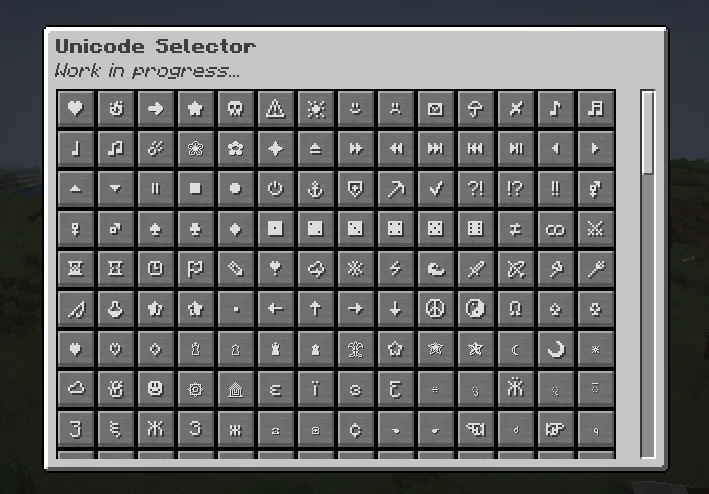
All the vanilla GUIs (screens) for Book & Quills, Books, Anvils and Signs have been reworked, with quick access to various tools (import & export books and signs to/from disk, copy entire page content, entire books or signs, clear a page or a book entirely in one click, ...), legacy colors and one-click away unicode characters!
On top of that, it also offers a quick access bar for unicode characters when opening the chat! You can also customize your nametags with these beautiful vanilla unicodes in any Anvil!
Impress your friends by using these unicode characters while talking to them, or give directions on signs in a beautiful way!
❤ FAQ ❤
Q: Does this mod allow anyone that did not install Stendhal to see the books and signs modified with it?
A: Yes! This mod is entirely client-side, meaning anyone with or without the mod will see the modifications done by it. It only takes advantages of hidden vanilla features and exposes them to the users without doing any breaking changes.
Q: Can I use your mod in/for my modpack/datapack?
A: Please do! A credit would be appreciated in your modlist.
Simply do not appropriate yourself this mod.
Q: Will this mod ever come to Forge?
A: No! This mod is intended to push a little forward the Fabric community, and this is my choice to explicitly not make it available to another mod loader for the time being.
However, Ghostwriter is a solid alternative for Forge and the book editing part.
Q: Where can I find the source code of the project?
A: As of now, nowhere. This project has been a precious opportunity to make myself comfortable again with Java and a good learning process for modding, as much as I would love some help and see how people could contribute in amazing ways, I still want to practice and learn more for future mods.
I don't exclude opening the source code later down the line!
Q: Why is your mod named "Stendhal"?
A: Glad you are wondering! Marie-Henri Stendhal was a renowned French writer born in the 19th century in my hometown in France.
Stendhal is being actively developed and ported to newer Minecraft versions over time.
If you would like to give suggestion and follow the development more actively, please join [my Discord Community]
You can join me on [my Discord Community] to discuss about Stendhal alongside my various projects, whether they are linked to Minecraft modding or not!
If you would like, feel free to support me on [Ko-Fi], it would make me really happy and motivated!
[][Ko-Fi]
[my Discord Community]: discord.gg/6StChT5m2V
[Ko-Fi]: ko-fi.com/nebspacefarer
Written by NebSpacefarer. Read it with pictures on Modrinth.
This mod runs only on your own game. Servers do not need it, so you can use it on any server.
Install Fabric for Minecraft 1.16 – 26.x.
Add the mods it needs: Fabric API.
Download the .jar file from Modrinth and put it in the mods folder of your .minecraft directory.
Start Minecraft with the Fabric profile.
With the CraftRank Launcher you can skip these steps: open Mods, search for Stendhal and click Install.
| Resource | Downloads | Versions | Last update | Price |
|---|---|---|---|---|
| Stendhalthe one you looked at | 9.3M | 1.16 – 26.x | Sep 20, 2026 | Free |
| Chat PatchesOBro1961 | 7.3M | 1.18 – 26.x | Oct 4, 2026 | Free |
 WayLinkPrimeli | 16 | 1.21 – 26.x | 29 days ago | Free |
 No Chat RestrictionsAizistral | 4.2M | 1.16 – 26.x | Sep 30, 2026 | Free |
Yes. Stendhal supports Minecraft 26.x. All supported versions: 26.x, 1.21, 1.20, 1.19, 1.18, 1.17, 1.16.
Yes. Stendhal is free to download from Modrinth.
Client-side. Stendhal goes in your own mods folder and works on any server, including servers without mods.
Yes: Fabric API. Install it before Stendhal.
Yes. The last update came out in the past day.
The closest ones are Chat Patches, WayLink and No Chat Restrictions. Compare all alternatives
Chat PatchesMods · 1.18 – 26.xA Minecraft Fabric client-side mod that touches up a few aspects of Minecraft's mundane chat, with as much configurability as possible!
WayLinkMods · 1.21 – 26.xMakes waypoints shared in chat work across JourneyMap, Xaero's Minimap and NoRisk Client. Add them with one click and share your own. Client-side.
No Chat RestrictionsMods · 1.16 – 26.xRestores access to game chat for all accounts
 No Report ButtonMods · 1.19 – 26.x
Removes the chat report button from the game menu screen
 My Server Is CompatibleMods · 1.12 – 1.21
Client-side mod to disable Forge's "Incompatible FML Modded Server" message.
 MidiChatMods · 1.21 – 26.x
A client-side Simple Voice Chat addon that lets you play music using MIDI inputs
Log in to leave a review.