
 CleanUIMods · 26.x
Removes the chat reporting and feedback buttons from the escape menu in 26.2+.
Gratis9 descargas

Removes the chat report button from the game menu screen
Descarga directa desde Modrinth · 3,717,146 descargas
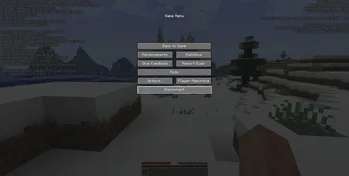

No Report Button (mod) es obra de Lucaslah. Removes the chat report button from the game menu screen.
Es compatible con Minecraft 1.19 – 26.x. Se ha descargado 3,717,146 veces en Modrinth. La última actualización salió el 02/10/2026.
No Report Button ha publicado 30 versiones en Modrinth desde el 12/08/2022. 12 salieron en el último año. La más reciente es 1.9.0, publicada el 01/10/2026. Está hecha para Minecraft 26.3. Funciona en NeoForge. La descarga ocupa 8 KB.
| Versión | Publicado | Minecraft | Tipo |
|---|---|---|---|
1.9.0 | 01/10/2026 | 26.3 | Estable |
1.9.0 | 01/10/2026 | 26.3 | Estable |
1.9.0 | 01/10/2026 | 26.3 | Estable |
1.8.0 | 26/06/2026 | 26.2 | Estable |
1.8.0 | 26/06/2026 | 26.2 | Estable |
No Report Button es de código abierto. Su última versión en GitHub es v1.9.0 for Minecraft 26.3, publicada el 01/10/2026.
Full Changelog: v1.8.0...v1.9.0
Antes: v1.8.0 for Minecraft 26.2 (26/06/2026), v1.7.1 for Minecraft 26.1 (03/04/2026).
This mod simply removes the new 1.19.1+ chat report button from the game pause menu screen and replaces it with a disabled open to LAN button (when on a multiplayer server) like was done before 1.19.1.
Supports fabric, forge and quilt 1.19.1+
Should be compatible with any mods, but if you do find a mod that is not please open an issue.
Fabric API not required.
See here for what version to use, or check the files tab and download the latest NRB version that supports the version of Minecraft you are on.
Mod is only supported on the client side, the mod will do nothing if used on the server
Escrita por Lucaslah. Léela con imágenes en Modrinth.
Este mod funciona solo en tu propio juego. Los servidores no lo necesitan, así que puedes usarlo en cualquier servidor.
Instala Fabric, Quilt, Forge y NeoForge para Minecraft 1.19 – 26.x.
Descarga el archivo .jar desde Modrinth y ponlo en la carpeta mods de tu directorio .minecraft.
Inicia Minecraft con el perfil de Fabric.
Más fácil: en Prism Launcher o la Modrinth App, busca No Report Button en los mods de tu instancia y haz clic en Install. Añade el loader y los mods que necesita por ti.
| Recurso | Descargas | Versiones | Última actualización | Precio |
|---|---|---|---|---|
| No Report Buttonel que estabas viendo | 3.7M | 1.19 – 26.x | 2 oct 2026 | Gratis |
| CleanUIPigly3 | 9 | 26.x | 5 oct 2026 | Gratis |
 MrMister14's Symbol MenuMrMister14 | 3 | 26.x | hace 18 días | Gratis |
 StendhalNebSpacefarer | 9.3M | 1.16 – 26.x | 20 sept 2026 | Gratis |
Sí. No Report Button es compatible con Minecraft 26.x. Todas las versiones compatibles: 26.x, 1.21, 1.20, 1.19.
Sí. No Report Button se puede descargar gratis desde Modrinth.
Del lado del cliente. No Report Button va en tu propia carpeta mods y funciona en cualquier servidor, incluso en servidores sin mods.
Sí. La última actualización salió en el último día.
Los más parecidos son CleanUI, MrMister14's Symbol Menu y Stendhal. Comparar todas las alternativas
CleanUIMods · 26.xRemoves the chat reporting and feedback buttons from the escape menu in 26.2+.
MrMister14's Symbol MenuMods · 26.xAdd a convenient symbol menu to Minecraft Java Edition chat! Open the Symbols menu from the chat screen, browse categories of Unicode symbols and emojis, and…
StendhalMods · 1.16 – 26.xStendhal is a client-side Fabric mod offering new and enhanced visual utilities for books, signs, anvil and the in-game chat.
 No Chat RestrictionsMods · 1.16 – 26.x
Restores access to game chat for all accounts
 Smooth ScrollingMods · 1.20 – 26.x
Customize the scrolling smoothness or speed in various places like chat, hotbar, creative screen...
 w1xdsT9Mods · 26.x
Offline chat spell checker that underlines spelling errors in the game chat input, with support for Russian and English.
Inicia sesión para dejar una reseña.