
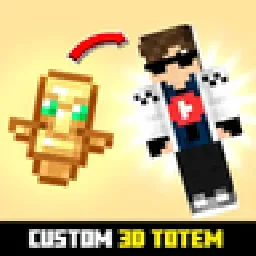
 Custom Totem 3DRessourcenpakete · 1.16 – 26.x
Customizable 3D Totem resource pack that lets you use your own skin as the Totem of Undying
Kostenlos247,694 Downloads
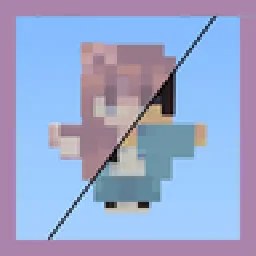
By adding your own skin to the pack, the totem of undying will update to look like ClownPierce's or Theobald's totem but with your skin!
Direkter Download von Modrinth · 136,354 Downloads
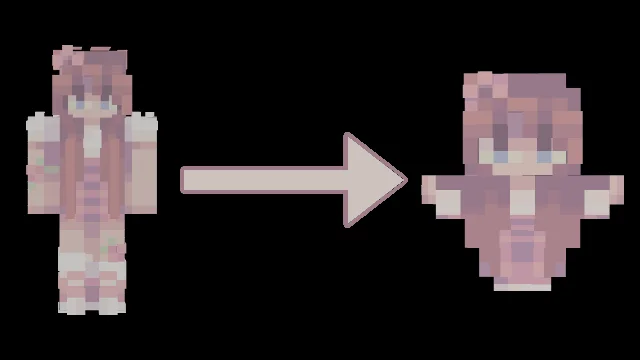
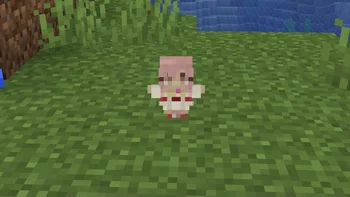
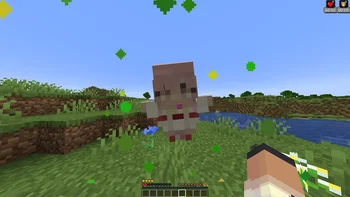
Customizable Totem (Ressourcenpaket) stammt von AlphaLeoli. By adding your own skin to the pack, the totem of undying will update to look like ClownPierce's or Theobald's totem but with your skin!
Unterstützt wird Minecraft 1.17 – 26.x. Auf Modrinth gibt es 136,354 Downloads. Das letzte Update erschien am 05.10.2025.
Customizable Totem hat seit 26.02.2023 7 Versionen auf Modrinth veröffentlicht. Keine davon erschien im letzten Jahr. Die neueste ist 6.1.0, erschienen am 05.10.2025. Sie ist für Minecraft 1.20.2 – 26.2 gemacht. Sie läuft auf Minecraft. Der Download ist 38 KB groß.
| Version | Veröffentlicht | Minecraft | Typ |
|---|---|---|---|
6.1.0 | 05.10.2025 | 1.20.2 – 26.2 | Release |
6.0.0 | 28.09.2025 | 1.21.4 – 1.21.8 | Release |
5.0.0 | 10.08.2025 | 1.21.4 – 1.21.8 | Release |
4.0 | 03.10.2024 | 1.17 – 1.21.8 | Release |
3 | 14.05.2023 | 1.19, 1.19.1, 1.19.2 | Release |
For more images and demonstrations, head to the gallery
This texture pack has a custom model for the totem of undying that makes it so that if you change the texture of the totem to a Minecraft skin, it will make the totem look like a mini version of the skin! You can replace the texture with any Minecraft skin at all, and it will map different pixels to the final totem texture.
All you need to do is download your skin from a website like namemc.com, then replace the file at assets/minecraft/textures/totem_skin.png in the texture pack with the file you downloaded. Make sure you rename the file to totem_skin or it won't work!
If you are having any trouble, there is a helpful tutorial on youtube: youtu.be/b1G7ePwF-0w?t=36s
If you want to suggest anything, report a bug, or vote on future packs, then join my discord and you can message me in there. I will usually respond very quickly.
Geschrieben von AlphaLeoli. Mit Bildern auf Modrinth lesen.
Lade die .zip-Datei von Modrinth herunter. Entpacke sie nicht.
Öffne in Minecraft Optionen, dann Ressourcenpakete, dann Paketordner öffnen.
Lege die .zip-Datei in diesen Ordner und gehe zurück ins Spiel.
Schiebe Customizable Totem in die rechte Liste und klicke auf Fertig.
Es ist für Minecraft 1.17 – 26.x gemacht. Auf anderen Versionen markiert Minecraft es als inkompatibel, oft funktioniert es aber trotzdem.
| Ressource | Downloads | Versionen | Letztes Update | Preis |
|---|---|---|---|---|
| Customizable Totemdie du angesehen hast | 136K | 1.17 – 26.x | 5. Okt. 2025 | Kostenlos |
| Custom Totem 3Dspunkyinsaan | 248K | 1.16 – 26.x | 25. März 2026 | Kostenlos |
 Trailer Player AnimationsAgente_511 | 511K | 1.18 – 1.21 | 28. Sept. 2025 | Kostenlos |
 Fresh Animations: Classic HorsesFreshLX | 362K | 1.19 – 26.x | vor 11 Tagen | Kostenlos |
Ja. Customizable Totem unterstützt Minecraft 26.x. Alle unterstützten Versionen: 26.x, 1.21, 1.20, 1.19, 1.18, 1.17.
Ja. Customizable Totem kannst du kostenlos bei Modrinth herunterladen.
Ja. Das letzte Update kam innerhalb des letzten Tages.
Am ähnlichsten sind Custom Totem 3D, Trailer Player Animations und Fresh Animations: Classic Horses. Alle Alternativen vergleichen
Custom Totem 3DRessourcenpakete · 1.16 – 26.xCustomizable 3D Totem resource pack that lets you use your own skin as the Totem of Undying
Trailer Player AnimationsRessourcenpakete · 1.18 – 1.21Make your player look like in the trailers! Dynamic animated player inspired by Fresh Animations resource pack.
Fresh Animations: Classic HorsesRessourcenpakete · 1.19 – 26.xRecreates the old look for horses, but with Fresh Animations. An official FA extension.
 3D Sugar CaneRessourcenpakete · 1.12 – 1.21
The 3D Sugar Cane texture pack enhances the appearance of sugar cane in Minecraft by giving it a more realistic, three-dimensional look
 Golden Days BaseRessourcenpakete · 1.16 – 26.x
Golden Days is a Minecraft resource pack meant to bring back old textures, lighting, names, and sounds from older versions of Minecraft, like Beta. Requires…
 Custom Skin TotemRessourcenpakete · 1.18 – 26.x
A simple custom totem featuring a unique player skin, designed to replace the default Totem of Undying with a personalized Minecraft look.
Logg dich ein, um eine Bewertung zu schreiben.