
 Custom Totem 3DPaquetes de recursos · 1.16 – 26.x
Customizable 3D Totem resource pack that lets you use your own skin as the Totem of Undying
Gratis247,694 descargas
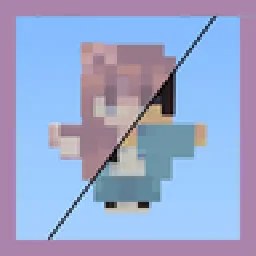
By adding your own skin to the pack, the totem of undying will update to look like ClownPierce's or Theobald's totem but with your skin!
Descarga directa desde Modrinth · 136,354 descargas
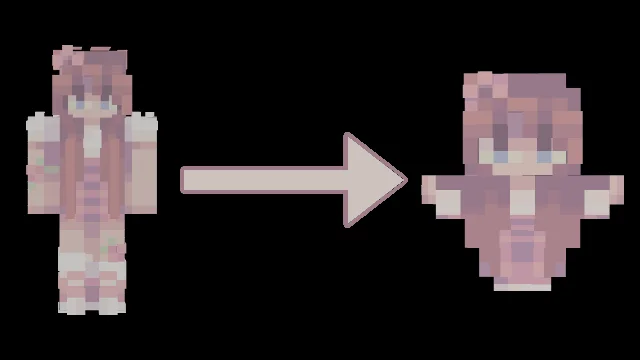
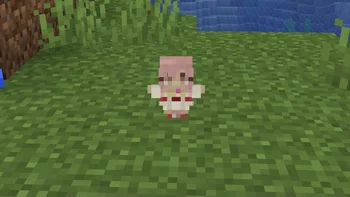
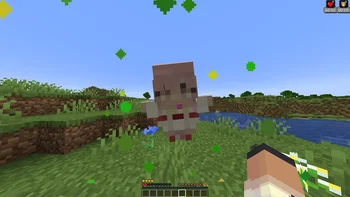
Customizable Totem (paquete de recursos) es obra de AlphaLeoli. By adding your own skin to the pack, the totem of undying will update to look like ClownPierce's or Theobald's totem but with your skin!
Es compatible con Minecraft 1.17 – 26.x. Se ha descargado 136,354 veces en Modrinth. La última actualización salió el 05/10/2025.
Customizable Totem ha publicado 7 versiones en Modrinth desde el 26/02/2023. Ninguna salió en el último año. La más reciente es 6.1.0, publicada el 05/10/2025. Está hecha para Minecraft 1.20.2 – 26.2. Funciona en Minecraft. La descarga ocupa 38 KB.
| Versión | Publicado | Minecraft | Tipo |
|---|---|---|---|
6.1.0 | 05/10/2025 | 1.20.2 – 26.2 | Estable |
6.0.0 | 28/09/2025 | 1.21.4 – 1.21.8 | Estable |
5.0.0 | 10/08/2025 | 1.21.4 – 1.21.8 | Estable |
4.0 | 03/10/2024 | 1.17 – 1.21.8 | Estable |
3 | 14/05/2023 | 1.19, 1.19.1, 1.19.2 | Estable |
For more images and demonstrations, head to the gallery
This texture pack has a custom model for the totem of undying that makes it so that if you change the texture of the totem to a Minecraft skin, it will make the totem look like a mini version of the skin! You can replace the texture with any Minecraft skin at all, and it will map different pixels to the final totem texture.
All you need to do is download your skin from a website like namemc.com, then replace the file at assets/minecraft/textures/totem_skin.png in the texture pack with the file you downloaded. Make sure you rename the file to totem_skin or it won't work!
If you are having any trouble, there is a helpful tutorial on youtube: youtu.be/b1G7ePwF-0w?t=36s
If you want to suggest anything, report a bug, or vote on future packs, then join my discord and you can message me in there. I will usually respond very quickly.
Escrita por AlphaLeoli. Léela con imágenes en Modrinth.
Descarga el archivo .zip desde Modrinth. No lo descomprimas.
En Minecraft, abre Opciones, luego Paquetes de recursos y luego Abrir carpeta de paquetes.
Suelta el archivo .zip en esa carpeta y vuelve al juego.
Mueve Customizable Totem a la lista de la derecha y pulsa Hecho.
Está hecho para Minecraft 1.17 – 26.x. En otras versiones Minecraft lo marca como incompatible, pero a menudo funciona igual.
| Recurso | Descargas | Versiones | Última actualización | Precio |
|---|---|---|---|---|
| Customizable Totemel que estabas viendo | 136K | 1.17 – 26.x | 5 oct 2025 | Gratis |
| Custom Totem 3Dspunkyinsaan | 248K | 1.16 – 26.x | 25 mar 2026 | Gratis |
 Trailer Player AnimationsAgente_511 | 511K | 1.18 – 1.21 | 28 sept 2025 | Gratis |
 Fresh Animations: Classic HorsesFreshLX | 362K | 1.19 – 26.x | hace 11 días | Gratis |
Sí. Customizable Totem es compatible con Minecraft 26.x. Todas las versiones compatibles: 26.x, 1.21, 1.20, 1.19, 1.18, 1.17.
Sí. Customizable Totem se puede descargar gratis desde Modrinth.
Sí. La última actualización salió en el último día.
Los más parecidos son Custom Totem 3D, Trailer Player Animations y Fresh Animations: Classic Horses. Comparar todas las alternativas
Custom Totem 3DPaquetes de recursos · 1.16 – 26.xCustomizable 3D Totem resource pack that lets you use your own skin as the Totem of Undying
Trailer Player AnimationsPaquetes de recursos · 1.18 – 1.21Make your player look like in the trailers! Dynamic animated player inspired by Fresh Animations resource pack.
Fresh Animations: Classic HorsesPaquetes de recursos · 1.19 – 26.xRecreates the old look for horses, but with Fresh Animations. An official FA extension.
 3D Sugar CanePaquetes de recursos · 1.12 – 1.21
The 3D Sugar Cane texture pack enhances the appearance of sugar cane in Minecraft by giving it a more realistic, three-dimensional look
 Golden Days BasePaquetes de recursos · 1.16 – 26.x
Golden Days is a Minecraft resource pack meant to bring back old textures, lighting, names, and sounds from older versions of Minecraft, like Beta. Requires…
 Custom Skin TotemPaquetes de recursos · 1.18 – 26.x
A simple custom totem featuring a unique player skin, designed to replace the default Totem of Undying with a personalized Minecraft look.
Inicia sesión para dejar una reseña.