
 Disable Custom Worlds AdviceMods · 1.16 – 1.21
Minecraft asking you if you want to load a custom world is annoying. Let's fix it!
Kostenlos7,298,643 Downloads
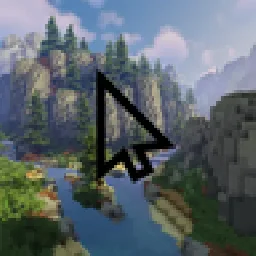
Replace your mouse cursor in Minecraft with anything you want. A diamond sword, a rainbow arrow, a heart… or your own image!
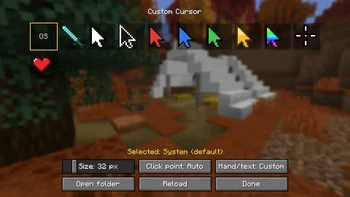
Replace your mouse cursor in Minecraft with anything you want. A diamond sword, a rainbow arrow, a heart… or your own image!
Custom Cursor (Ressource) stammt von jahsohsani. Unterstützt wird Minecraft 1.8 – 26.x. Auf Modrinth gibt es 17 Downloads. Das letzte Update erschien am 25.09.2026.
Custom Cursor hat seit 25.09.2026 9 Versionen auf Modrinth veröffentlicht. 9 davon erschienen im letzten Jahr. Die neueste ist 1.0.0, erschienen am 25.09.2026. Sie ist für Minecraft 1.8.9 gemacht. Sie läuft auf Forge. Der Download ist 295 KB groß.
| Version | Veröffentlicht | Minecraft | Typ |
|---|---|---|---|
1.0.0 | 25.09.2026 | 1.8.9 | Release |
1.0.0+1.16.5-fabric | 25.09.2026 | 1.16 – 1.16.5 | Release |
1.0.0 | 25.09.2026 | 1.16.5 | Release |
1.0.0+1.20.1-fabric | 25.09.2026 | 1.20.1 – 1.20.6 | Release |
1.0.0 | 25.09.2026 | 1.20.1 – 1.20.6 | Release |
Replace your mouse cursor in Minecraft with anything you want.
A diamond sword, a rainbow arrow, a heart… or your own image!
diamond sword, arrows (white, black, red, blue, green, gold, rainbow), crosshair and heart
Open the cursor settings:
My cursor disappears while I play?
That's normal: Minecraft hides the mouse while you control the camera. Your cursor shows up as soon as you open a menu or an inventory.
Does it work on servers?
Yes. The mod is client-side only: nothing to install on the server, and it changes nothing for other players.
Where are my settings saved?
In config/customcursor.json, and your images in config/customcursor/.
100% client-side. Works alongside other mods and resource packs.
Geschrieben von jahsohsani. Mit Bildern auf Modrinth lesen.
Diese Mod läuft nur in deinem eigenen Spiel. Server brauchen sie nicht, du kannst sie also auf jedem Server nutzen.
Installiere Fabric, Forge und NeoForge für Minecraft 1.8 – 26.x.
Lade die .jar-Datei von Modrinth herunter und lege sie in den mods-Ordner deines .minecraft-Verzeichnisses.
Starte Minecraft mit dem Fabric-Profil.
Mit dem CraftRank Launcher sparst du dir diese Schritte: Öffne Mods, suche nach Custom Cursor und klicke auf Installieren.
| Ressource | Downloads | Versionen | Letztes Update | Preis |
|---|---|---|---|---|
| Custom Cursordie du angesehen hast | 17 | 1.8 – 26.x | 25. Sept. 2026 | Kostenlos |
| Disable Custom Worlds Advicenaritanara | 7.3M | 1.16 – 1.21 | 7. Juli 2024 | Kostenlos |
 Cursor CrosshairJacobStar_ | 99 | 26.x | 27. Sept. 2026 | Kostenlos |
 custom cover image自定义存档封面图hsds | 12 | 1.21 – 26.x | 9. Okt. 2026 | Kostenlos |
Ja. Custom Cursor unterstützt Minecraft 26.x. Alle unterstützten Versionen: 26.x, 1.21, 1.20, 1.16, 1.8.
Ja. Custom Cursor kannst du kostenlos bei Modrinth herunterladen.
Clientseitig. Custom Cursor kommt in deinen eigenen mods-Ordner und funktioniert auf jedem Server, auch auf Servern ohne Mods.
Ja. Das letzte Update kam innerhalb des letzten Tages.
Am ähnlichsten sind Disable Custom Worlds Advice, Cursor Crosshair und custom cover image自定义存档封面图. Alle Alternativen vergleichen
Disable Custom Worlds AdviceMods · 1.16 – 1.21Minecraft asking you if you want to load a custom world is annoying. Let's fix it!
Cursor CrosshairMods · 26.xFree your crosshair from the center of the screen and control it with your mouse—interact with blocks, entities, and hotbar slots without moving the camera.
custom cover image自定义存档封面图Mods · 1.21 – 26.xYou can take in-game screenshots to customize your save file cover. 可以自己在游戏内截图,自定义你的存档缩略图。
Logg dich ein, um eine Bewertung zu schreiben.