
 Disable Custom Worlds AdviceMods · 1.16 – 1.21
Minecraft asking you if you want to load a custom world is annoying. Let's fix it!
Free7,296,390 downloads
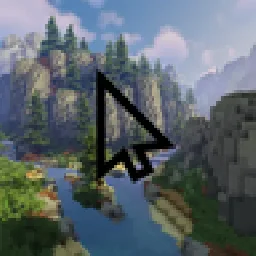
Replace your mouse cursor in Minecraft with anything you want. A diamond sword, a rainbow arrow, a heart… or your own image!
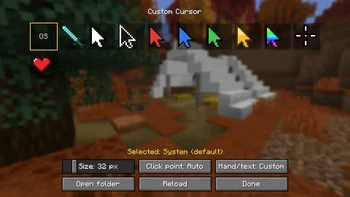
Replace your mouse cursor in Minecraft with anything you want. A diamond sword, a rainbow arrow, a heart… or your own image!
Custom Cursor is a resource made by jahsohsani. It supports Minecraft 1.8 – 26.x. It has been downloaded 17 times on Modrinth. The last update came out on Sep 25, 2026.
Custom Cursor has had 9 releases on Modrinth since Sep 25, 2026. 9 of them came out in the past year. The newest is 1.0.0, released on Sep 25, 2026. It is made for Minecraft 1.8.9. It runs on Forge. The download is 295 KB.
| Version | Released | Minecraft | Type |
|---|---|---|---|
1.0.0 | Sep 25, 2026 | 1.8.9 | Release |
1.0.0+1.16.5-fabric | Sep 25, 2026 | 1.16 – 1.16.5 | Release |
1.0.0 | Sep 25, 2026 | 1.16.5 | Release |
1.0.0+1.20.1-fabric | Sep 25, 2026 | 1.20.1 – 1.20.6 | Release |
1.0.0 | Sep 25, 2026 | 1.20.1 – 1.20.6 | Release |
Replace your mouse cursor in Minecraft with anything you want.
A diamond sword, a rainbow arrow, a heart… or your own image!
diamond sword, arrows (white, black, red, blue, green, gold, rainbow), crosshair and heart
Open the cursor settings:
My cursor disappears while I play?
That's normal: Minecraft hides the mouse while you control the camera. Your cursor shows up as soon as you open a menu or an inventory.
Does it work on servers?
Yes. The mod is client-side only: nothing to install on the server, and it changes nothing for other players.
Where are my settings saved?
In config/customcursor.json, and your images in config/customcursor/.
100% client-side. Works alongside other mods and resource packs.
Written by jahsohsani. Read it with pictures on Modrinth.
This mod runs only on your own game. Servers do not need it, so you can use it on any server.
Install Fabric, Forge and NeoForge for Minecraft 1.8 – 26.x.
Download the .jar file from Modrinth and put it in the mods folder of your .minecraft directory.
Start Minecraft with the Fabric profile.
With the CraftRank Launcher you can skip these steps: open Mods, search for Custom Cursor and click Install.
| Resource | Downloads | Versions | Last update | Price |
|---|---|---|---|---|
| Custom Cursorthe one you looked at | 17 | 1.8 – 26.x | Sep 25, 2026 | Free |
| Disable Custom Worlds Advicenaritanara | 7.3M | 1.16 – 1.21 | Jul 7, 2024 | Free |
 Cursor CrosshairJacobStar_ | 99 | 26.x | Sep 27, 2026 | Free |
 custom cover image自定义存档封面图hsds | 12 | 1.21 – 26.x | Oct 9, 2026 | Free |
Yes. Custom Cursor supports Minecraft 26.x. All supported versions: 26.x, 1.21, 1.20, 1.16, 1.8.
Yes. Custom Cursor is free to download from Modrinth.
Client-side. Custom Cursor goes in your own mods folder and works on any server, including servers without mods.
Yes. The last update came out in the past day.
The closest ones are Disable Custom Worlds Advice, Cursor Crosshair and custom cover image自定义存档封面图. Compare all alternatives
Disable Custom Worlds AdviceMods · 1.16 – 1.21Minecraft asking you if you want to load a custom world is annoying. Let's fix it!
Cursor CrosshairMods · 26.xFree your crosshair from the center of the screen and control it with your mouse—interact with blocks, entities, and hotbar slots without moving the camera.
custom cover image自定义存档封面图Mods · 1.21 – 26.xYou can take in-game screenshots to customize your save file cover. 可以自己在游戏内截图,自定义你的存档缩略图。
Log in to leave a review.