
 Disable Custom Worlds AdviceMods · 1.16 – 1.21
Minecraft asking you if you want to load a custom world is annoying. Let's fix it!
Gratis7,296,390 descargas
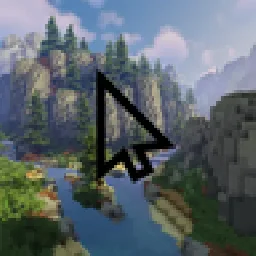
Replace your mouse cursor in Minecraft with anything you want. A diamond sword, a rainbow arrow, a heart… or your own image!
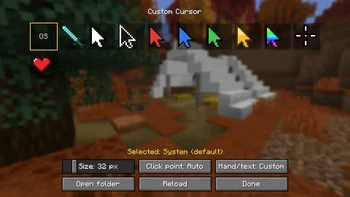
Replace your mouse cursor in Minecraft with anything you want. A diamond sword, a rainbow arrow, a heart… or your own image!
Custom Cursor (recurso) es obra de jahsohsani. Es compatible con Minecraft 1.8 – 26.x. Se ha descargado 17 veces en Modrinth. La última actualización salió el 25/09/2026.
Custom Cursor ha publicado 9 versiones en Modrinth desde el 25/09/2026. 9 salieron en el último año. La más reciente es 1.0.0, publicada el 25/09/2026. Está hecha para Minecraft 1.8.9. Funciona en Forge. La descarga ocupa 295 KB.
| Versión | Publicado | Minecraft | Tipo |
|---|---|---|---|
1.0.0 | 25/09/2026 | 1.8.9 | Estable |
1.0.0+1.16.5-fabric | 25/09/2026 | 1.16 – 1.16.5 | Estable |
1.0.0 | 25/09/2026 | 1.16.5 | Estable |
1.0.0+1.20.1-fabric | 25/09/2026 | 1.20.1 – 1.20.6 | Estable |
1.0.0 | 25/09/2026 | 1.20.1 – 1.20.6 | Estable |
Replace your mouse cursor in Minecraft with anything you want.
A diamond sword, a rainbow arrow, a heart… or your own image!
diamond sword, arrows (white, black, red, blue, green, gold, rainbow), crosshair and heart
Open the cursor settings:
My cursor disappears while I play?
That's normal: Minecraft hides the mouse while you control the camera. Your cursor shows up as soon as you open a menu or an inventory.
Does it work on servers?
Yes. The mod is client-side only: nothing to install on the server, and it changes nothing for other players.
Where are my settings saved?
In config/customcursor.json, and your images in config/customcursor/.
100% client-side. Works alongside other mods and resource packs.
Escrita por jahsohsani. Léela con imágenes en Modrinth.
Este mod funciona solo en tu propio juego. Los servidores no lo necesitan, así que puedes usarlo en cualquier servidor.
Instala Fabric, Forge y NeoForge para Minecraft 1.8 – 26.x.
Descarga el archivo .jar desde Modrinth y ponlo en la carpeta mods de tu directorio .minecraft.
Inicia Minecraft con el perfil de Fabric.
Con el CraftRank Launcher te saltas estos pasos: abre Mods, busca Custom Cursor y pulsa Instalar.
| Recurso | Descargas | Versiones | Última actualización | Precio |
|---|---|---|---|---|
| Custom Cursorel que estabas viendo | 17 | 1.8 – 26.x | 25 sept 2026 | Gratis |
| Disable Custom Worlds Advicenaritanara | 7.3M | 1.16 – 1.21 | 7 jul 2024 | Gratis |
 Cursor CrosshairJacobStar_ | 99 | 26.x | 27 sept 2026 | Gratis |
 custom cover image自定义存档封面图hsds | 12 | 1.21 – 26.x | 9 oct 2026 | Gratis |
Sí. Custom Cursor es compatible con Minecraft 26.x. Todas las versiones compatibles: 26.x, 1.21, 1.20, 1.16, 1.8.
Sí. Custom Cursor se puede descargar gratis desde Modrinth.
Del lado del cliente. Custom Cursor va en tu propia carpeta mods y funciona en cualquier servidor, incluso en servidores sin mods.
Sí. La última actualización salió en el último día.
Los más parecidos son Disable Custom Worlds Advice, Cursor Crosshair y custom cover image自定义存档封面图. Comparar todas las alternativas
Disable Custom Worlds AdviceMods · 1.16 – 1.21Minecraft asking you if you want to load a custom world is annoying. Let's fix it!
Cursor CrosshairMods · 26.xFree your crosshair from the center of the screen and control it with your mouse—interact with blocks, entities, and hotbar slots without moving the camera.
custom cover image自定义存档封面图Mods · 1.21 – 26.xYou can take in-game screenshots to customize your save file cover. 可以自己在游戏内截图,自定义你的存档缩略图。
Inicia sesión para dejar una reseña.