
Save and switch between multiple keybind layouts -- PvP, building, survival -- including keybinds from other mods.
Gratis93 descargas

Flashback - Survival Inspect is a mod that helps you recreate the POVs of other players that played in your recordings. Just add the new "Simple See" Element…
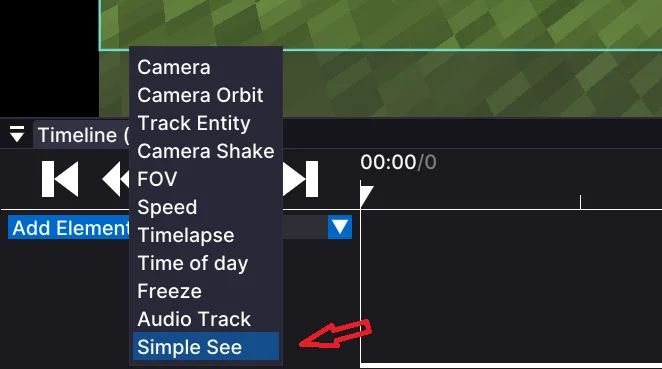
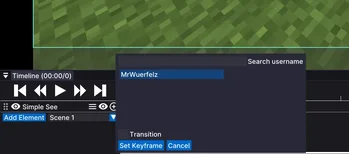
Flashback - Survival Inspect is a mod that helps you recreate the POVs of other players that played in your recordings. Just add the new "Simple See" Element…
Flashback (recurso) es obra de ben.kusche25. Es compatible con Minecraft 1.21. Se ha descargado 25 veces en Modrinth. La última actualización salió el 19/08/2026.
La más reciente es 0.1.5, publicada el 19/08/2026. Está hecha para Minecraft 1.21.11. Funciona en Fabric. La descarga ocupa 52 KB.
| Versión | Publicado | Minecraft | Tipo |
|---|---|---|---|
0.1.5 | 19/08/2026 | 1.21.11 | Beta |
This mod adds a new element for the flashback mod. It adds the feature to recreate POVs from you or other players that also played in your recordings.
To use the feature, add an element like you usually do with the blue button. Then press "simple see" in the elements menu. There you can select any player and you can search for usernames (note: it only shows players that played in the recording, as said above). You can also select if it should instantly cut to the pov or if it should try to create a simple fade animation. To end the POV, add another keyframe in the timeline where it should end.
We are planning on adding more features for this mod, such as F5 mode or different animations.
Escrita por ben.kusche25. Léela con imágenes en Modrinth.
Este mod funciona solo en tu propio juego. Los servidores no lo necesitan, así que puedes usarlo en cualquier servidor.
Instala Fabric para Minecraft 1.21.
Añade los mods que necesita: API de Fabric y Flashback.
Descarga el archivo .jar desde Modrinth y ponlo en la carpeta mods de tu directorio .minecraft.
Inicia Minecraft con el perfil de Fabric.
Con el CraftRank Launcher te saltas estos pasos: abre Mods, busca Flashback y pulsa Instalar.
Todavía no. La versión más reciente que admite es Minecraft 1.21.
Sí. Flashback se puede descargar gratis desde Modrinth.
Del lado del cliente. Flashback va en tu propia carpeta mods y funciona en cualquier servidor, incluso en servidores sin mods.
Sí: Fabric API, Flashback. Instálalo antes de Flashback.
Sí. La última actualización salió en el último día.
Save and switch between multiple keybind layouts -- PvP, building, survival -- including keybinds from other mods.
Inicia sesión para dejar una reseña.