
Save and switch between multiple keybind layouts -- PvP, building, survival -- including keybinds from other mods.
Free93 downloads

Flashback - Survival Inspect is a mod that helps you recreate the POVs of other players that played in your recordings. Just add the new "Simple See" Element…

Flashback - Survival Inspect is a mod that helps you recreate the POVs of other players that played in your recordings. Just add the new "Simple See" Element…
Flashback is a resource made by ben.kusche25. It supports Minecraft 1.21. It has been downloaded 25 times on Modrinth. The last update came out on Aug 19, 2026.
The newest is 0.1.5, released on Aug 19, 2026. It is made for Minecraft 1.21.11. It runs on Fabric. The download is 52 KB.
| Version | Released | Minecraft | Type |
|---|---|---|---|
0.1.5 | Aug 19, 2026 | 1.21.11 | Beta |
This mod adds a new element for the flashback mod. It adds the feature to recreate POVs from you or other players that also played in your recordings.
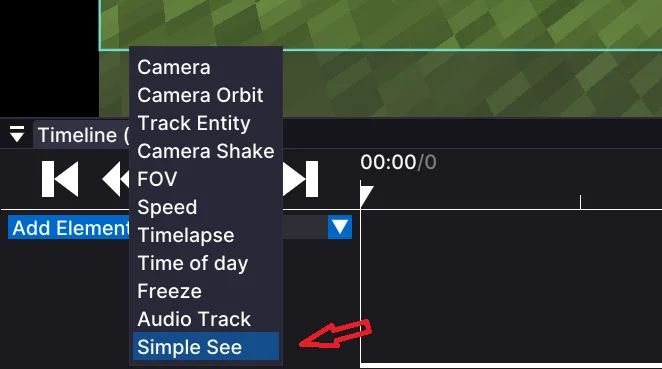
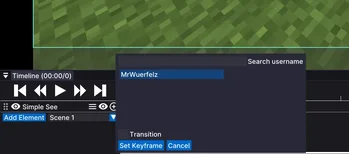
To use the feature, add an element like you usually do with the blue button. Then press "simple see" in the elements menu. There you can select any player and you can search for usernames (note: it only shows players that played in the recording, as said above). You can also select if it should instantly cut to the pov or if it should try to create a simple fade animation. To end the POV, add another keyframe in the timeline where it should end.
We are planning on adding more features for this mod, such as F5 mode or different animations.
Written by ben.kusche25. Read it with pictures on Modrinth.
This mod runs only on your own game. Servers do not need it, so you can use it on any server.
Install Fabric for Minecraft 1.21.
Add the mods it needs: Fabric API and Flashback.
Download the .jar file from Modrinth and put it in the mods folder of your .minecraft directory.
Start Minecraft with the Fabric profile.
With the CraftRank Launcher you can skip these steps: open Mods, search for Flashback and click Install.
Not yet. The newest version it supports is Minecraft 1.21.
Yes. Flashback is free to download from Modrinth.
Client-side. Flashback goes in your own mods folder and works on any server, including servers without mods.
Yes: Fabric API, Flashback. Install it before Flashback.
Yes. The last update came out in the past day.
Save and switch between multiple keybind layouts -- PvP, building, survival -- including keybinds from other mods.
Log in to leave a review.