
Save and switch between multiple keybind layouts -- PvP, building, survival -- including keybinds from other mods.
Gratuit93 téléchargements

Flashback - Survival Inspect is a mod that helps you recreate the POVs of other players that played in your recordings. Just add the new "Simple See" Element…
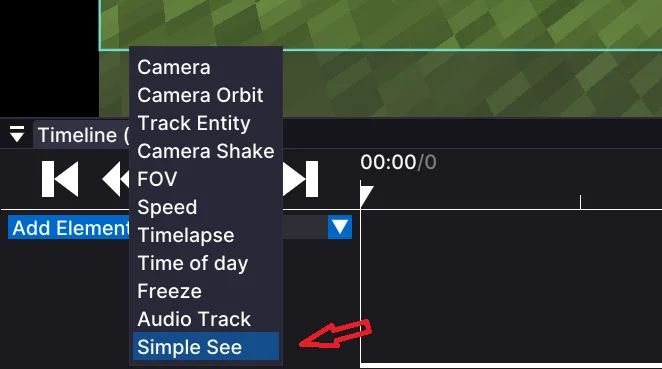
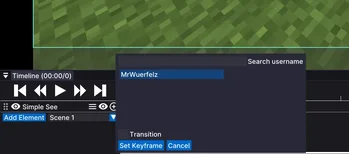
Flashback - Survival Inspect is a mod that helps you recreate the POVs of other players that played in your recordings. Just add the new "Simple See" Element…
Flashback (ressource) est une création de ben.kusche25. Versions prises en charge : Minecraft 1.21. On compte 31 téléchargements sur Modrinth. La dernière mise à jour date du 19/08/2026.
La plus récente est 0.1.5, sortie le 19/08/2026. Elle est faite pour Minecraft 1.21.11. Elle fonctionne sur Fabric. Le téléchargement fait 52 KB.
| Version | Publié | Minecraft | Type |
|---|---|---|---|
0.1.5 | 19/08/2026 | 1.21.11 | Bêta |
This mod adds a new element for the flashback mod. It adds the feature to recreate POVs from you or other players that also played in your recordings.
To use the feature, add an element like you usually do with the blue button. Then press "simple see" in the elements menu. There you can select any player and you can search for usernames (note: it only shows players that played in the recording, as said above). You can also select if it should instantly cut to the pov or if it should try to create a simple fade animation. To end the POV, add another keyframe in the timeline where it should end.
We are planning on adding more features for this mod, such as F5 mode or different animations.
Écrite par ben.kusche25. À lire avec les images sur Modrinth.
Ce mod fonctionne uniquement dans ton jeu. Les serveurs n'en ont pas besoin, tu peux donc l'utiliser sur n'importe quel serveur.
Installe Fabric pour Minecraft 1.21.
Ajoute les mods dont il a besoin : API Fabric et Flashback.
Télécharge le fichier .jar depuis Modrinth et place-le dans le dossier mods de ton répertoire .minecraft.
Lance Minecraft avec le profil Fabric.
Avec le CraftRank Launcher, tu peux sauter ces étapes : ouvre Mods, cherche Flashback et clique sur Installer.
Pas encore. La version la plus récente prise en charge est Minecraft 1.21.
Oui. Flashback se télécharge gratuitement sur Modrinth.
Côté client. Flashback se place dans ton propre dossier mods et fonctionne sur n'importe quel serveur, même sans mods.
Oui : Fabric API, Flashback. Installe-le avant Flashback.
Oui. La dernière mise à jour date des dernières 24 heures.
Save and switch between multiple keybind layouts -- PvP, building, survival -- including keybinds from other mods.
Connecte-toi pour laisser un avis.