
 Keybind FixMods · 1.18 – 1.20
Allows multiple functions to be mapped to the same keybind without (as much) conflict
Free2,845,035 downloads
Save and switch between multiple keybind layouts -- PvP, building, survival -- including keybinds from other mods.
Direct download from Modrinth · 109 downloads
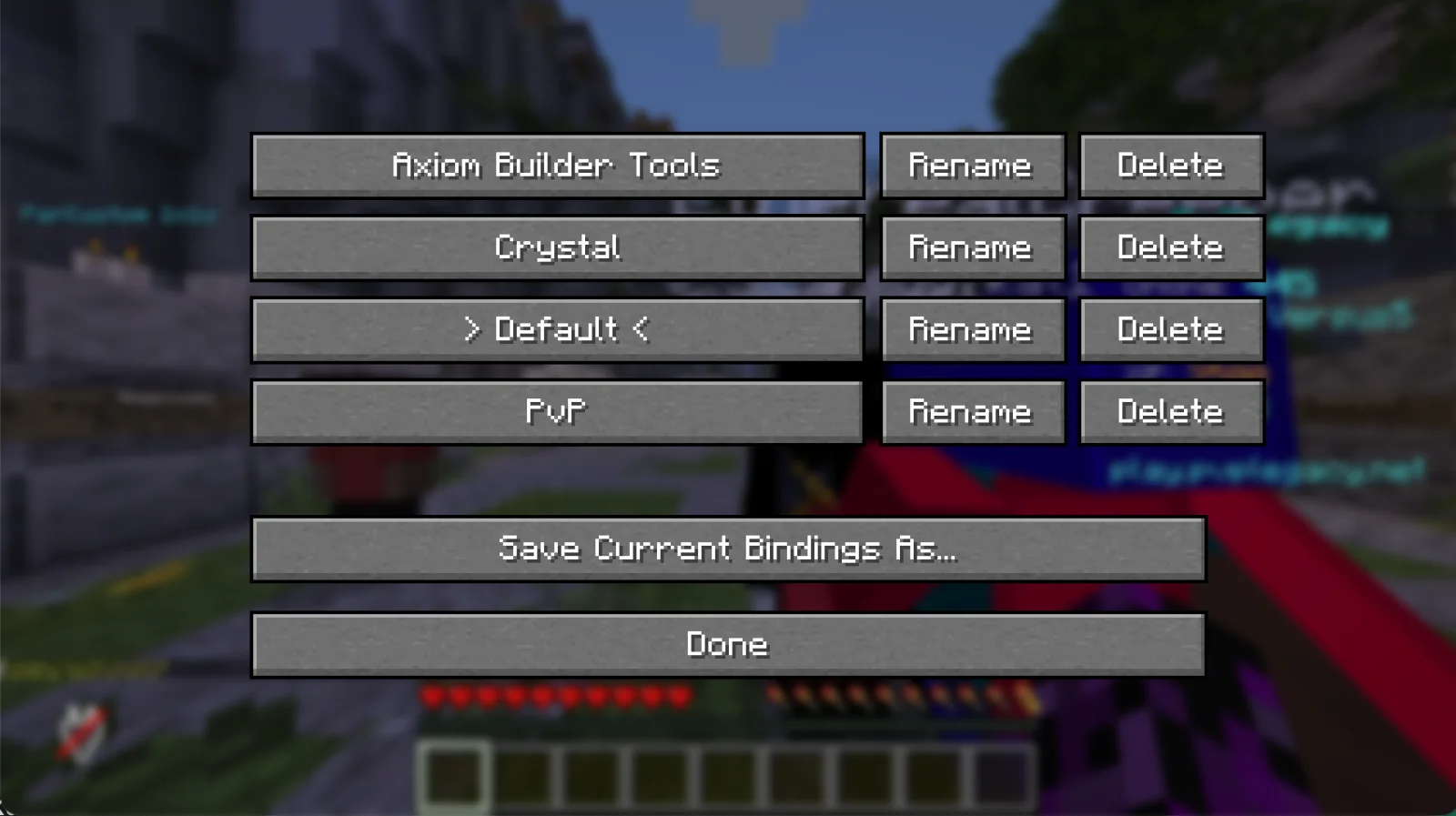
Quark's Keybind Configurations is a mod made by TheDarkQuark. Save and switch between multiple keybind layouts -- PvP, building, survival -- including keybinds from other mods.
It supports Minecraft 1.21 – 26.x. It has been downloaded 109 times on Modrinth. The last update came out on Nov 6, 2026.
Quark's Keybind Configurations has had 3 releases on Modrinth since Aug 11, 2026. 3 of them came out in the past year. The newest is 0.1.0, released on Nov 6, 2026. It is made for Minecraft 26.3. It runs on Fabric. The download is 17 KB.
| Version | Released | Minecraft | Type |
|---|---|---|---|
0.1.0 | Nov 6, 2026 | 26.3 | Release |
0.1.0+1.21.11 | Aug 11, 2026 | 1.21.11 | Release |
0.1.0 | Aug 11, 2026 | 26.1.2 | Release |
Quark's Keybind Configurations is open source. Its newest release on GitHub is v0.1.0, published on Aug 11, 2026.
Initial release.
Requires Minecraft 26.1.2, Fabric Loader >= 0.19.3, Fabric API, Java >= 25.
Before that: v0.1.0 (Minecraft 1.21.11) (Aug 11, 2026).
A Fabric mod for Minecraft that lets you save multiple keybind layouts — PvP, building, survival, whatever — and switch between them on the fly. It rebinds everything registered with the game's Options, so it covers vanilla keys and every other mod's keybinds too, not just its own.
./gradlew build
The output jar is written to build/libs/.
MIT — see [LICENSE](LICENSE).
Written by TheDarkQuark. Read it with pictures on Modrinth.
This mod runs only on your own game. Servers do not need it, so you can use it on any server.
Install Fabric for Minecraft 1.21 – 26.x.
Download the .jar file from Modrinth and put it in the mods folder of your .minecraft directory.
Start Minecraft with the Fabric profile.
Easier: in Prism Launcher or the Modrinth App, search for Quark's Keybind Configurations in your instance's mods and click Install. It adds the loader and the mods it needs for you.
Full guide: How to install Minecraft mods
| Resource | Downloads | Versions | Last update | Price |
|---|---|---|---|---|
| Quark's Keybind Configurationsthe one you looked at | 109 | 1.21 – 26.x | 5 days ago | Free |
| Keybind Fixfzzyhmstrs | 2.8M | 1.18 – 1.20 | Nov 18, 2022 | Free |
| Who Provide This Keybind?TheWhiteDog9487 | 66 | 26.x | Sep 21, 2026 | Free |
 BetterCopycatsYeahAkis_ | 9 | 1.18 – 1.21 | 23 days ago | Free |
Yes. Quark's Keybind Configurations supports Minecraft 26.x. All supported versions: 26.x, 1.21.
Yes. Quark's Keybind Configurations is free to download from Modrinth.
Client-side. Quark's Keybind Configurations goes in your own mods folder and works on any server, including servers without mods.
Yes. The last update came out in the past day.
The closest ones are Keybind Fix, Who Provide This Keybind? and BetterCopycats. Compare all alternatives
Keybind FixMods · 1.18 – 1.20Allows multiple functions to be mapped to the same keybind without (as much) conflict
Shows which mod provides each key binding via a tooltip on the keybinds screen.
BetterCopycatsMods · 1.18 – 1.21Lets flowers and other plants be placed on copycat blocks and slabs, including half a block lower on bottom slabs.
 Matcha Flavoured: The Gluttony AddonMods · 26.x
This addon adds compatibility between Matcha Flavoured hunger system and any food from other mods
 Keybind ProfilesMods · 1.21
This mod lets you back up your keybinds, so if you change them, you can load them back up with a command.
 IP x Sable x VoxyMods · 1.21
Brings Compatibily between immersive portals and other mods
Log in to leave a review.