
 Aurora's ShadersShaders · 1.20 – 1.21
Based on Complimentary Unbound, a beautifully colorful Vanilla+ shader meant for making the game look good while maintaining good performance and vanilla feel.
Gratis948,697 descargas
A Minecraft shader with multiple dithering styles to stylize your game!
Descarga directa desde Modrinth · 8,186 descargas
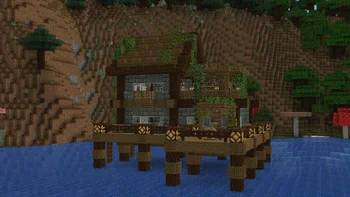
Dithered Shader (pack de shaders) es obra de BouncingElf10. A Minecraft shader with multiple dithering styles to stylize your game!
Es compatible con Minecraft 1.17 – 1.21. Se ha descargado 8,186 veces en Modrinth. La última actualización salió el 02/05/2025.
La más reciente es 1.0, publicada el 02/05/2025. Está hecha para Minecraft 1.17 – 1.21.4. Funciona en Iris y Optifine. La descarga ocupa 2.3 MB.
| Versión | Publicado | Minecraft | Tipo |
|---|---|---|---|
1.0 | 02/05/2025 | 1.17 – 1.21.4 | Estable |
Dithered Shader es de código abierto. Su última versión en GitHub es Dithered Shader V1.0, publicada el 02/05/2025.
-
6 dithering styles:
-
6 Ordered Dithering (Bayer) Styles
-
Multiple Bayer matrix sizes: 2×2, 4×4, 8×8, 16×16, 32×32
-
Adjustable posterization
-
Adjustable scaling factor (pixelation)
A Minecraft shader aimed to stylize your game using dithering effects
Ordered (Bayer) Dithering
Blue Noise Dithering
Triangular Noise
IGN Noise
Random Channels
Halftone
Escrita por BouncingElf10. Léela con imágenes en Modrinth.
Instala Iris (con Sodium) u OptiFine para tu versión de Minecraft: los shaders necesitan uno de ellos.
Descarga el archivo .zip desde Modrinth. No lo descomprimas.
En Minecraft, abre Opciones, luego Gráficos, luego Shader Packs y pulsa Abrir carpeta de shaders.
Suelta el archivo .zip en esa carpeta, elige Dithered Shader en la lista y pulsa Listo.
Los shaders exigen mucho a la tarjeta gráfica. Si el juego va lento, elige un perfil más bajo en sus ajustes.
| Recurso | Descargas | Versiones | Última actualización | Precio |
|---|---|---|---|---|
| Dithered Shaderel que estabas viendo | 8,186 | 1.17 – 1.21 | 2 may 2025 | Gratis |
| Aurora's ShadersCrafterAurora | 949K | 1.20 – 1.21 | 28 mar 2025 | Gratis |
 Vanilletix Shadersara_mat | 379K | 1.13 – 26.x | 11 may 2026 | Gratis |
 SnowimaginedSpacEagle17 | 141K | 1.8 – 1.21 | 27 dic 2022 | Gratis |
Todavía no. La versión más reciente que admite es Minecraft 1.21.
Sí. Dithered Shader se puede descargar gratis desde Modrinth.
Sí: Iris Shaders. Instálalo antes de Dithered Shader.
Sí. La última actualización salió en el último día.
Los más parecidos son Aurora's Shaders, Vanilletix Shaders y Snowimagined. Comparar todas las alternativas
Aurora's ShadersShaders · 1.20 – 1.21Based on Complimentary Unbound, a beautifully colorful Vanilla+ shader meant for making the game look good while maintaining good performance and vanilla feel.
Vanilletix ShadersShaders · 1.13 – 26.xA shader pack that is created to improve the graphics of your game, leaving it in vanilla style
SnowimaginedShaders · 1.8 – 1.21This shader transforms your game into a beautiful winter wonderland.
 Bad Apple ShadersShaders · 1.8 – 26.x
[🚨WORKS ON EVERYTHING🚨] | A shader that makes the game render similarly to "Bad Apple".
 Tricked ShadersShaders · 1.8 – 26.x
Based on Mellow Shader, a modified version to reduce brightness and make the game look better while maintaining good performance and vanilla feel.
 B&W ShaderShaders · 1.12 – 26.x
A shader that completely turns your game into a black and white version
Inicia sesión para dejar una reseña.