
 Aurora's ShadersShaders · 1.20 – 1.21
Based on Complimentary Unbound, a beautifully colorful Vanilla+ shader meant for making the game look good while maintaining good performance and vanilla feel.
Free947,964 downloads
A Minecraft shader with multiple dithering styles to stylize your game!
Opens Modrinth · 8,183 downloads there
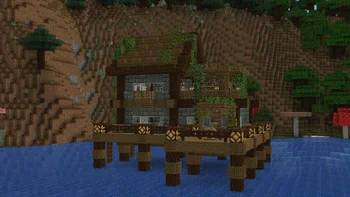
A Minecraft shader with multiple dithering styles to stylize your game!
Dithered Shader is a shader pack made by BouncingElf10. It supports Minecraft 1.17 – 1.21. It has been downloaded 8,183 times on Modrinth. The last update came out on May 2, 2025.
The newest is 1.0, released on May 2, 2025. It is made for Minecraft 1.17 – 1.21.4. It runs on Iris and Optifine. The download is 2.3 MB.
| Version | Released | Minecraft | Type |
|---|---|---|---|
1.0 | May 2, 2025 | 1.17 – 1.21.4 | Release |
Dithered Shader is open source. Its newest release on GitHub is Dithered Shader V1.0, published on May 2, 2025.
-
6 dithering styles:
-
6 Ordered Dithering (Bayer) Styles
-
Multiple Bayer matrix sizes: 2×2, 4×4, 8×8, 16×16, 32×32
-
Adjustable posterization
-
Adjustable scaling factor (pixelation)
A Minecraft shader aimed to stylize your game using dithering effects
Ordered (Bayer) Dithering
Blue Noise Dithering
Triangular Noise
IGN Noise
Random Channels
Halftone
Written by BouncingElf10. Read it with pictures on Modrinth.
Install Iris (with Sodium) or OptiFine for your Minecraft version: shaders need one of them.
Download the .zip file from Modrinth. Do not unzip it.
In Minecraft, open Options, then Video Settings, then Shader Packs, and click Open Shader Pack Folder.
Drop the .zip file into that folder, pick Dithered Shader in the list and click Done.
Shaders are heavy on the graphics card. If the game gets slow, pick a lower profile in the shader settings.
| Resource | Downloads | Versions | Last update | Price |
|---|---|---|---|---|
| Dithered Shaderthe one you looked at | 8,183 | 1.17 – 1.21 | May 2, 2025 | Free |
| Aurora's ShadersCrafterAurora | 948K | 1.20 – 1.21 | Mar 28, 2025 | Free |
 Vanilletix Shadersara_mat | 378K | 1.13 – 26.x | May 11, 2026 | Free |
 SnowimaginedSpacEagle17 | 141K | 1.8 – 1.21 | Dec 27, 2022 | Free |
Not yet. The newest version it supports is Minecraft 1.21.
Yes. Dithered Shader is free to download from Modrinth.
Yes: Iris Shaders. Install it before Dithered Shader.
Yes. The last update came out in the past day.
The closest ones are Aurora's Shaders, Vanilletix Shaders and Snowimagined. Compare all alternatives
Aurora's ShadersShaders · 1.20 – 1.21Based on Complimentary Unbound, a beautifully colorful Vanilla+ shader meant for making the game look good while maintaining good performance and vanilla feel.
Vanilletix ShadersShaders · 1.13 – 26.xA shader pack that is created to improve the graphics of your game, leaving it in vanilla style
SnowimaginedShaders · 1.8 – 1.21This shader transforms your game into a beautiful winter wonderland.
 Bad Apple ShadersShaders · 1.8 – 26.x
[🚨WORKS ON EVERYTHING🚨] | A shader that makes the game render similarly to "Bad Apple".
 Tricked ShadersShaders · 1.8 – 26.x
Based on Mellow Shader, a modified version to reduce brightness and make the game look better while maintaining good performance and vanilla feel.
 B&W ShaderShaders · 1.12 – 26.x
A shader that completely turns your game into a black and white version
Log in to leave a review.