
 Better SelectionMods · 1.19 – 26.x
Makes text more pleasant to select by improving the "move by word" feature (Ctrl+← and Ctrl+→).
Gratis7,290,116 descargas

Move around your HUD and fix the broken hotbar selection indicator!
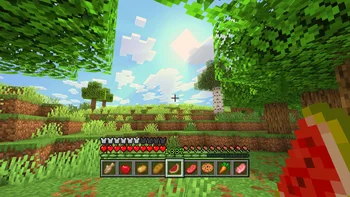

Raised (mod) es obra de yurisuika. Move around your HUD and fix the broken hotbar selection indicator!
Es compatible con Minecraft 1.16 – 26.x. Se ha descargado 2,824,034 veces en Modrinth. La última actualización salió el 23/09/2026.
Raised ha publicado 697 versiones en Modrinth desde el 19/01/2022. 309 salieron en el último año. La más reciente es Fabric-1.21.8-6.0.2, publicada el 23/09/2026. Está hecha para Minecraft 1.21.6, 1.21.7, 1.21.8. Funciona en Fabric. La descarga ocupa 133 KB.
| Versión | Publicado | Minecraft | Tipo |
|---|---|---|---|
Fabric-1.21.8-6.0.2 | 23/09/2026 | 1.21.6, 1.21.7, 1.21.8 | Estable |
Forge-26.1.2-6.0.2 | 23/09/2026 | 26.1, 26.1.1, 26.1.2 | Estable |
Fabric-26.2-6.0.2 | 23/09/2026 | 26.2 | Estable |
Forge-1.21.10-6.0.2 | 23/09/2026 | 1.21.9, 1.21.10 | Estable |
NeoForge-1.21.3-6.0.2 | 23/09/2026 | 1.21.2, 1.21.3 | Estable |
Raised es de código abierto. Su última versión en GitHub es 6.0.2, publicada el 23/09/2026.
Antes: 6.0.1 (22/09/2026), 6.0.0 (22/09/2026).
Since time immemorial, the hotbar selection indicator has been broken. With vanilla textures, you may not have noticed it, but it becomes clearly visible with certain resource packs. Raised seeks to fix this.
How it is fixed depends on your game version:
To show off your fixed hotbar selection indicator, Raised positions the hotbar stack slightly off the bottom of the screen, just like in Bedrock! But you are not limited to only that...
Raised gives you the power to move around both vanilla and modded HUD layers!
Simply create a group and set its x-axis and y-axis offsets. Add as many layers to the group as you like, and they will all move the same amount! Set the position for each layer individually to choose which way the layer will move across the screen!
Raised allows mods to register layer entries for their own HUD overlays. Layers can be manually registered, but many are automatically registered without mods having to do anything at all!
How does this work? Any mod that registers a (Neo)Forge overlay is automatically captured and added to Raised's layer registry and placed in your config!
If a mod renders an overlay solely via a (Neo)Forge render event, it will not have a Raised layer automatically registered. However, it will move along with the vanilla layer that it renders with.
Fabric is unfortunately the wild west of HUDs, as it lacks any sort of registry and only has one global render event for the entire HUD. For more information, see the wiki.
You can edit the groups and layers directly from the config, from a suite of commands, or from the options screen (openable via keybind or from a button on the (Neo)Forge mods screen).
Please note that using the options screen limits the amount that a layer may be offset to accommodate the use of slider controls (they need min/max values). Use commands or directly edit the config if you want to override this necessary limitation!
You can find releases of Raised on both [Modrinth] and [CurseForge] and also access development builds on [GitHub]!
Raised supports Fabric 1.16+, Forge 1.16+, and NeoForge 1.20.2+.
You can delve into the [wiki] for details or submit a [bug report] if something isn't quite right!
Still need something? Head on over to the [discussions] forum for support, to read announcements, or discuss anything about the mod!
[Modrinth]: modrinth.com/mod/raised
[CurseForge]: curseforge.com/minecraft/mc-mods/raised
[GitHub]: github.com/yurisuika/raised
[wiki]: github.com/yurisuika/raised/wiki
[bug report]: github.com/yurisuika/raised/issues
[discussions]: github.com/yurisuika/raised/discussions
[Discord]: discord.gg/0zdNEkQle7Qg9C1H
Escrita por yurisuika. Léela con imágenes en Modrinth.
Este mod funciona solo en tu propio juego. Los servidores no lo necesitan, así que puedes usarlo en cualquier servidor.
Instala Fabric, Forge y NeoForge para Minecraft 1.16 – 26.x.
Añade los mods que necesita: API de Fabric.
Descarga el archivo .jar desde Modrinth y ponlo en la carpeta mods de tu directorio .minecraft.
Inicia Minecraft con el perfil de Fabric.
Con el CraftRank Launcher te saltas estos pasos: abre Mods, busca Raised y pulsa Instalar.
| Recurso | Descargas | Versiones | Última actualización | Precio |
|---|---|---|---|---|
| Raisedel que estabas viendo | 2.8M | 1.16 – 26.x | 23 sept 2026 | Gratis |
| Better SelectionMDLC01 | 7.3M | 1.19 – 26.x | 26 sept 2026 | Gratis |
 MenuMovenomad_dev | 38 | 1.21 – 26.x | 29 sept 2026 | Gratis |
Sí. Raised es compatible con Minecraft 26.x. Todas las versiones compatibles: 26.x, 1.21, 1.20, 1.19, 1.18, 1.17, 1.16.
Sí. Raised se puede descargar gratis desde Modrinth.
Del lado del cliente. Raised va en tu propia carpeta mods y funciona en cualquier servidor, incluso en servidores sin mods.
Sí: Fabric API. Instálalo antes de Raised.
Sí. La última actualización salió en el último día.
Better SelectionMods · 1.19 – 26.xMakes text more pleasant to select by improving the "move by word" feature (Ctrl+← and Ctrl+→).
MenuMoveMods · 1.21 – 26.xAllows you to move around while in menus and inventories!
Inicia sesión para dejar una reseña.