
 Better SelectionMods · 1.19 – 26.x
Makes text more pleasant to select by improving the "move by word" feature (Ctrl+← and Ctrl+→).
Gratuit7,290,116 téléchargements
Move around your HUD and fix the broken hotbar selection indicator!
Téléchargement direct depuis Modrinth · 2,826,205 téléchargements
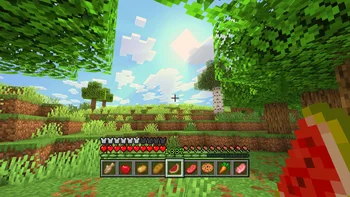

Raised (mod) est une création de yurisuika. Move around your HUD and fix the broken hotbar selection indicator!
Versions prises en charge : Minecraft 1.16 – 26.x. On compte 2,826,205 téléchargements sur Modrinth. La dernière mise à jour date du 23/09/2026.
Raised a publié 697 versions sur Modrinth depuis le 19/01/2022. 309 sont sorties au cours de l'année passée. La plus récente est Fabric-1.21.8-6.0.2, sortie le 23/09/2026. Elle est faite pour Minecraft 1.21.6, 1.21.7, 1.21.8. Elle fonctionne sur Fabric. Le téléchargement fait 133 KB.
| Version | Publié | Minecraft | Type |
|---|---|---|---|
Fabric-1.21.8-6.0.2 | 23/09/2026 | 1.21.6, 1.21.7, 1.21.8 | Stable |
Forge-26.1.2-6.0.2 | 23/09/2026 | 26.1, 26.1.1, 26.1.2 | Stable |
Fabric-26.2-6.0.2 | 23/09/2026 | 26.2 | Stable |
Forge-1.21.10-6.0.2 | 23/09/2026 | 1.21.9, 1.21.10 | Stable |
NeoForge-1.21.3-6.0.2 | 23/09/2026 | 1.21.2, 1.21.3 | Stable |
Raised est open source. Sa dernière version sur GitHub est 6.0.2, publiée le 23/09/2026.
Avant : 6.0.1 (22/09/2026), 6.0.0 (22/09/2026).
Since time immemorial, the hotbar selection indicator has been broken. With vanilla textures, you may not have noticed it, but it becomes clearly visible with certain resource packs. Raised seeks to fix this.
How it is fixed depends on your game version:
To show off your fixed hotbar selection indicator, Raised positions the hotbar stack slightly off the bottom of the screen, just like in Bedrock! But you are not limited to only that...
Raised gives you the power to move around both vanilla and modded HUD layers!
Simply create a group and set its x-axis and y-axis offsets. Add as many layers to the group as you like, and they will all move the same amount! Set the position for each layer individually to choose which way the layer will move across the screen!
Raised allows mods to register layer entries for their own HUD overlays. Layers can be manually registered, but many are automatically registered without mods having to do anything at all!
How does this work? Any mod that registers a (Neo)Forge overlay is automatically captured and added to Raised's layer registry and placed in your config!
If a mod renders an overlay solely via a (Neo)Forge render event, it will not have a Raised layer automatically registered. However, it will move along with the vanilla layer that it renders with.
Fabric is unfortunately the wild west of HUDs, as it lacks any sort of registry and only has one global render event for the entire HUD. For more information, see the wiki.
You can edit the groups and layers directly from the config, from a suite of commands, or from the options screen (openable via keybind or from a button on the (Neo)Forge mods screen).
Please note that using the options screen limits the amount that a layer may be offset to accommodate the use of slider controls (they need min/max values). Use commands or directly edit the config if you want to override this necessary limitation!
You can find releases of Raised on both [Modrinth] and [CurseForge] and also access development builds on [GitHub]!
Raised supports Fabric 1.16+, Forge 1.16+, and NeoForge 1.20.2+.
You can delve into the [wiki] for details or submit a [bug report] if something isn't quite right!
Still need something? Head on over to the [discussions] forum for support, to read announcements, or discuss anything about the mod!
[Modrinth]: modrinth.com/mod/raised
[CurseForge]: curseforge.com/minecraft/mc-mods/raised
[GitHub]: github.com/yurisuika/raised
[wiki]: github.com/yurisuika/raised/wiki
[bug report]: github.com/yurisuika/raised/issues
[discussions]: github.com/yurisuika/raised/discussions
[Discord]: discord.gg/0zdNEkQle7Qg9C1H
Écrite par yurisuika. À lire avec les images sur Modrinth.
Ce mod fonctionne uniquement dans ton jeu. Les serveurs n'en ont pas besoin, tu peux donc l'utiliser sur n'importe quel serveur.
Installe Fabric, Forge et NeoForge pour Minecraft 1.16 – 26.x.
Ajoute les mods dont il a besoin : API Fabric.
Télécharge le fichier .jar depuis Modrinth et place-le dans le dossier mods de ton répertoire .minecraft.
Lance Minecraft avec le profil Fabric.
Plus simple : dans Prism Launcher ou la Modrinth App, cherche Raised dans les mods de ton instance et clique sur Install. Le loader et les mods requis sont ajoutés pour toi.
| Ressource | Téléchargements | Versions | Mise à jour | Prix |
|---|---|---|---|---|
| Raisedcelle que tu regardais | 2.8M | 1.16 – 26.x | 23 sept. 2026 | Gratuit |
| Better SelectionMDLC01 | 7.3M | 1.19 – 26.x | 26 sept. 2026 | Gratuit |
 MenuMovenomad_dev | 38 | 1.21 – 26.x | 29 sept. 2026 | Gratuit |
Oui. Raised prend en charge Minecraft 26.x. Toutes les versions prises en charge : 26.x, 1.21, 1.20, 1.19, 1.18, 1.17, 1.16.
Oui. Raised se télécharge gratuitement sur Modrinth.
Côté client. Raised se place dans ton propre dossier mods et fonctionne sur n'importe quel serveur, même sans mods.
Oui : Fabric API. Installe-le avant Raised.
Oui. La dernière mise à jour date des dernières 24 heures.
Better SelectionMods · 1.19 – 26.xMakes text more pleasant to select by improving the "move by word" feature (Ctrl+← and Ctrl+→).
MenuMoveMods · 1.21 – 26.xAllows you to move around while in menus and inventories!
Connecte-toi pour laisser un avis.