
 Better SelectionModlar · 1.19 – 26.x
Makes text more pleasant to select by improving the "move by word" feature (Ctrl+← and Ctrl+→).
Ücretsiz7,290,116 indirme
Move around your HUD and fix the broken hotbar selection indicator!
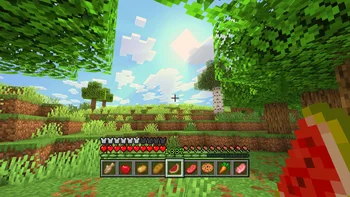

Raised, yurisuika tarafından yapılmış bir mod. Move around your HUD and fix the broken hotbar selection indicator!
Desteklediği sürümler: Minecraft 1.16 – 26.x. Modrinth üzerinde 2,824,034 kez indirildi. Son güncelleme 23.09.2026 tarihinde çıktı.
Raised, 19.01.2022 tarihinden beri Modrinth üzerinde 697 sürüm yayınladı. Bunların 309 tanesi son bir yılda çıktı. En yenisi 23.09.2026 tarihinde çıkan Fabric-1.21.8-6.0.2. Minecraft 1.21.6, 1.21.7, 1.21.8 için yapıldı. Fabric üzerinde çalışır. İndirme boyutu 133 KB.
| Sürüm | Yayın tarihi | Minecraft | Tür |
|---|---|---|---|
Fabric-1.21.8-6.0.2 | 23.09.2026 | 1.21.6, 1.21.7, 1.21.8 | Kararlı |
Forge-26.1.2-6.0.2 | 23.09.2026 | 26.1, 26.1.1, 26.1.2 | Kararlı |
Fabric-26.2-6.0.2 | 23.09.2026 | 26.2 | Kararlı |
Forge-1.21.10-6.0.2 | 23.09.2026 | 1.21.9, 1.21.10 | Kararlı |
NeoForge-1.21.3-6.0.2 | 23.09.2026 | 1.21.2, 1.21.3 | Kararlı |
Raised açık kaynaklıdır. GitHub'daki en yeni sürümü 23.09.2026 tarihinde yayınlanan 6.0.2.
Öncekiler: 6.0.1 (22.09.2026), 6.0.0 (22.09.2026).
Since time immemorial, the hotbar selection indicator has been broken. With vanilla textures, you may not have noticed it, but it becomes clearly visible with certain resource packs. Raised seeks to fix this.
How it is fixed depends on your game version:
To show off your fixed hotbar selection indicator, Raised positions the hotbar stack slightly off the bottom of the screen, just like in Bedrock! But you are not limited to only that...
Raised gives you the power to move around both vanilla and modded HUD layers!
Simply create a group and set its x-axis and y-axis offsets. Add as many layers to the group as you like, and they will all move the same amount! Set the position for each layer individually to choose which way the layer will move across the screen!
Raised allows mods to register layer entries for their own HUD overlays. Layers can be manually registered, but many are automatically registered without mods having to do anything at all!
How does this work? Any mod that registers a (Neo)Forge overlay is automatically captured and added to Raised's layer registry and placed in your config!
If a mod renders an overlay solely via a (Neo)Forge render event, it will not have a Raised layer automatically registered. However, it will move along with the vanilla layer that it renders with.
Fabric is unfortunately the wild west of HUDs, as it lacks any sort of registry and only has one global render event for the entire HUD. For more information, see the wiki.
You can edit the groups and layers directly from the config, from a suite of commands, or from the options screen (openable via keybind or from a button on the (Neo)Forge mods screen).
Please note that using the options screen limits the amount that a layer may be offset to accommodate the use of slider controls (they need min/max values). Use commands or directly edit the config if you want to override this necessary limitation!
You can find releases of Raised on both [Modrinth] and [CurseForge] and also access development builds on [GitHub]!
Raised supports Fabric 1.16+, Forge 1.16+, and NeoForge 1.20.2+.
You can delve into the [wiki] for details or submit a [bug report] if something isn't quite right!
Still need something? Head on over to the [discussions] forum for support, to read announcements, or discuss anything about the mod!
[Modrinth]: modrinth.com/mod/raised
[CurseForge]: curseforge.com/minecraft/mc-mods/raised
[GitHub]: github.com/yurisuika/raised
[wiki]: github.com/yurisuika/raised/wiki
[bug report]: github.com/yurisuika/raised/issues
[discussions]: github.com/yurisuika/raised/discussions
[Discord]: discord.gg/0zdNEkQle7Qg9C1H
Yazan: yurisuika. Resimli halini Modrinth sayfasında oku.
Bu mod yalnızca senin oyununda çalışır. Sunucuların buna ihtiyacı yok, bu yüzden her sunucuda kullanabilirsin.
Minecraft 1.16 – 26.x için Fabric, Forge ve NeoForge kur.
İhtiyaç duyduğu modları ekle: Fabric API.
.jar dosyasını Modrinth üzerinden indir ve .minecraft klasöründeki mods klasörüne koy.
Minecraft'ı Fabric profiliyle başlat.
CraftRank Launcher ile bu adımları atlayabilirsin: Modlar'ı aç, Raised ara ve Kur'a tıkla.
| Kaynak | İndirmeler | Sürümler | Son güncelleme | Fiyat |
|---|---|---|---|---|
| Raisedbaktığın | 2.8M | 1.16 – 26.x | 23 Eyl 2026 | Ücretsiz |
| Better SelectionMDLC01 | 7.3M | 1.19 – 26.x | 26 Eyl 2026 | Ücretsiz |
 MenuMovenomad_dev | 38 | 1.21 – 26.x | 29 Eyl 2026 | Ücretsiz |
Evet. Raised, Minecraft 26.x sürümünü destekliyor. Desteklenen tüm sürümler: 26.x, 1.21, 1.20, 1.19, 1.18, 1.17, 1.16.
Evet. Raised, Modrinth üzerinden ücretsiz indirilebilir.
İstemci tarafı. Raised kendi mods klasörüne kurulur ve modsuz sunucular dahil her sunucuda çalışır.
Evet: Fabric API. Bunu Raised öncesinde kur.
Evet. Son güncelleme son 24 saat içinde çıktı.
Better SelectionModlar · 1.19 – 26.xMakes text more pleasant to select by improving the "move by word" feature (Ctrl+← and Ctrl+→).
MenuMoveModlar · 1.21 – 26.xAllows you to move around while in menus and inventories!
Yorum yazmak için giriş yap.