
 Entity Texture FeaturesMods · 1.16 – 26.x
Emissive, Random & Custom texture support for entities in resourcepacks just like Optifine but for Fabric
Gratis110,997,522 descargas
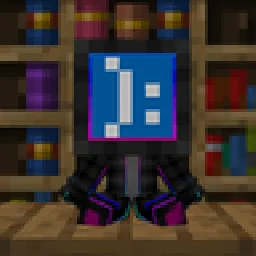
Turn player skins into collectible vinyl Pop figures with display boxes, custom poses, and mini editions! Just like Funko-pops!
Descarga directa desde Modrinth · 96 descargas
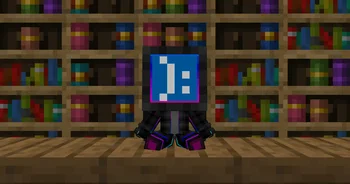
Poppped (mod) es obra de Miguelki. Turn player skins into collectible vinyl Pop figures with display boxes, custom poses, and mini editions! Just like Funko-pops!
Es compatible con Minecraft 1.20 – 26.x. Se ha descargado 96 veces en Modrinth. La última actualización salió el 03/10/2026.
Poppped ha publicado 23 versiones en Modrinth desde el 21/09/2026. 23 salieron en el último año. La más reciente es 1.2+26.3-neoforge, publicada el 03/10/2026. Está hecha para Minecraft 26.3. Funciona en NeoForge. La descarga ocupa 188 KB.
| Versión | Publicado | Minecraft | Tipo |
|---|---|---|---|
1.2+26.3-neoforge | 03/10/2026 | 26.3 | Estable |
1.2+26.3-fabric | 03/10/2026 | 26.3 | Estable |
1.2+26.2-neoforge | 03/10/2026 | 26.2 | Estable |
1.2+26.2-fabric | 03/10/2026 | 26.2 | Estable |
1.2+26.1.2-neoforge | 03/10/2026 | 26.1, 26.1.1, 26.1.2 | Estable |
Popped transforms Minecraft player skins into customizable, collectible vinyl figures. Collect your own character, display your friends' avatars, or build a showcase gallery of your favorite creators in your world.
Action Pops can be posed dynamically in-game. Sneak and right-click (Shift + Right Click) on the figure to cycle through its poses:
Action pop craft
Empty box craft
Pop craft
Mini pop craft
Re-pop minis craft
The mod connects to minotar's skin api in order to get the skins on offline servers or if not available for any reason.
It also connects to NEOLauncher's skin api in order to get offline skins applied to the NEOLauncher Account skin panel.
Available for Fabric (requires Fabric API), NeoForge, and Forge on Minecraft 1.21+.
Escrita por Miguelki. Léela con imágenes en Modrinth.
Este mod hace falta en el servidor y en cada jugador que entra.
Instala Fabric, Forge y NeoForge para Minecraft 1.20 – 26.x.
Descarga el archivo .jar desde Modrinth y ponlo en la carpeta mods de tu directorio .minecraft.
Inicia Minecraft con el perfil de Fabric.
Más fácil: en Prism Launcher o la Modrinth App, busca Poppped en los mods de tu instancia y haz clic en Install. Añade el loader y los mods que necesita por ti.
| Recurso | Descargas | Versiones | Última actualización | Precio |
|---|---|---|---|---|
| Popppedel que estabas viendo | 96 | 1.20 – 26.x | 3 oct 2026 | Gratis |
| Entity Texture FeaturesTraben | 111M | 1.16 – 26.x | hace 8 días | Gratis |
 Bundle TabKERS | 49 | 1.21 – 26.x | hace 27 días | Gratis |
 Nexora PlayersVOIDx7472 | 10 | 26.x | 29 ago 2026 | Gratis |
Sí. Poppped es compatible con Minecraft 26.x. Todas las versiones compatibles: 26.x, 1.21, 1.20.
Sí. Poppped se puede descargar gratis desde Modrinth.
Ambos. El servidor y cada jugador necesitan Poppped instalado.
Sí. La última actualización salió en el último día.
Los más parecidos son Entity Texture Features, Bundle Tab y Nexora Players. Comparar todas las alternativas
Entity Texture FeaturesMods · 1.16 – 26.xEmissive, Random & Custom texture support for entities in resourcepacks just like Optifine but for Fabric
Bundle TabMods · 1.21 – 26.xManage your Bundle in a way that feels just like vanilla Minecraft.
Nexora PlayersMods · 26.xthiss project adds custom player which you can customize name and skins!!
 Origins: SkinsMods · 1.20
An Origins addon that allows Origins datapack creators assign custom player skins to origins using PNG files directly from datapacks.
 OptiGUIMods · 1.18 – 26.x
Blazing fast custom GUI textures on Fabric and Quilt with built-in OptiFine custom GUI resource pack support
 Sodium Shadowy Path BlocksMods · 1.16 – 26.x
Reintroduces vanilla-like smooth lighting to non-full blocks (e.g. dirt paths and how they have dark shading when directly next to a full block) when using…
Inicia sesión para dejar una reseña.