
 Entity Texture FeaturesMods · 1.16 – 26.x
Emissive, Random & Custom texture support for entities in resourcepacks just like Optifine but for Fabric
Free110,997,522 downloads
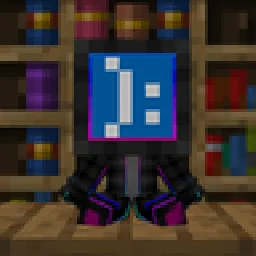
Turn player skins into collectible vinyl Pop figures with display boxes, custom poses, and mini editions! Just like Funko-pops!
Direct download from Modrinth · 30 downloads
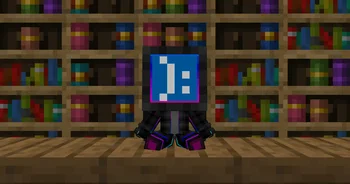
Poppped is a mod made by Miguelki. Turn player skins into collectible vinyl Pop figures with display boxes, custom poses, and mini editions! Just like Funko-pops!
It supports Minecraft 1.20 – 26.x. It has been downloaded 30 times on Modrinth. The last update came out on Oct 3, 2026.
Poppped has had 23 releases on Modrinth since Sep 21, 2026. 23 of them came out in the past year. The newest is 1.2+26.3-neoforge, released on Oct 3, 2026. It is made for Minecraft 26.3. It runs on NeoForge. The download is 188 KB.
| Version | Released | Minecraft | Type |
|---|---|---|---|
1.2+26.3-neoforge | Oct 3, 2026 | 26.3 | Release |
1.2+26.3-fabric | Oct 3, 2026 | 26.3 | Release |
1.2+26.2-neoforge | Oct 3, 2026 | 26.2 | Release |
1.2+26.2-fabric | Oct 3, 2026 | 26.2 | Release |
1.2+26.1.2-neoforge | Oct 3, 2026 | 26.1, 26.1.1, 26.1.2 | Release |
Popped transforms Minecraft player skins into customizable, collectible vinyl figures. Collect your own character, display your friends' avatars, or build a showcase gallery of your favorite creators in your world.
Action Pops can be posed dynamically in-game. Sneak and right-click (Shift + Right Click) on the figure to cycle through its poses:
Action pop craft
Empty box craft
Pop craft
Mini pop craft
Re-pop minis craft
The mod connects to minotar's skin api in order to get the skins on offline servers or if not available for any reason.
It also connects to NEOLauncher's skin api in order to get offline skins applied to the NEOLauncher Account skin panel.
Available for Fabric (requires Fabric API), NeoForge, and Forge on Minecraft 1.21+.
Written by Miguelki. Read it with pictures on Modrinth.
This mod is needed on both the server and every player who joins.
Install Fabric, Forge and NeoForge for Minecraft 1.20 – 26.x.
Download the .jar file from Modrinth and put it in the mods folder of your .minecraft directory.
Start Minecraft with the Fabric profile.
Easier: in Prism Launcher or the Modrinth App, search for Poppped in your instance's mods and click Install. It adds the loader and the mods it needs for you.
Full guide: How to install Minecraft mods
| Resource | Downloads | Versions | Last update | Price |
|---|---|---|---|---|
| Popppedthe one you looked at | 30 | 1.20 – 26.x | Oct 3, 2026 | Free |
| Entity Texture FeaturesTraben | 111M | 1.16 – 26.x | 7 days ago | Free |
 Nexora PlayersVOIDx7472 | 10 | 26.x | Aug 29, 2026 | Free |
 Bundle TabKERS | 8 | 1.21 – 26.x | 26 days ago | Free |
Yes. Poppped supports Minecraft 26.x. All supported versions: 26.x, 1.21, 1.20.
Yes. Poppped is free to download from Modrinth.
Both. The server and every player need Poppped installed.
Yes. The last update came out in the past day.
The closest ones are Entity Texture Features, Nexora Players and Bundle Tab. Compare all alternatives
Entity Texture FeaturesMods · 1.16 – 26.xEmissive, Random & Custom texture support for entities in resourcepacks just like Optifine but for Fabric
Nexora PlayersMods · 26.xthiss project adds custom player which you can customize name and skins!!
Bundle TabMods · 1.21 – 26.xManage your Bundle in a way that feels just like vanilla Minecraft.
 Origins: SkinsMods · 1.20
An Origins addon that allows Origins datapack creators assign custom player skins to origins using PNG files directly from datapacks.
 OptiGUIMods · 1.18 – 26.x
Blazing fast custom GUI textures on Fabric and Quilt with built-in OptiFine custom GUI resource pack support
 Sodium Shadowy Path BlocksMods · 1.16 – 26.x
Reintroduces vanilla-like smooth lighting to non-full blocks (e.g. dirt paths and how they have dark shading when directly next to a full block) when using…
Log in to leave a review.