
 Shulker Box TooltipMods · 1.16 – 26.x
View the contents of shulker boxes from your inventory
Gratis42,103,982 descargas
Restyle your crosshair, inventory, hotbar, buttons, chat, menus and fonts. Themes, presets, 15 fonts.
Descarga directa desde Modrinth · 7 descargas
Origen y titularidad. Esta página se generó automáticamente a partir de datos públicos que Modrinth ofrece a través de su API pública. El nombre, las descripciones, las imágenes, las marcas y todo el demás contenido de este proyecto pertenecen a sabrxe y a sus respectivos titulares. CraftRank no es el autor de este proyecto y no está afiliado, respaldado ni patrocinado por su autor ni por Modrinth.
Alojamiento y distribución. CraftRank no aloja, almacena, sube ni distribuye los archivos de descarga de este proyecto, y no conserva ningún archivo de ese tipo en sus servidores. Todas las descargas las proporciona directamente Modrinth desde sus propios servidores; el botón Descargar solo enlaza al archivo allí. La licencia indicada en Modrinth es MIT.
Uso de API públicas. Modrinth, Hangar (PaperMC) y SpigotMC (a través de la API de Spiget) ponen sus API a disposición pública de sitios web y aplicaciones de terceros. Los Términos de uso de Modrinth otorgan a los usuarios de la API una licencia para descargar, mostrar y consultar contenido a través de sus propios servicios (sección “API Usage”), y los creadores que publican en Modrinth conceden a Modrinth y a sus licenciatarios el derecho a mostrar y distribuir su contenido a terceros (sección “User Contributions”). CraftRank utiliza estas API conforme a las normas publicadas de las plataformas: se identifica en cada solicitud y respeta sus límites de uso.
Sin garantía. La información de esta página se ofrece "tal cual", sin ninguna garantía. Descargar y usar este proyecto es bajo su propia responsabilidad y está sujeto a la licencia y las condiciones de su autor.
Avisos de derechos de autor (DMCA). Solo el titular de los derechos de autor o alguien autorizado a actuar en su nombre puede presentar un aviso, y debe hacerlo una persona mayor de edad o su padre, madre o tutor legal. Un aviso válido enviado a abuse@craftrank.org debe incluir: el enlace de esta página; la obra presuntamente infringida; su nombre completo, dirección postal, teléfono y correo electrónico; una declaración de que cree de buena fe que el uso no está autorizado por el titular, su agente o la ley; una declaración, bajo pena de perjurio, de que el aviso es exacto y de que usted es el titular o está autorizado a actuar en su nombre; y su firma física o electrónica. Los avisos incompletos no se tramitan. Los avisos válidos se atienden en un plazo de 48 horas, sin necesidad de pasar por Google.
Avisos falsos. Quien afirme a sabiendas y falsamente que un material es infractor responde de los daños causados, incluidas las costas y los honorarios de abogados (17 U.S.C. § 512(f)). Los avisos presentados de mala fe o por quien no es titular de los derechos quedan registrados y serán impugnados.
TweakBox (mod) es obra de sabrxe. Restyle your crosshair, inventory, hotbar, buttons, chat, menus and fonts. Themes, presets, 15 fonts.
Es compatible con Minecraft 1.21. Se ha descargado 7 veces en Modrinth. La última actualización salió el 26/09/2026.
La más reciente es 1.0.0, publicada el 26/09/2026. Está hecha para Minecraft 1.21.11. Funciona en Fabric. La descarga ocupa 2.1 MB.
| Versión | Publicado | Minecraft | Tipo |
|---|---|---|---|
1.0.0 | 26/09/2026 | 1.21.11 | Estable |
Tweakbox
Make Minecraft look like yours. Tweakbox is a client-side customization mod. Restyle your crosshair, inventory, hotbar, buttons, chat, menus and fonts from one clean settings screen, with live previews for everything.
Press K in-game (rebindable) or click Tweakbox... on the Options screen.
Features
One-click Themes
Seven ready-made looks: Vanilla, Dark Mode, Neon, Pastel, Minimal, High Contrast and Ocean. Each one restyles the inventory, hotbar, buttons, crosshair colors, chat colors and menu background at once. Don't like it? Hit Undo.
Crosshair Studio
Draw your own crosshair on an 11x11 pixel grid and make it as big as you want. Pick two colors: one for when something is in range to hit, and one for when nothing is.
Inventory, Hotbar & Button skins
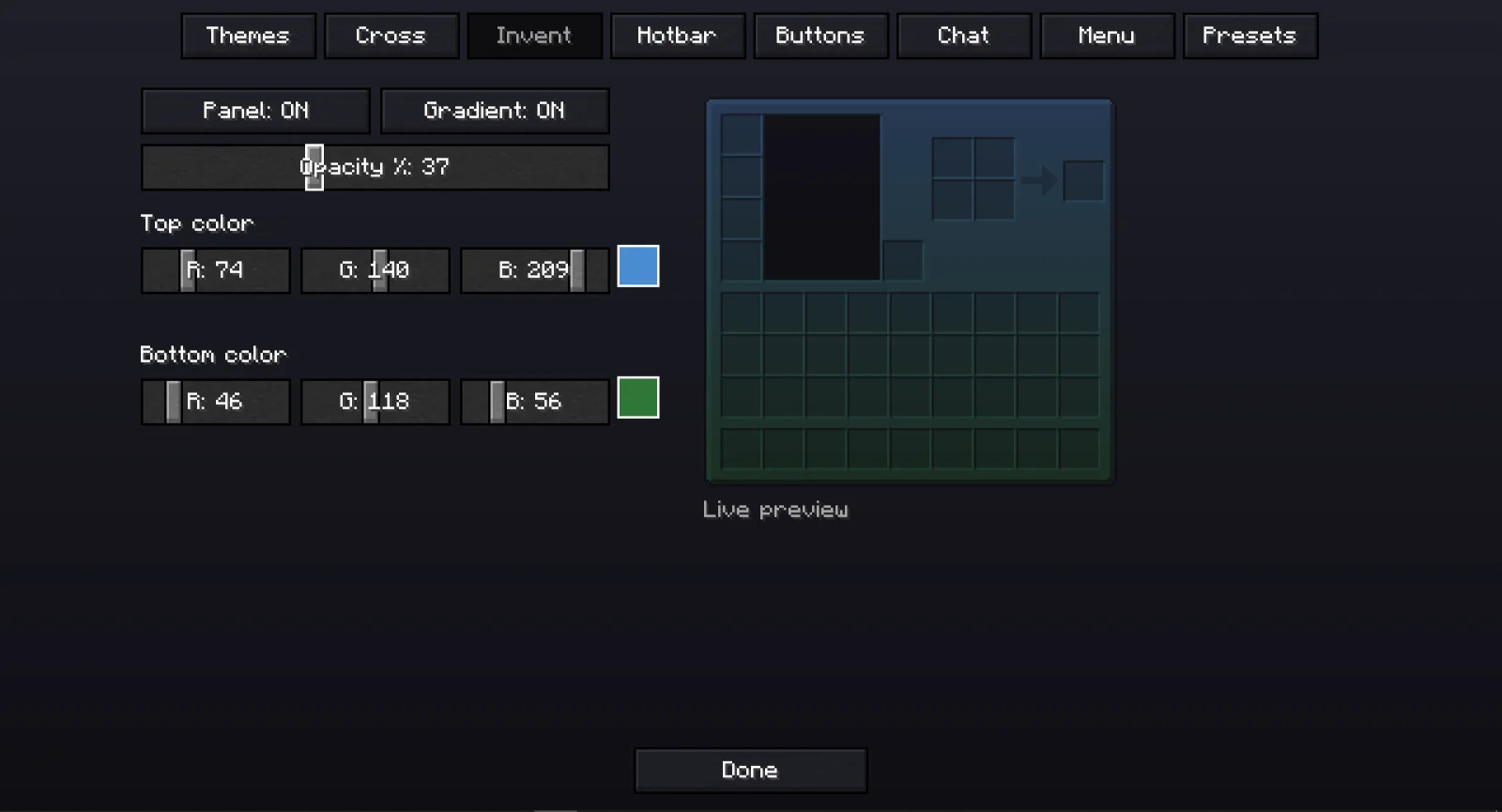
Tint the inventory panel (with an optional top-to-bottom gradient), the hotbar, the selected-slot highlight and every button. Adjust color and opacity, with a live preview of your real inventory.
Menu backgrounds & blur control
Replace the title and menu background with a color gradient or your own image (config/tweakbox/background.png). You can dim it, or turn the menu blur off entirely.
15 built-in fonts
Inter, Roboto, Open Sans, Lato, Nunito, Poppins, Fredoka, Quicksand, Comfortaa, Righteous, Orbitron, Press Start 2P, VT323, Silkscreen and Bangers. Pick one and the whole game uses it.
Chat skins
Color whispers, deaths, joins and advancements, add timestamps, and get a star on messages that mention you.
Presets
Save up to 5 complete setups and switch between them with a keybind. You can also copy or paste your whole configuration as a code to share.
Good to know
Client-side only. Install it on your own game. Servers don't need it, and it changes nothing about gameplay or what other players see.
Requires Fabric API.
It works with mods that use Minecraft's own buttons, text and sprites. Mods that draw a completely custom interface with their own rendering are not restyled.
Everything is off or vanilla by default, so nothing changes until you choose it.
If you also use another crosshair mod, Tweakbox's crosshair draws on top of it and switches that mod's crosshair off while Tweakbox's is enabled.
Compatibility
Minecraft 1.21.11, Fabric Loader 0.19+, Fabric API
License
MIT. The bundled fonts are licensed under the SIL Open Font License, and the license texts are included in the mod.
Escrita por sabrxe. Léela con imágenes en Modrinth.
Este mod funciona solo en tu propio juego. Los servidores no lo necesitan, así que puedes usarlo en cualquier servidor.
Instala Fabric para Minecraft 1.21.
Añade los mods que necesita: API de Fabric.
Descarga el archivo .jar desde Modrinth y ponlo en la carpeta mods de tu directorio .minecraft.
Inicia Minecraft con el perfil de Fabric.
Más fácil: en Prism Launcher o la Modrinth App, busca TweakBox en los mods de tu instancia y haz clic en Install. Añade el loader y los mods que necesita por ti.
| Recurso | Descargas | Versiones | Última actualización | Precio |
|---|---|---|---|---|
| TweakBoxel que estabas viendo | 7 | 1.21 | 26 sept 2026 | Gratis |
| Shulker Box TooltipMisterPeModder | 42.1M | 1.16 – 26.x | 25 oct 2026 | Gratis |
 No Report ButtonLucaslah | 3.8M | 1.19 – 26.x | 2 oct 2026 | Gratis |
 Smooth ScrollingSmajloSlovakian | 13.6M | 1.20 – 26.x | 17 oct 2026 | Gratis |
Todavía no. La versión más reciente que admite es Minecraft 1.21.
Sí. TweakBox se puede descargar gratis desde Modrinth.
Del lado del cliente. TweakBox va en tu propia carpeta mods y funciona en cualquier servidor, incluso en servidores sin mods.
Sí: Fabric API. Instálalo antes de TweakBox.
Sí. La última actualización salió en el último día.
Los más parecidos son Shulker Box Tooltip, No Report Button y Smooth Scrolling. Comparar todas las alternativas
Shulker Box TooltipMods · 1.16 – 26.xView the contents of shulker boxes from your inventory
No Report ButtonMods · 1.19 – 26.xRemoves the chat report button from the game menu screen
Smooth ScrollingMods · 1.20 – 26.xCustomize the scrolling smoothness or speed in various places like chat, hotbar, creative screen...
 Inventory ManagementMods · 1.18 – 26.x
Sort and transfer items with the click of a button.
 Cursor CrosshairMods · 26.x
Free your crosshair from the center of the screen and control it with your mouse—interact with blocks, entities, and hotbar slots without moving the camera.
 No Chat ReportsMods · 1.19 – 26.x
Makes chat unreportable (where possible)
Inicia sesión para dejar una reseña.