
 Shulker Box TooltipMods · 1.16 – 26.x
View the contents of shulker boxes from your inventory
Free42,103,982 downloads
Restyle your crosshair, inventory, hotbar, buttons, chat, menus and fonts. Themes, presets, 15 fonts.
Direct download from Modrinth · 7 downloads
Source and ownership. This page was generated automatically from public data that Modrinth provides through its public API. The name, descriptions, images, trademarks and all other content of this project belong to sabrxe and their respective owners. CraftRank is not the author of this project and is not affiliated with, endorsed or sponsored by its author or by Modrinth.
Hosting and distribution. CraftRank does not host, store, upload or distribute the download files of this project, and no such file is kept on CraftRank's servers. Every download is provided directly by Modrinth from its own servers; the Download button only links to the file there. The license stated on Modrinth is MIT.
Use of public APIs. Modrinth, Hangar (PaperMC) and SpigotMC (through the Spiget API) make their APIs publicly available to third-party websites and applications. Modrinth's Terms of Use give API users a license to download, display and query content through their own services (section “API Usage”), and creators who publish on Modrinth grant Modrinth and its licensees the right to display and distribute their content to third parties (section “User Contributions”). CraftRank uses these APIs in line with the platforms' published rules: it identifies itself in every request and respects their rate limits.
No warranty. The information on this page is provided "as is", without any warranty. Downloading and using this project is at your own risk and subject to the license and terms of its author.
Copyright notices (DMCA). Only the copyright owner or someone authorised to act for them may file a notice, and it must come from a person of legal age or from their parent or legal guardian. A valid notice sent to abuse@craftrank.org must contain: the link of this page; the work claimed to be infringed; your full name, postal address, phone number and e-mail; a statement that you believe in good faith that the use is not authorised by the owner, its agent or the law; a statement, under penalty of perjury, that the notice is accurate and that you are the owner or authorised to act for them; and your physical or electronic signature. Incomplete notices are not processed. Valid notices are acted on within 48 hours, with no need to go through Google.
False notices. Anyone who knowingly misrepresents that material is infringing is liable for the damages caused, including costs and attorneys' fees (17 U.S.C. § 512(f)). Notices filed in bad faith or by someone who does not hold the rights are kept on record and will be contested.
TweakBox is a mod made by sabrxe. Restyle your crosshair, inventory, hotbar, buttons, chat, menus and fonts. Themes, presets, 15 fonts.
It supports Minecraft 1.21. It has been downloaded 7 times on Modrinth. The last update came out on Sep 26, 2026.
The newest is 1.0.0, released on Sep 26, 2026. It is made for Minecraft 1.21.11. It runs on Fabric. The download is 2.1 MB.
| Version | Released | Minecraft | Type |
|---|---|---|---|
1.0.0 | Sep 26, 2026 | 1.21.11 | Release |
Tweakbox
Make Minecraft look like yours. Tweakbox is a client-side customization mod. Restyle your crosshair, inventory, hotbar, buttons, chat, menus and fonts from one clean settings screen, with live previews for everything.
Press K in-game (rebindable) or click Tweakbox... on the Options screen.
Features
One-click Themes
Seven ready-made looks: Vanilla, Dark Mode, Neon, Pastel, Minimal, High Contrast and Ocean. Each one restyles the inventory, hotbar, buttons, crosshair colors, chat colors and menu background at once. Don't like it? Hit Undo.
Crosshair Studio
Draw your own crosshair on an 11x11 pixel grid and make it as big as you want. Pick two colors: one for when something is in range to hit, and one for when nothing is.
Inventory, Hotbar & Button skins
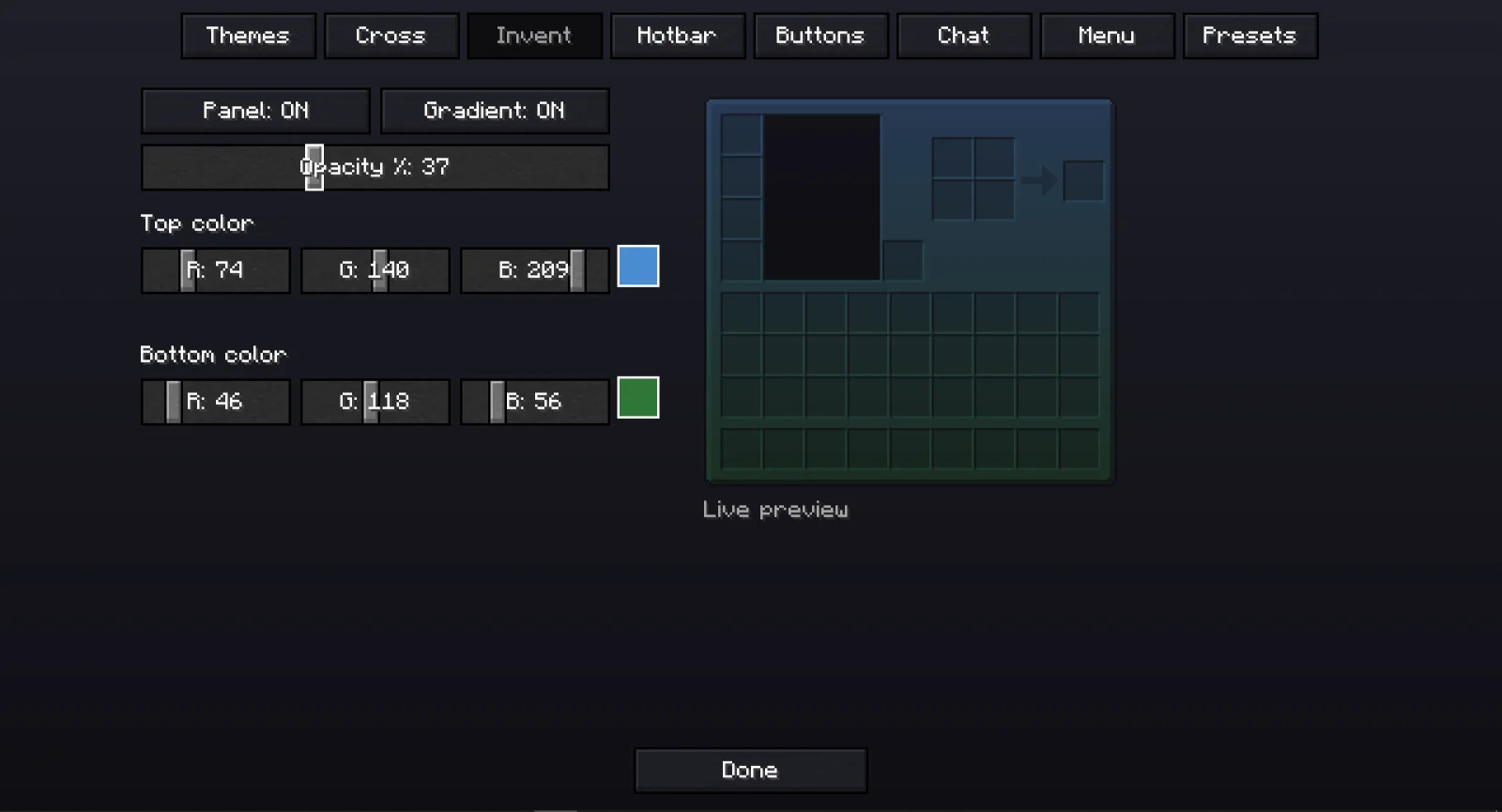
Tint the inventory panel (with an optional top-to-bottom gradient), the hotbar, the selected-slot highlight and every button. Adjust color and opacity, with a live preview of your real inventory.
Menu backgrounds & blur control
Replace the title and menu background with a color gradient or your own image (config/tweakbox/background.png). You can dim it, or turn the menu blur off entirely.
15 built-in fonts
Inter, Roboto, Open Sans, Lato, Nunito, Poppins, Fredoka, Quicksand, Comfortaa, Righteous, Orbitron, Press Start 2P, VT323, Silkscreen and Bangers. Pick one and the whole game uses it.
Chat skins
Color whispers, deaths, joins and advancements, add timestamps, and get a star on messages that mention you.
Presets
Save up to 5 complete setups and switch between them with a keybind. You can also copy or paste your whole configuration as a code to share.
Good to know
Client-side only. Install it on your own game. Servers don't need it, and it changes nothing about gameplay or what other players see.
Requires Fabric API.
It works with mods that use Minecraft's own buttons, text and sprites. Mods that draw a completely custom interface with their own rendering are not restyled.
Everything is off or vanilla by default, so nothing changes until you choose it.
If you also use another crosshair mod, Tweakbox's crosshair draws on top of it and switches that mod's crosshair off while Tweakbox's is enabled.
Compatibility
Minecraft 1.21.11, Fabric Loader 0.19+, Fabric API
License
MIT. The bundled fonts are licensed under the SIL Open Font License, and the license texts are included in the mod.
Written by sabrxe. Read it with pictures on Modrinth.
This mod runs only on your own game. Servers do not need it, so you can use it on any server.
Install Fabric for Minecraft 1.21.
Add the mods it needs: Fabric API.
Download the .jar file from Modrinth and put it in the mods folder of your .minecraft directory.
Start Minecraft with the Fabric profile.
Easier: in Prism Launcher or the Modrinth App, search for TweakBox in your instance's mods and click Install. It adds the loader and the mods it needs for you.
Full guide: How to install Minecraft mods
| Resource | Downloads | Versions | Last update | Price |
|---|---|---|---|---|
| TweakBoxthe one you looked at | 7 | 1.21 | Sep 26, 2026 | Free |
| Shulker Box TooltipMisterPeModder | 42.1M | 1.16 – 26.x | Oct 25, 2026 | Free |
 No Report ButtonLucaslah | 3.8M | 1.19 – 26.x | Oct 2, 2026 | Free |
 Smooth ScrollingSmajloSlovakian | 13.6M | 1.20 – 26.x | Oct 17, 2026 | Free |
Not yet. The newest version it supports is Minecraft 1.21.
Yes. TweakBox is free to download from Modrinth.
Client-side. TweakBox goes in your own mods folder and works on any server, including servers without mods.
Yes: Fabric API. Install it before TweakBox.
Yes. The last update came out in the past day.
The closest ones are Shulker Box Tooltip, No Report Button and Smooth Scrolling. Compare all alternatives
Shulker Box TooltipMods · 1.16 – 26.xView the contents of shulker boxes from your inventory
No Report ButtonMods · 1.19 – 26.xRemoves the chat report button from the game menu screen
Smooth ScrollingMods · 1.20 – 26.xCustomize the scrolling smoothness or speed in various places like chat, hotbar, creative screen...
 Inventory ManagementMods · 1.18 – 26.x
Sort and transfer items with the click of a button.
 Cursor CrosshairMods · 26.x
Free your crosshair from the center of the screen and control it with your mouse—interact with blocks, entities, and hotbar slots without moving the camera.
 No Chat ReportsMods · 1.19 – 26.x
Makes chat unreportable (where possible)
Log in to leave a review.