
NouveauCraftRank SitesA free website and storeMake yours ›
1.10.41CraftRank Launcher is out Télécharger ›AshlarFree server software built on Paper, with DDoS and backdoor protection See Ashlar ›Propriétaires de serveursYour own launcher with your name, logo and one click onto your server See themes ›
Ressources / Mods / Command Keys

Command Keys

A powerful command macro mod.
ModsGratuit1.19 – 26.x
par NotRyken · repris depuis Modrinth
Télécharger › Install with the launcher

Opens Modrinth · 3,226,152 downloads there

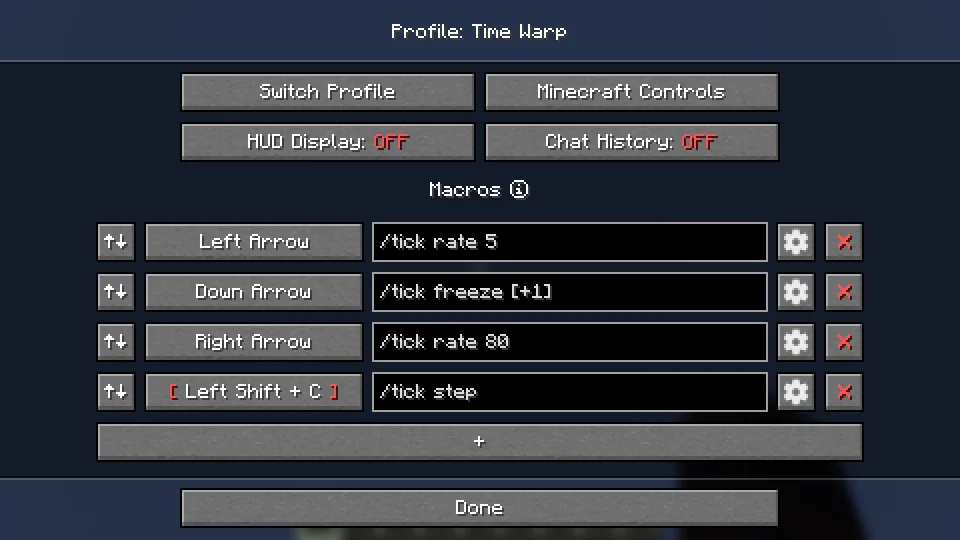
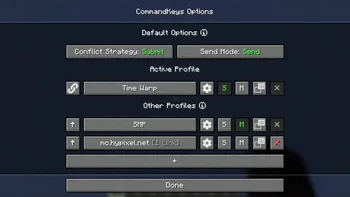
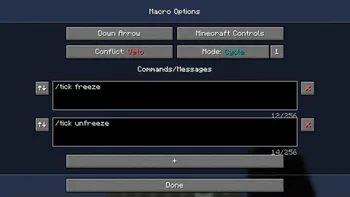
Command Keys, capture 1Command Keys, capture 2Command Keys, capture 3

Ce qu'il fait

A powerful command macro mod.
Command Keys (ressource) est une création de NotRyken. Versions prises en charge : Minecraft 1.19 – 26.x. On compte 3,226,152 téléchargements sur Modrinth. La dernière mise à jour date du 09/10/2026.

Versions prises en charge

26.x1.211.201.19

Historique des versions

Command Keys a publié 231 versions sur Modrinth depuis le 14/07/2023. 66 sont sorties au cours de l'année passée. La plus récente est 3.104.1+26.3, sortie le 09/10/2026. Elle est faite pour Minecraft 26.3. Elle fonctionne sur Fabric. Le téléchargement fait 265 KB.

VersionPubliéMinecraftType
3.104.1+26.309/10/202626.3Stable
3.103.2+26.209/10/202626.2Stable
3.102.5+26.1.209/10/202626.1, 26.1.1, 26.1.2Stable

Dernière version sur GitHub

Command Keys est open source. Sa dernière version sur GitHub est v3.104.1+26.3-NeoForge, publiée le 09/10/2026.

Changelog

Avant : v3.104.1+26.3-Fabric (09/10/2026), v3.103.2+26.2-NeoForge (09/10/2026).

Description de l'auteur sur Modrinth

CommandKeys

A powerful command macro mod.

Features

  • Multiple commands per macro
  • Multiple macros per keybind
  • Optional delay timing between commands
  • Efficient keybind conflict management with modifier key support
  • Five modes:
  1. Send all commands when the key is pressed
  2. Cycle through commands, one per keypress
  3. Repeat on a configurable interval
  4. Select a random message and send
  5. Type the command in chat, but don't send it
  • Profiles with automatic switching based on server address or world name
  • Fully custom GUI for easy configuration

Usage

Profiles

Automatic Switching

  • When you join a world/server, the name/address will be checked against the list of profiles. If

there is a profile linked to that world/server, it will be activated. Otherwise, the default
profile will be used.

  • Use the S and M buttons to make a profile the default for singleplayer or multiplayer.

Manual Switching

  • To activate a profile manually, click the up-arrow button on the left.
  • Click the link button to link the profile to the world/server for future automatic activation.
  • Click the settings button to rename the profile or remove links.

Macros

Access

  • Edit a profile by clicking the large button on the profile selection screen, or by pressing the

edit key
(default: K) in-game.

Binding Keys

  • You can bind almost any keyboard key or mouse button to a macro, similar to Minecraft's own

Controls. However, you can also bind any pair of keys; just press one while holding the other (
e.g. press 'T' while holding
'Shift').

Conflict Strategy

  • If a key is already in use by Minecraft, you can choose a conflict strategy;
  • Submit: The macro will be ignored, the Minecraft keybind will function normally.
  • Assert: The macro and the Minecraft keybind will both function.
  • Veto: The macro will function, the Minecraft keybind will be cancelled (if possible).
  • Avoid: The macro will not work in-game, but you can still activate it by pressing the key

while on the edit screen (with nothing selected). For example, if you have a macro bound to W,
press K then W to activate it.

Send Mode

  • Send: All commands for the macro will be sent. You can configure delays between commands.
  • Type: The first command will be typed into the chat box, but not sent.
  • Edit: A GUI will be shown to allow you to enter a replacement for the %edit% placeholder, then

the first message will be sent.

  • Cycle: The commands will be cycled through, with one command sent each time you press the key.
  • Note: In Cycle mode, if you need more than one command to be sent for a single key-press, enter

those commands into a single box, separated by pairs of commas (e.g.
/tick freeze,,/say Stopped).

  • Random: A message will be chosen at random and sent each time the key is pressed.
  • Repeat: Like Send, but the macro will be repeated (delay is configurable) until you press the

key again.

Placeholders

  • Simple Placeholders
  • %lastsent%: The most recently-sent message or command in history, if any.
  • %lastcmd%: The most recently-sent command in history, if any.
  • %clipboard%: The contents of the clipboard, if any.
  • %myname%: Minecraft username.
  • %pmsender%: The name of the sender of the most recently-received private message, if any. (

Searches max of 50).

  • %pos%: The integer coordinates of the player (x y z).
  • %x%: The integer X coordinate of the player. Also available for Y and Z.
  • %lpos%: The integer coordinates of the block the player is looking at, if any. Also provides

%lx%, %ly%,
%lz%.

  • Regex Placeholders
  • %#(.*)%: Regex Group 1 from the most recently-received message matching the regex following

the #, if any. Note: regex pattern must have at least 1 capturing group.

  • %clipboard#(.*)%: The contents of the clipboard, if any, verified to match a regex pattern

following the

. This can be used to prevent unintentional exposure of clipboard contents. E.g. use

%clipboard#^-?\d+ -?\d+ -?\d+$% to only send the clipboard contents if it's formatted like a
set of coordinates.

  • %pos([FBLR])(\d+)%: %pos% but offset some number of blocks in a direction relative to the

cardinal direction that the player is nearest to facing. E.g. use %posL20% to get the
coordinates 20 blocks to the player's left.

  • %x([+-]\d+)%: %x% but offset some number of blocks. E.g. use %x-10% to get the X

coordinate 10 blocks to the player's West. Also available for Y and Z.

  • %lpos([FBLR])(\d+)%: As per pos above but for the block the player is looking at, if any.
  • %lx([+-]\d+)%: As per x above but for the block the player is looking at, if any.

Dependencies

Fabric: Fabric API, ModMenu

NeoForge: None

Compatibility

If you encounter issues, please report on Discord or GitHub.

Contact

Écrite par NotRyken. À lire avec les images sur Modrinth.

Comment installer Command Keys

  1. Ce mod fonctionne uniquement dans ton jeu. Les serveurs n'en ont pas besoin, tu peux donc l'utiliser sur n'importe quel serveur.

  2. Installe Fabric, Quilt, Forge et NeoForge pour Minecraft 1.19 – 26.x.

  3. Ajoute les mods dont il a besoin : Mod Menu.

  4. Télécharge le fichier .jar depuis Modrinth et place-le dans le dossier mods de ton répertoire .minecraft.

  5. Lance Minecraft avec le profil Fabric.

  6. Avec le CraftRank Launcher, tu peux sauter ces étapes : ouvre Mods, cherche Command Keys et clique sur Installer.

Compatibilité

Versions de Minecraft
26.x, 1.21, 1.20, 1.19
Fonctionne sur
Fabric, Quilt, Forge, NeoForge
Où il fonctionne
Client uniquement (ton jeu)
Édition
Java
Nécessite
Mod Menu
Licence
Utilisation gratuite
Prix
Gratuit
Suivi
Mis à jour activement (10/11/2026)

Questions

Est-ce que Command Keys fonctionne sur Minecraft 26.x ?

Oui. Command Keys prend en charge Minecraft 26.x. Toutes les versions prises en charge : 26.x, 1.21, 1.20, 1.19.

Est-ce que Command Keys est gratuit ?

Oui. Command Keys se télécharge gratuitement sur Modrinth.

Command Keys est-il côté client ou côté serveur ?

Côté client. Command Keys se place dans ton propre dossier mods et fonctionne sur n'importe quel serveur, même sans mods.

Command Keys a-t-il besoin d'autre chose ?

Oui : Mod Menu. Installe-le avant Command Keys.

Command Keys est-il encore mis à jour ?

Oui. La dernière mise à jour date des dernières 24 heures.

Avis

–★★★★★
0 avis
50
40
30
20
10

Connecte-toi pour laisser un avis.