
NouveauCraftRank SitesSite web et boutique gratuitsCrée la tienne ›
AshlarLogiciel serveur gratuit basé sur Paper, avec protection DDoS et anti-backdoor Voir Ashlar ›Security RadarA free check of your server's login, anti-bot and proxy settings, only with your OK Voir comment ça marche ›CommunautéPose des questions, partage tes constructions et trouve des joueurs Rejoindre le forum ›
Ressources / Plugins / JPTeleport

JPTeleport

Teleports for Paper servers: spawn, homes, warps, public player warps, /tpa, /back and random teleport, with menus. Turn off any part.

PluginsGratuit26.x
par JPPlugins · repris depuis Modrinth
Télécharger ›

Téléchargement direct depuis Modrinth · 2 téléchargements
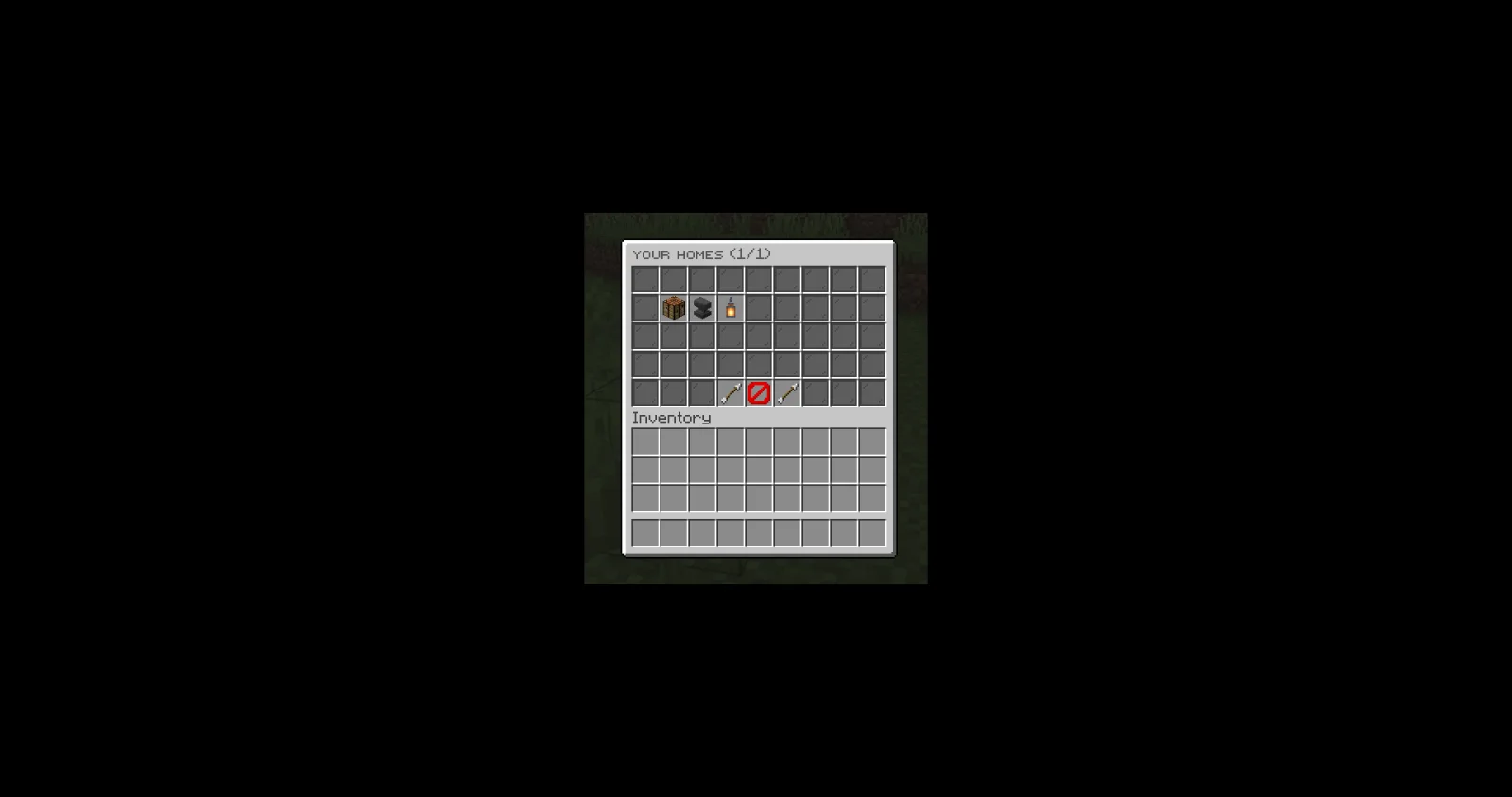
JPTeleport, capture 1

Ce qu'il fait

JPPlugins a créé JPTeleport (plugin) pour les serveurs Paper / Spigot. Teleports for Paper servers: spawn, homes, warps, public player warps, /tpa, /back and random teleport, with menus. Turn off any part.

Versions prises en charge : Minecraft 26.x. On compte 2 téléchargements sur Modrinth. Il arrive ainsi en position n° 91 sur les 96 plugins de téléportation et de warps listés ici. La dernière mise à jour date du 09/11/2026.

Versions prises en charge

26.x

Historique des versions

La plus récente est 1.0.0, sortie le 08/11/2026. Elle est faite pour Minecraft 26.3. Elle fonctionne sur Paper. Le téléchargement fait 175 KB.

VersionPubliéMinecraftType
1.0.008/11/202626.3Stable

Commandes

Les commandes citées sur la page Modrinth de JPTeleport :

/pwarp/tpa/tpahere/back/tp/tphere/tpall/jptp/jp/sethome/home/delhome/homeicon/sethomeicon/warpicon/setwarpicon
Description de l'auteur sur Modrinth

Every teleport your Paper server needs, in one plugin. Use all of it or turn off the parts you don't want.

Part of JP Plugins, but it works on its own.

Features

Places

  • Spawn, homes and warps
  • Public player warps that players create and browse by category
  • Entry fees: owners charge visitors with /pwarp price and earn money. Visitors confirm the fee first and only pay once they arrive
  • Menus for homes, warps and player warps

Between players

  • Teleport requests (/tpa, /tpahere)
  • /back and random teleport

For server owners

  • Home limits per rank, cooldowns, delays and teleport costs
  • Admin teleports (/tp, /tphere, /tpall and more)
  • Each part can be turned off
  • Messages in English, Spanish, Portuguese, French and German, or add your own language

Requirements

  • Paper 26.3 or newer (Java 25)

Optional

  • Vault: teleport costs, entry fees and ranks
  • PlaceholderAPI: placeholders in texts, and JPTeleport's own placeholders

Installation

  1. Put the jar in your server's plugins folder.
  2. Restart the server. plugins/JPTeleport/ is created with the config and messages.
  3. Change what you want in the files, then use /jptp reload or restart.

Type /jp as an operator to see every JP plugin you have installed, its version and which optional plugins it found.

Commands

  • /jptp : Main JPTeleport admin command.
  • /setspawn: Set the global spawn point.
  • /spawn: Teleport to the server spawn.
  • /sethome [name]: Set your home.
  • /home [name]: Teleport to your home.
  • /delhome [name]: Delete one of your homes.
  • /homes: List all your homes.
  • /homeicon [item|reset] (also /sethomeicon): Change the icon of one of your homes in /homes.
  • /warpicon [item|reset] (also /setwarpicon): Change the icon of a warp in /warps.
  • /setwarp : Create or update a warp.
  • /warp : Teleport to a warp.
  • /delwarp : Delete a warp.
  • /warps [edit]: List all warps. Admins arrange them with /warps edit.
  • /setplayerwarp [category] (also /setpwarp): Create or update one of your public player warps.
  • /delplayerwarp (also /delpwarp): Delete one of your public player warps.
  • /playerwarp [name] (also /pwarp): Teleport to a public player warp or open your management menu.
  • /playerwarps [category] (also /pwarps): Browse all public player warps by category.
  • /tpa : Send a teleport request to another player.
  • /tpahere : Ask another player to teleport to you.
  • /tpaccept [player] (also /tpyes): Accept a teleport request.
  • /tpadeny [player] (also /tpdeny, /tpno): Deny a teleport request.
  • /tpacancel [player]: Cancel your outgoing teleport requests.
  • /tptoggle: Toggle receiving teleport requests.
  • /back: Return to your previous location.
  • /tp [target] | /tp [player] : Teleport to a player, a player to a player, or to coordinates.
  • /tphere : Teleport a player to your location.
  • /tpo : Teleport yourself to a player.
  • /tppos [world]: Teleport yourself to precise coordinates.
  • /tpall [player] (also /tpaall): Teleport everyone to you or another target.
  • /rtp [world] (also /wild, /randomtp): Randomly teleport to a safe location.

Permissions

  • jptp.admin (operators): Access to JPTeleport admin commands.
  • jptp.* (operators): Grants all JPTeleport permissions.
  • jptp.spawn.set (operators): Set the global spawn point.
  • jptp.spawn.use (everyone): Use /spawn.
  • jptp.home.set (everyone): Set your personal home.
  • jptp.home.use (everyone): Use /home.
  • jptp.home.delete (everyone): Delete your home.
  • jptp.home.list (everyone): List your homes.
  • jptp.home.icon (everyone): Choose icons for your homes in /homes.
  • jptp.playerwarp.rate (everyone): Rate player warps.
  • jptp.playerwarp.feature (everyone): Buy featured slots for your own player warps.
  • jptp.warp.set (operators): Create or update warps.
  • jptp.warp.use (everyone): Use /warp.
  • jptp.warp.delete (operators): Delete warps.
  • jptp.warp.list (everyone): List warps.
  • jptp.playerwarp.set (everyone): Create or update your public player warps.
  • jptp.playerwarp.price (everyone): Charge visitors an entry fee for your player warps.
  • jptp.playerwarp.use (everyone): Use public player warps.
  • jptp.playerwarp.delete (everyone): Delete your public player warps.
  • jptp.playerwarp.list (everyone): Browse public player warps.
  • jptp.teleport.request (everyone): Send teleport requests.
  • jptp.teleport.requesthere (everyone): Send /tpahere requests.
  • jptp.teleport.accept (everyone): Accept teleport requests.
  • jptp.teleport.deny (everyone): Deny teleport requests.
  • jptp.teleport.toggle (everyone): Toggle incoming teleport requests.
  • jptp.teleport.toggle.bypass (operators): Send requests to players who disabled them.
  • jptp.back (everyone): Use /back after teleporting.
  • jptp.back.ondeath (everyone): Use /back to return to your death location.
  • jptp.tp.use (operators): Use administrative teleport commands.
  • jptp.rtp.use (everyone): Use /rtp.
  • jptp.rtp.world (operators): Use /rtp in another world.
  • jptp.bypass.countdown (operators): Skip teleport countdown.
  • jptp.bypass.cooldown (operators): Skip teleport cooldowns.
  • jptp.bypass.cost (operators): Teleport for free when the economy is enabled.

Placeholders

Needs PlaceholderAPI.

  • %jptp_homes%: homes the player has
  • %jptp_homes_max%: homes they may have ("∞" for unlimited)
  • %jptp_player_warps%: player warps they own
  • %jptp_player_warps_max%: player warps they may own
  • %jptp_pwarp_visits_%: visits of a player warp
  • %jptp_pwarp_rating_%: average stars of a player warp (0.0 - 5.0)
  • %jptp_pwarp_owner_%: owner of a player warp

Support

Full docs, the default config and setup guides are on the JPTeleport page of the JP Plugins website.
Questions, bugs or ideas? Join the JP Plugins Discord.

License

JPTeleport is free to use on any server, including servers that make money, but it is not open source. Don't reupload, sell or share modified copies of it. The full terms are in LICENSE.txt inside the jar.

Écrite par JPPlugins. À lire avec les images sur Modrinth.

Comment installer JPTeleport

  1. Vérifie que ton serveur tourne sous Paper et Spigot en Minecraft 26.x.

  2. Télécharge le fichier .jar depuis Modrinth et place-le dans le dossier plugins de ton serveur.

  3. Redémarre le serveur. Évite /reload, beaucoup de plugins le supportent mal.

  4. Tape /plugins dans la console : JPTeleport doit apparaître en vert. Ses fichiers de config sont créés dans le dossier plugins au premier démarrage.

Guide complet: Comment installer des plugins sur un serveur Minecraft

Compatibilité

Versions de Minecraft
26.x
Fonctionne sur
Paper, Spigot
Édition
Java
Nécessite
PlaceholderAPI
Licence
Utilisation gratuite
Prix
Gratuit
Suivi
Mis à jour activement (14/11/2026)

JPTeleport comparé à des ressources similaires Comparer toutes les alternatives

RessourceTéléchargementsVersionsMise à jourPrix
JPTeleportcelle que tu regardais226.xil y a 5 joursGratuit
HuskHomesWiIIiam278238K1.16 – 26.xil y a 15 joursGratuit
ChorusHomeControll3r24526.xil y a 11 joursGratuit
UltraTeleportsCreativeDM11.20 – 26.xil y a 3 joursGratuit

Questions

Est-ce que JPTeleport fonctionne sur Minecraft 26.x ?

Oui. JPTeleport prend en charge Minecraft 26.x. Toutes les versions prises en charge : 26.x.

Est-ce que JPTeleport est gratuit ?

Oui. JPTeleport se télécharge gratuitement sur Modrinth.

Sur quel logiciel serveur fonctionne JPTeleport ?

JPTeleport fonctionne sur les serveurs Paper et Spigot.

JPTeleport a-t-il besoin d'autre chose ?

Oui : PlaceholderAPI. Installe-le avant JPTeleport.

JPTeleport est-il encore mis à jour ?

Oui. La dernière mise à jour date des dernières 24 heures.

Quelles sont les meilleures alternatives à JPTeleport ?

Les plus proches sont HuskHomes, ChorusHome et UltraTeleports. Comparer toutes les alternatives

Alternatives à JPTeleport

ChorusHomePlugins · 26.x

Safe, fast and fully customizable homes for Paper 26.2: multiple named homes, rank limits, public homes, safe teleports, hex colors in every message.

Gratuit5 téléchargements
Just TPAPlugins · 1.19 – 26.x

JustTPA is a simple tpa plugin where players can ask other players if they can teleport to them.

Gratuit246,122 téléchargements
HomePluginPlugins · 1.16 – 26.x

A lightweight and efficient plugin to manage player homes, warps and world spawns, featuring optional caching and powerful synchronization tools.

Gratuit28,450 téléchargements
Comparer toutes les alternatives ›

Avis

–★★★★★
0 avis
50
40
30
20
10

Connecte-toi pour laisser un avis.