
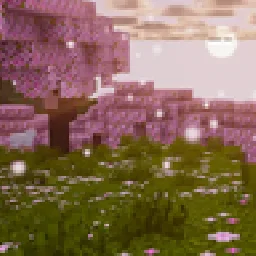
 Aurelia ShadersShadery · 1.21 – 26.x
Warm, cinematic golden-hour shaders — soft PCSS shadows, global illumination, volumetric clouds, glowing ores, vibrant biome atmosphere.
Za darmoPobrania: 7,888
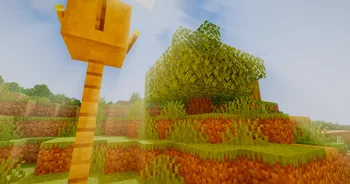
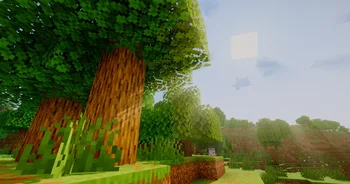
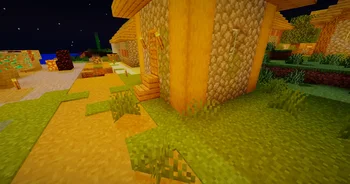
Soleron to paczka shaderów, autor: xsoras. A warm, cozy atmosphere and heartwarming shadows.
Obsługiwane wersje: Minecraft 1.8 – 26.x. Liczba pobrań w serwisie Modrinth: 3,134. Ostatnia aktualizacja: 12.09.2026.
Soleron ma 2 wydań na Modrinth od 24.05.2026. 2 z nich wyszło w ostatnim roku. Najnowsza to 1.1, wydana 12.09.2026. Jest zrobiona dla Minecraft 1.10 – 1.14. Działa na Iris i Optifine. Plik ma 32 KB.
| Wersja | Wydano | Minecraft | Typ |
|---|---|---|---|
1.1 | 12.09.2026 | 1.10 – 1.14 | Wydanie |
0.8 | 24.05.2026 | 1.10 – 1.20.3 | Wydanie |
Cold atmosphere. Warm light. No compromise.
Soleron is a performance-conscious Minecraft Java shader built for players who want cinematic visuals without sacrificing control. Every feature is slider-tunable directly from the in-game shader menu — no config file editing required.
Soft Shadows that actually look soft.
Soleron uses PCSS (Percentage-Closer Soft Shadows) paired with a 32-sample Poisson PCF filter on a 4096px shadow map. Shadows widen naturally as distance from the caster increases — just like real sunlight. Shadow softness, bias, sample count and search radius are all slider-adjustable.
Volumetric God Rays with moonlight.
An 80-sample raymarched god ray pass casts dramatic light shafts through trees, windows and overhangs. Works at night too — moonlight casts its own subtle shafts. Density, decay and weight are fully configurable.
Six tone mapping operators.
Choose between Reinhard, ACES, Hable, Lottes, Uchimura and AgX from the shader menu. ACES is the default — punchy highlights, deep shadows, no blown-out skies.
Colored shadows.
Stained glass, leaves and translucent blocks cast tinted shadows on the ground. Three quality tiers: off, balanced, high.
Vegetation SSS.
Leaves and tall grass scatter light from behind, glowing warmly when backlit by the sun. Strength is adjustable.
Floating dust particles.
Tiny animated dust motes drift around light sources — torches, lanterns, sunbeams. Adds life to dark corridors and forest scenes without a noticeable FPS cost.
Dual-pass Gaussian bloom.
Smooth, controllable bloom with a separate threshold slider so only the brightest surfaces glow. No halo artifacts.
Full post-processing suite.
Chromatic aberration · film grain · lens flare · vignette · depth edge fringe — each toggleable and tunable individually.
Atmospheric fog.
Height-based ambient fog with density, start distance and height ceiling controls. Works seamlessly with the god ray pass.
Loader · OptiFine 1.16+ / Iris 1.18+
Java Edition · 1.16 — 1.21
GLSL · #version 120
Render Pipeline · GBuffers + Composite
Tested on Nvidia RTX 5070 and above. AMD/Intel may require setting shadow samples to 32 and colored shadow quality to "Balanced".
Shadow softness · PCSS angle · bloom strength · tone mapper · exposure · saturation · god ray density · sun halo · ambient fog · wave speed · water alpha · vignette · film grain · chromatic aberration · and more.
Made with OptiFine/Iris GBuffer pipeline.
Autor: xsoras. Z obrazkami na Modrinth.
Zainstaluj Iris (z Sodium) albo OptiFine dla swojej wersji Minecrafta: shadery potrzebują jednego z nich.
Pobierz plik .zip z Modrinth. Nie rozpakowuj go.
W Minecrafcie otwórz Opcje, potem Ustawienia grafiki, potem Shadery i kliknij Otwórz folder shaderów.
Wrzuć plik .zip do tego folderu, wybierz Soleron z listy i kliknij Gotowe.
Shadery mocno obciążają kartę graficzną. Jeśli gra zwalnia, wybierz niższy profil w ustawieniach shadera.
| Zasób | Pobrania | Wersje | Aktualizacja | Cena |
|---|---|---|---|---|
 Soleronten, który oglądałeś | 3,134 | 1.8 – 26.x | 12 wrz 2026 | Za darmo |
| Aurelia Shadersjankrodev | 7,888 | 1.21 – 26.x | 29 wrz 2026 | Za darmo |
 Vanilish ShadersTypon | 66K | 1.8 – 1.21 | 16 lut 2026 | Za darmo |
 Earth ShadersGamesofDev | 44K | 1.20 – 26.x | 30 kwi 2026 | Za darmo |
Tak. Soleron działa w wersji Minecrafta 26.x. Wszystkie obsługiwane wersje: 26.x, 1.21, 1.20, 1.19, 1.18, 1.17, 1.16, 1.13, 1.12, 1.8.
Tak. Soleron można pobrać za darmo z serwisu Modrinth.
Tak. Ostatnia aktualizacja wyszła w ciągu ostatniej doby.
Najbliższe to Aurelia Shaders, Vanilish Shaders i Earth Shaders. Porównaj wszystkie alternatywy
Aurelia ShadersShadery · 1.21 – 26.xWarm, cinematic golden-hour shaders — soft PCSS shadows, global illumination, volumetric clouds, glowing ores, vibrant biome atmosphere.
Vanilish ShadersShadery · 1.8 – 1.21A lightweight shader that adds a realistic, warm atmosphere and soft lighting to Minecraft while maintaining the vanilla style.
Earth ShadersShadery · 1.20 – 26.xA bright, realistic Minecraft scene showcasing smooth lighting, soft shadows, and clear water reflections, giving the world a calm and natural atmosphere.
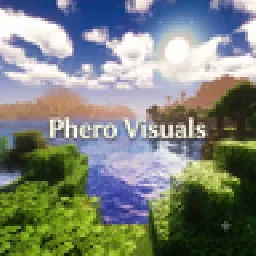 Phero VisualsShadery · 1.16 – 26.x
Phero Visuals Minecraft shader pack featuring vibrant lighting, realistic water, dynamic skies, soft shadows, cinematic atmosphere, and optimized performance…
 Oxygen AtmosphereShadery · 1.19 – 26.x
A foggy, misty shader for cozy, cinematic worlds: soft height fog, moon phases with rare Blood Moons, time-of-day water, rain and puddles, and a storm-filled…
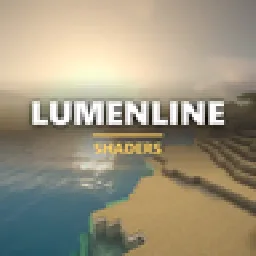 Lumenline ShadersShadery · 1.8 – 26.x
Warm golden-hour light that wraps every block: soft shadows, light shafts, glowing leaves. 6 quality levels.
Zaloguj się, aby wystawić opinię.