
 Discord IntegrationPluginy · 1.12 – 26.x
This mod links your server chat with a channel on your discord server
Za darmoPobrania: 285,945
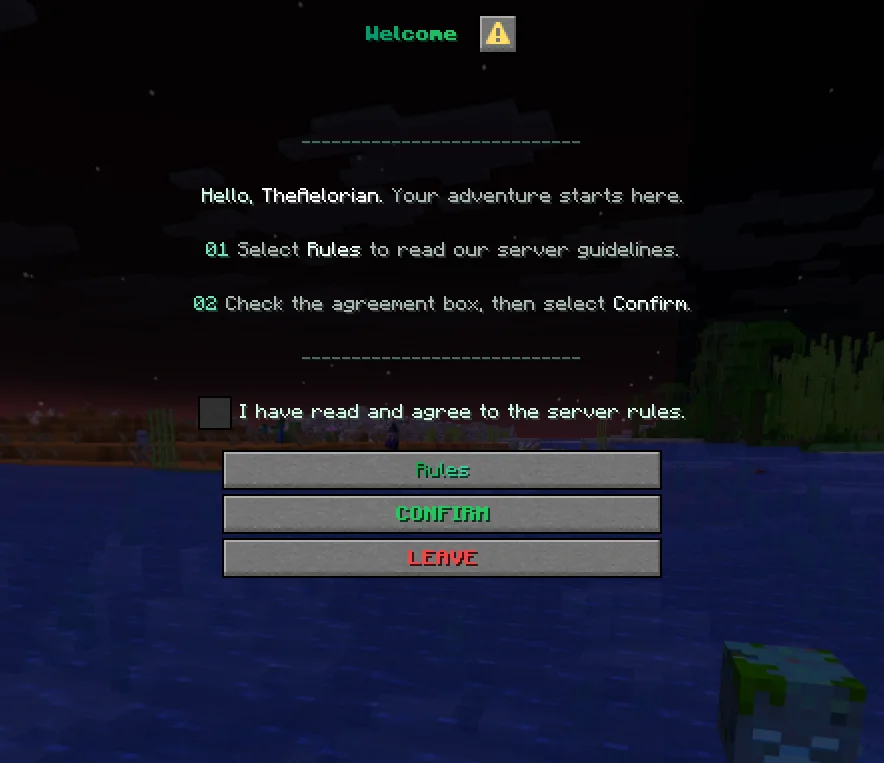
NexRules to plugin do serwerów Paper / Spigot, autor: Aelorian. Require players to accept your server rules before they join. Show rules in a Minecraft dialog or link to your website or Discord.
Obsługiwane wersje: Minecraft 1.21 – 26.x. Liczba pobrań w serwisie Modrinth: 3. Zajmuje 152. miejsce w kategorii „pluginy czatu głosowego i społecznościowe” (łącznie: 160). Ostatnia aktualizacja: 05.11.2026.
Najnowsza to 1.0.0, wydana 05.11.2026. Jest zrobiona dla Minecraft 1.21.7 – 26.3. Działa na Folia, Paper i Purpur. Plik ma 60 KB.
| Wersja | Wydano | Minecraft | Typ |
|---|---|---|---|
1.0.0 | 05.11.2026 | 1.21.7 – 26.3 | Wydanie |
Komendy wymienione na stronie NexRules w Modrinth:
/nexrules/rules/nrulesWymienione tam uprawnienia, do nadania pluginem takim jak LuckPerms:
nexrules.previewnexrules.publishnexrules.statusnexrules.resetnexrules.reloadNexRules shows new players a welcome dialog before they enter the world. They can read the rules, tick the agreement checkbox and confirm, or click Leave to disconnect. Players who already accepted the current rules can join as usual.
Edit rules.yml, check the draft with /nexrules preview, then run /nexrules publish. Publishing backs up the file and increases the rules version. Returning players are asked to accept the update and can see a summary of what changed.
Command · What it does · Permission
/rules · Open the rules · Everyone
/nexrules or /nrules · Open the welcome screen · Everyone
/nexrules preview [first\ · changes] [locale] · Preview the draft agreement or change summary · nexrules.preview
/nexrules publish [new-version] · Back up and publish a new rules version · nexrules.publish
/nexrules status · Check which version a player accepted and when · nexrules.status
/nexrules reset · Ask a player to agree again on their next login · nexrules.reset
/nexrules reload · Reload configuration without bumping the rules version · nexrules.reload
Staff permissions default to server operators.
Drop the JAR into plugins/, start the server and edit plugins/NexRules/rules.yml. Run /nexrules reload to apply your initial setup.
Supports Paper and Purpur from Minecraft 1.21.7 through 26.3 on builds with the Dialog API. Folia support starts with 1.21.8. Use Java 21 for Minecraft 1.21.x and Java 25 for 26.x. Folia 26.3 was tested on an alpha build.
Autor: Aelorian. Z obrazkami na Modrinth.
Upewnij się, że twój serwer działa na Paper i Spigot w Minecraft 1.21 – 26.x.
Pobierz plik .jar z Modrinth i wrzuć go do folderu plugins na serwerze.
Zrestartuj serwer. Unikaj /reload, wiele pluginów źle to znosi.
Wpisz /plugins w konsoli: NexRules powinien być na zielono. Pliki konfiguracyjne tworzą się w folderze plugins przy pierwszym starcie.
Pełny poradnik: Jak zainstalować pluginy na serwerze Minecraft
| Zasób | Pobrania | Wersje | Aktualizacja | Cena |
|---|---|---|---|---|
 NexRulesten, który oglądałeś | 3 | 1.21 – 26.x | 7 d. temu | Za darmo |
| Discord IntegrationErdbeerbaerLP | 286K | 1.12 – 26.x | 13 wrz 2026 | Za darmo |
 Custom Join MessagesInsprill | 28K | 1.12 – 26.x | 25 d. temu | Za darmo |
 WhitelisterTheredstonee | 1,517 | 1.21 – 26.x | 28 d. temu | Za darmo |
Tak. NexRules działa w wersji Minecrafta 26.x. Wszystkie obsługiwane wersje: 26.x, 1.21.
Tak. NexRules można pobrać za darmo z serwisu Modrinth.
NexRules działa na serwerach Paper i Spigot.
Tak. Ostatnia aktualizacja wyszła w ciągu ostatniej doby.
Najbliższe to Discord Integration, Custom Join Messages i Whitelister. Porównaj wszystkie alternatywy
Discord IntegrationPluginy · 1.12 – 26.xThis mod links your server chat with a channel on your discord server
Custom Join MessagesPluginy · 1.12 – 26.xWelcome players with first-join, join, and quit messages, publicly or privately, via Chat, Titles, Action Bars, Boss Bars, and Sounds. Permission-based and…
WhitelisterPluginy · 1.21 – 26.xManage your Minecraft whitelist directly through Discord. Players can be whitelisted by simply typing their name in a designated Discord channel. The bot…
 ProfilesPluginy · 1.21 – 26.x
Profiles with TONS of player statistics, join dates, fav items & more!
A scoreboard where every player picks which rows they see, from a dialog menu.
 ConsentGatePluginy · 1.21 – 26.x
Show your rules, terms, and privacy policy in game, and only let players in after they accept.
Zaloguj się, aby wystawić opinię.