
 Discord IntegrationPlugins · 1.12 – 26.x
This mod links your server chat with a channel on your discord server
Free285,945 downloads
Require players to accept your server rules before they join. Show rules in a Minecraft dialog or link to your website or Discord.
Direct download from Modrinth · 3 downloads
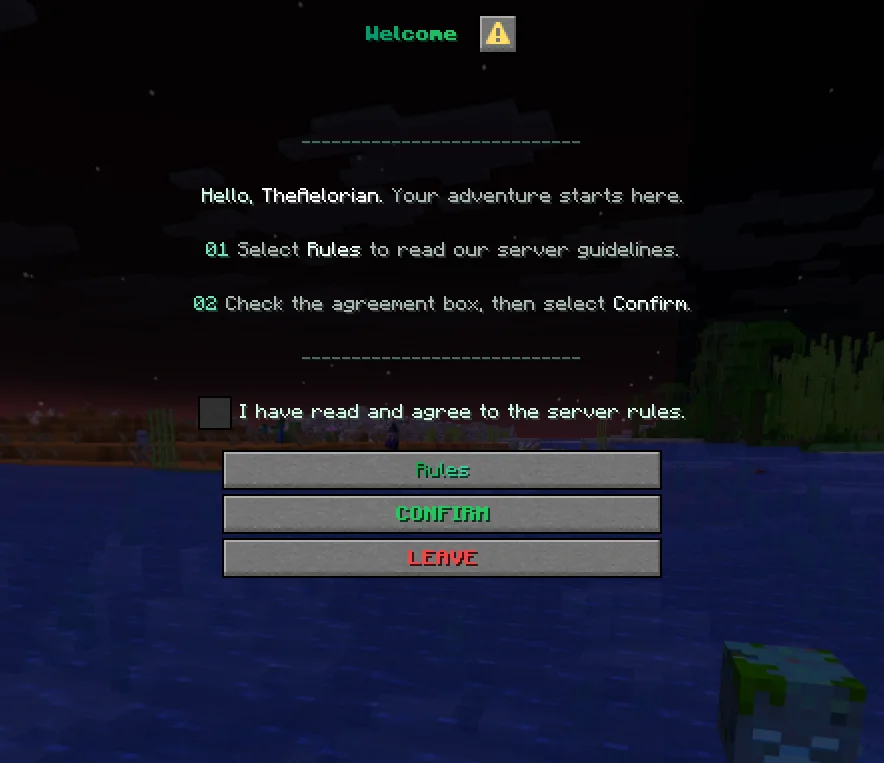
NexRules is a plugin for Paper / Spigot servers, made by Aelorian. Require players to accept your server rules before they join. Show rules in a Minecraft dialog or link to your website or Discord.
It supports Minecraft 1.21 – 26.x. It has been downloaded 3 times on Modrinth. That puts it at #152 of the 160 voice chat and social plugins listed here. The last update came out on Nov 5, 2026.
The newest is 1.0.0, released on Nov 5, 2026. It is made for Minecraft 1.21.7 – 26.3. It runs on Folia, Paper and Purpur. The download is 60 KB.
| Version | Released | Minecraft | Type |
|---|---|---|---|
1.0.0 | Nov 5, 2026 | 1.21.7 – 26.3 | Release |
The commands named on the Modrinth page of NexRules:
/nexrules/rules/nrulesPermission nodes named there, to give with a plugin like LuckPerms:
nexrules.previewnexrules.publishnexrules.statusnexrules.resetnexrules.reloadNexRules shows new players a welcome dialog before they enter the world. They can read the rules, tick the agreement checkbox and confirm, or click Leave to disconnect. Players who already accepted the current rules can join as usual.
Edit rules.yml, check the draft with /nexrules preview, then run /nexrules publish. Publishing backs up the file and increases the rules version. Returning players are asked to accept the update and can see a summary of what changed.
Command · What it does · Permission
/rules · Open the rules · Everyone
/nexrules or /nrules · Open the welcome screen · Everyone
/nexrules preview [first\ · changes] [locale] · Preview the draft agreement or change summary · nexrules.preview
/nexrules publish [new-version] · Back up and publish a new rules version · nexrules.publish
/nexrules status · Check which version a player accepted and when · nexrules.status
/nexrules reset · Ask a player to agree again on their next login · nexrules.reset
/nexrules reload · Reload configuration without bumping the rules version · nexrules.reload
Staff permissions default to server operators.
Drop the JAR into plugins/, start the server and edit plugins/NexRules/rules.yml. Run /nexrules reload to apply your initial setup.
Supports Paper and Purpur from Minecraft 1.21.7 through 26.3 on builds with the Dialog API. Folia support starts with 1.21.8. Use Java 21 for Minecraft 1.21.x and Java 25 for 26.x. Folia 26.3 was tested on an alpha build.
Written by Aelorian. Read it with pictures on Modrinth.
Make sure your server runs Paper and Spigot on Minecraft 1.21 – 26.x.
Download the .jar file from Modrinth and put it in the plugins folder of your server.
Restart the server. Avoid /reload, many plugins do not handle it well.
Type /plugins in the console: NexRules should be listed in green. Its config files are created in the plugins folder on the first start.
Full guide: How to install plugins on a Minecraft server
| Resource | Downloads | Versions | Last update | Price |
|---|---|---|---|---|
| NexRulesthe one you looked at | 3 | 1.21 – 26.x | 7 days ago | Free |
| Discord IntegrationErdbeerbaerLP | 286K | 1.12 – 26.x | Sep 13, 2026 | Free |
 Custom Join MessagesInsprill | 28K | 1.12 – 26.x | 25 days ago | Free |
 WhitelisterTheredstonee | 1,517 | 1.21 – 26.x | 28 days ago | Free |
Yes. NexRules supports Minecraft 26.x. All supported versions: 26.x, 1.21.
Yes. NexRules is free to download from Modrinth.
NexRules runs on Paper and Spigot servers.
Yes. The last update came out in the past day.
The closest ones are Discord Integration, Custom Join Messages and Whitelister. Compare all alternatives
Discord IntegrationPlugins · 1.12 – 26.xThis mod links your server chat with a channel on your discord server
Custom Join MessagesPlugins · 1.12 – 26.xWelcome players with first-join, join, and quit messages, publicly or privately, via Chat, Titles, Action Bars, Boss Bars, and Sounds. Permission-based and…
WhitelisterPlugins · 1.21 – 26.xManage your Minecraft whitelist directly through Discord. Players can be whitelisted by simply typing their name in a designated Discord channel. The bot…
 ProfilesPlugins · 1.21 – 26.x
Profiles with TONS of player statistics, join dates, fav items & more!
A scoreboard where every player picks which rows they see, from a dialog menu.
 ConsentGatePlugins · 1.21 – 26.x
Show your rules, terms, and privacy policy in game, and only let players in after they accept.
Log in to leave a review.