
 Discord IntegrationPlugins · 1.12 – 26.x
This mod links your server chat with a channel on your discord server
Gratis285,945 descargas
Require players to accept your server rules before they join. Show rules in a Minecraft dialog or link to your website or Discord.
Descarga directa desde Modrinth · 3 descargas
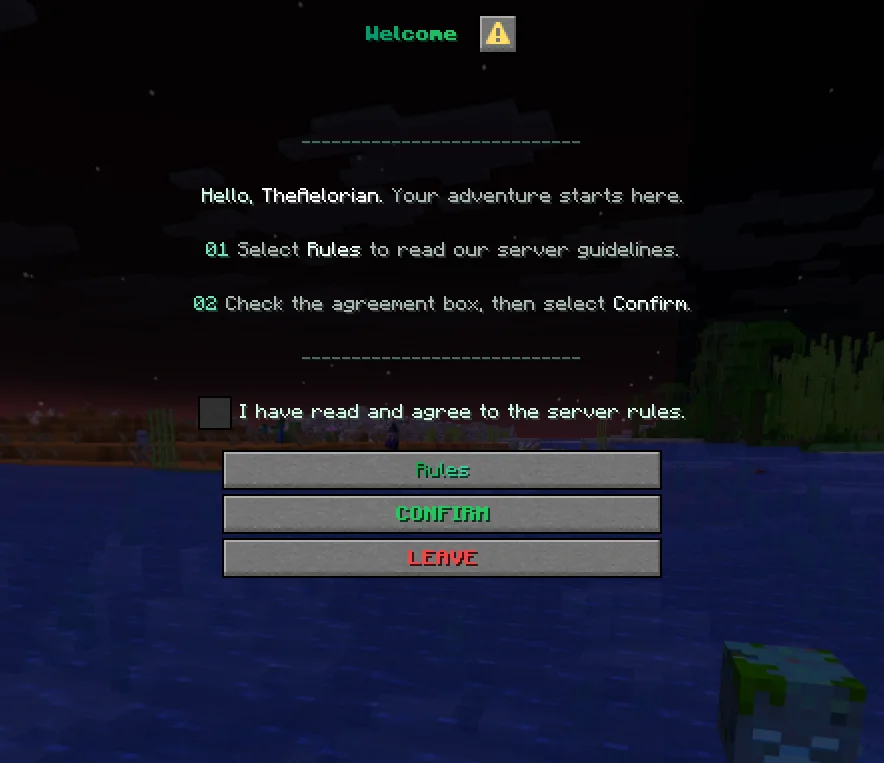
Aelorian creó NexRules (plugin) para servidores Paper / Spigot. Require players to accept your server rules before they join. Show rules in a Minecraft dialog or link to your website or Discord.
Es compatible con Minecraft 1.21 – 26.x. Se ha descargado 3 veces en Modrinth. Eso lo sitúa en el puesto 152 de los 160 plugins de chat de voz y sociales de esta lista. La última actualización salió el 05/11/2026.
La más reciente es 1.0.0, publicada el 05/11/2026. Está hecha para Minecraft 1.21.7 – 26.3. Funciona en Folia, Paper y Purpur. La descarga ocupa 60 KB.
| Versión | Publicado | Minecraft | Tipo |
|---|---|---|---|
1.0.0 | 05/11/2026 | 1.21.7 – 26.3 | Estable |
Los comandos que aparecen en la página de NexRules en Modrinth:
/nexrules/rules/nrulesPermisos que se nombran allí, para dar con un plugin como LuckPerms:
nexrules.previewnexrules.publishnexrules.statusnexrules.resetnexrules.reloadNexRules shows new players a welcome dialog before they enter the world. They can read the rules, tick the agreement checkbox and confirm, or click Leave to disconnect. Players who already accepted the current rules can join as usual.
Edit rules.yml, check the draft with /nexrules preview, then run /nexrules publish. Publishing backs up the file and increases the rules version. Returning players are asked to accept the update and can see a summary of what changed.
Command · What it does · Permission
/rules · Open the rules · Everyone
/nexrules or /nrules · Open the welcome screen · Everyone
/nexrules preview [first\ · changes] [locale] · Preview the draft agreement or change summary · nexrules.preview
/nexrules publish [new-version] · Back up and publish a new rules version · nexrules.publish
/nexrules status · Check which version a player accepted and when · nexrules.status
/nexrules reset · Ask a player to agree again on their next login · nexrules.reset
/nexrules reload · Reload configuration without bumping the rules version · nexrules.reload
Staff permissions default to server operators.
Drop the JAR into plugins/, start the server and edit plugins/NexRules/rules.yml. Run /nexrules reload to apply your initial setup.
Supports Paper and Purpur from Minecraft 1.21.7 through 26.3 on builds with the Dialog API. Folia support starts with 1.21.8. Use Java 21 for Minecraft 1.21.x and Java 25 for 26.x. Folia 26.3 was tested on an alpha build.
Escrita por Aelorian. Léela con imágenes en Modrinth.
Asegúrate de que tu servidor use Paper y Spigot en Minecraft 1.21 – 26.x.
Descarga el archivo .jar desde Modrinth y ponlo en la carpeta plugins de tu servidor.
Reinicia el servidor. Evita /reload, muchos plugins no lo llevan bien.
Escribe /plugins en la consola: NexRules debería aparecer en verde. Sus archivos de configuración se crean en la carpeta plugins al primer arranque.
Guía completa: Cómo instalar plugins en un servidor de Minecraft
| Recurso | Descargas | Versiones | Última actualización | Precio |
|---|---|---|---|---|
| NexRulesel que estabas viendo | 3 | 1.21 – 26.x | hace 7 días | Gratis |
| Discord IntegrationErdbeerbaerLP | 286K | 1.12 – 26.x | 13 sept 2026 | Gratis |
 Custom Join MessagesInsprill | 28K | 1.12 – 26.x | hace 25 días | Gratis |
 WhitelisterTheredstonee | 1,517 | 1.21 – 26.x | hace 28 días | Gratis |
Sí. NexRules es compatible con Minecraft 26.x. Todas las versiones compatibles: 26.x, 1.21.
Sí. NexRules se puede descargar gratis desde Modrinth.
NexRules funciona en servidores Paper y Spigot.
Sí. La última actualización salió en el último día.
Los más parecidos son Discord Integration, Custom Join Messages y Whitelister. Comparar todas las alternativas
Discord IntegrationPlugins · 1.12 – 26.xThis mod links your server chat with a channel on your discord server
Custom Join MessagesPlugins · 1.12 – 26.xWelcome players with first-join, join, and quit messages, publicly or privately, via Chat, Titles, Action Bars, Boss Bars, and Sounds. Permission-based and…
WhitelisterPlugins · 1.21 – 26.xManage your Minecraft whitelist directly through Discord. Players can be whitelisted by simply typing their name in a designated Discord channel. The bot…
 ProfilesPlugins · 1.21 – 26.x
Profiles with TONS of player statistics, join dates, fav items & more!
A scoreboard where every player picks which rows they see, from a dialog menu.
 ConsentGatePlugins · 1.21 – 26.x
Show your rules, terms, and privacy policy in game, and only let players in after they accept.
Inicia sesión para dejar una reseña.