
 Photon ShadersShaderlar · 1.16 – 26.x
A gameplay-focused shader pack with a semi-realistic style
Ücretsiz29,170,092 indirme
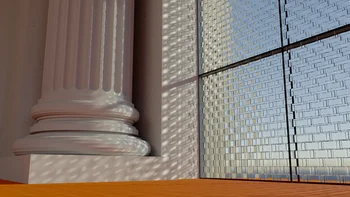


Camellia, xirreal tarafından yapılmış bir shader paketi. A pathtracing shader pack with quad raytracing.
Desteklediği sürümler: Minecraft 1.21 – 26.x. Modrinth üzerinde 6,884 kez indirildi. Son güncelleme 26.09.2026 tarihinde çıktı.
Camellia, 14.09.2026 tarihinden beri Modrinth üzerinde 4 sürüm yayınladı. Bunların 4 tanesi son bir yılda çıktı. En yenisi 26.09.2026 tarihinde çıkan 1.2.0. Minecraft 1.21.11 – 26.3 için yapıldı. Iris üzerinde çalışır. İndirme boyutu 1.4 MB.
| Sürüm | Yayın tarihi | Minecraft | Tür |
|---|---|---|---|
1.2.0 | 26.09.2026 | 1.21.11 – 26.3 | Kararlı |
1.1.1 | 20.09.2026 | 1.21.10 – 26.3 | Kararlı |
1.1.0 | 18.09.2026 | 1.21.10 – 26.3 | Kararlı |
1.0.0 | 14.09.2026 | 1.21.10 – 26.3 | Kararlı |
Camellia is a pathtracer shader for Minecraft.
It's my take on Quad Raytracing in Minecraft, using the state of the art techniques from the H-PLOC paper to build a BVH directly on the GPU.
While I tried my best, performance is still suboptimal and not yet suitable for real-time gameplay. Camellia is intended for research, experimentation, and learning.
This is NOT a realtime shader. You will need to stand still and let the shader accumulate samples, like a render in Blender.
Pressing F1 starts the accumulation and freezes input and geometry, so that the scene can't change anymore.
Some tips for faster renders:
Screenshots taken with Patrix 128x
Special thanks to sixthsurge for allowing me to use their clouds in my shader! Check out Photon for a surprisingly fast and stunning realtime shader.
Camellia's original work is shared under the source-available license in LICENSE; it is not an open-source license. Third-party code and research remain under their own terms. See THIRD_PARTY_NOTICES.md and licenses/.
I want people to learn from Camellia (especially what is wrong with it) so the license allows you to read and modify the source code for personal use. If you want to publish a derivative, you must contact me for permission. See the license for details.
If Camellia is useful to you, sponsor me on GitHub.Check out my other projects too!
Yazan: xirreal. Resimli halini Modrinth sayfasında oku.
Minecraft sürümün için Iris (Sodium ile) ya da OptiFine kur: shaderlar bunlardan birine ihtiyaç duyar.
.zip dosyasını Modrinth üzerinden indir. Zipten çıkarma.
Minecraft'ta Seçenekler, Görüntü Ayarları, Shader Paketleri'ni aç ve Shader Paketi Klasörünü Aç'a tıkla.
.zip dosyasını o klasöre bırak, listeden Camellia seç ve Bitti'ye tıkla.
Shaderlar ekran kartını zorlar. Oyun yavaşlarsa shader ayarlarından daha düşük bir profil seç.
| Kaynak | İndirmeler | Sürümler | Son güncelleme | Fiyat |
|---|---|---|---|---|
 Camelliabaktığın | 6,884 | 1.21 – 26.x | 26 Eyl 2026 | Ücretsiz |
| Photon Shaderssixthsurge | 29.2M | 1.16 – 26.x | 23 gün önce | Ücretsiz |
 Super Duper VanillaEldeston | 8.3M | 1.13 – 1.21 | 8 Tem 2025 | Ücretsiz |
 Lux V1TechDevOnGitHub | 1.3M | 1.8 – 26.x | 26 Eyl 2026 | Ücretsiz |
Evet. Camellia, Minecraft 26.x sürümünü destekliyor. Desteklenen tüm sürümler: 26.x, 1.21.
Evet. Camellia, Modrinth üzerinden ücretsiz indirilebilir.
Evet. Son güncelleme son 24 saat içinde çıktı.
En yakın olanlar Photon Shaders, Super Duper Vanilla ve Lux V1. Tüm alternatifleri karşılaştır
Photon ShadersShaderlar · 1.16 – 26.xA gameplay-focused shader pack with a semi-realistic style
Super Duper VanillaShaderlar · 1.13 – 1.21A shader pack created to convey the style of the cancelled Super Duper Graphics Pack and other popular Minecraft titles.
Lux V1Shaderlar · 1.8 – 26.xLux is a high fidelity Minecraft: Java Edition shader pack based on Capt Tatsu's BSL Shaders.
 Builder's QOL ShadersShaderlar · 1.12 – 1.20
A lightweight shader pack designed to enhance the vanilla aesthetic.
 Vanilletix ShadersShaderlar · 1.13 – 26.x
A shader pack that is created to improve the graphics of your game, leaving it in vanilla style
 Spring ShadersShaderlar · 1.12 – 26.x
A fresh and clear shader pack themed around spring.
Yorum yazmak için giriş yap.