
 Bloom BountyEklentiler · 1.21 – 26.x
Highly Optimized and Supported Bounty Plugin. Folia, All Paper Forks, Spigot. 1.21.x - 26.x
Ücretsiz4 indirme

Highly Optimized and Supported Shop Plugin. Folia, All Paper Forks, Spigot. 1.21.x - 26.x
Modrinth üzerinden doğrudan indirme · 3 indirme
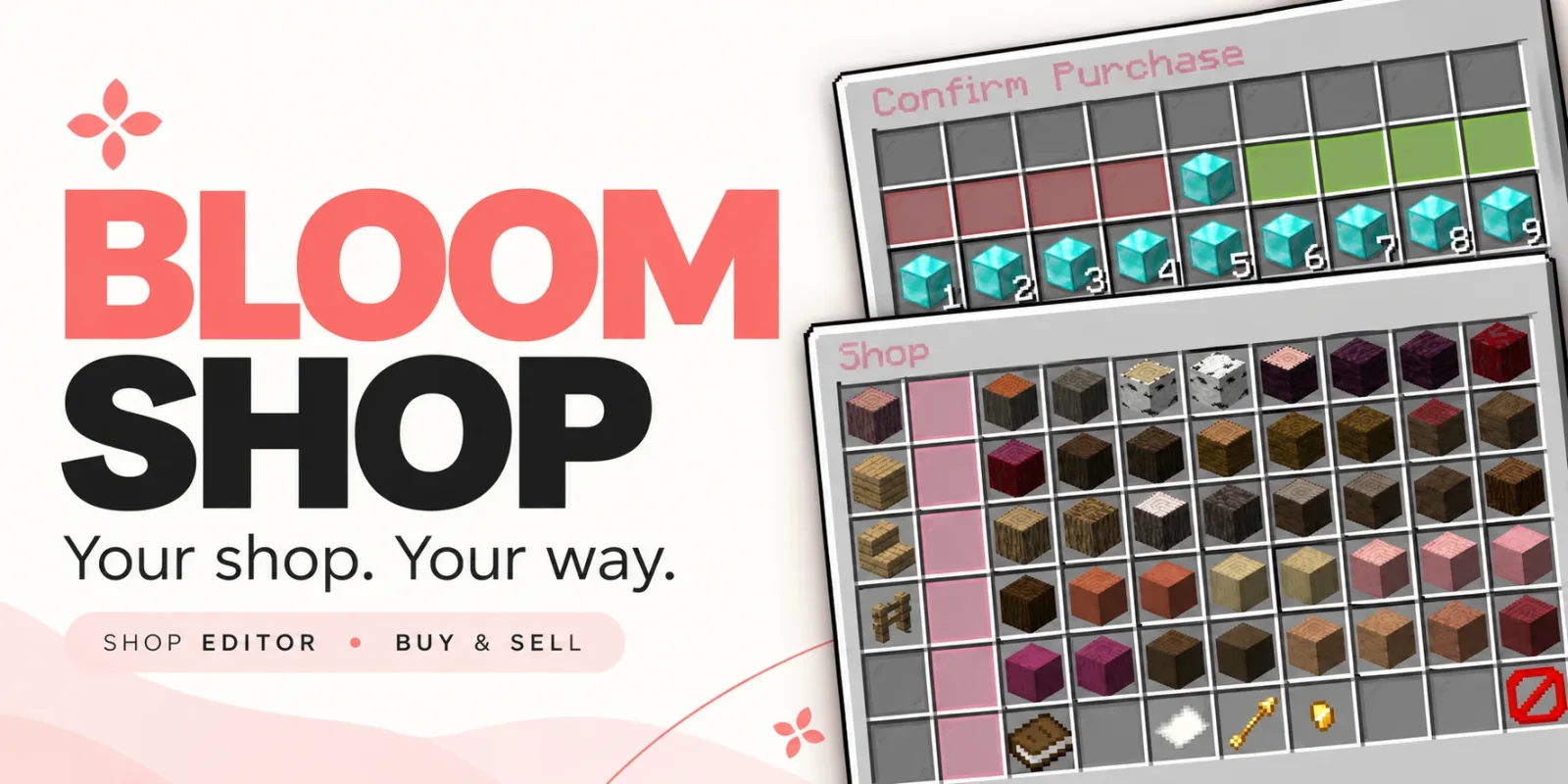
Bloom Shop, Metene tarafından Paper / Spigot sunucuları için yapılmış bir eklenti. Highly Optimized and Supported Shop Plugin. Folia, All Paper Forks, Spigot. 1.21.x - 26.x.
Desteklediği sürümler: Minecraft 1.21 – 26.x. Modrinth üzerinde 3 kez indirildi. Böylece burada listelenen performans eklentileri (138 adet) arasında 114. sırada yer alıyor. Son güncelleme 03.11.2026 tarihinde çıktı.
Bloom Shop, 28.10.2026 tarihinden beri Modrinth üzerinde 2 sürüm yayınladı. Bunların 2 tanesi son bir yılda çıktı. En yenisi 03.11.2026 tarihinde çıkan 1.6.1. Minecraft 1.21 – 26.3 için yapıldı. Bukkit, Folia, Paper, Purpur ve Spigot üzerinde çalışır. İndirme boyutu 229 KB.
| Sürüm | Yayın tarihi | Minecraft | Tür |
|---|---|---|---|
1.6.1 | 03.11.2026 | 1.21 – 26.3 | Kararlı |
1.5.0 | 28.10.2026 | 1.21 – 26.3 | Kararlı |
Bloom Shop için Modrinth sayfasında geçen komutlar:
/shopOrada geçen yetki düğümleri (LuckPerms gibi bir eklentiyle verilir):
bloomshop.usebloomshop.buybloomshop.sellbloomshop.admin.editorbloomshop.admin.reloadbloomshop.admin.*bloom.**Your shop. Your way.
Make everyday shopping a lovely part of your server. Bloom Shop brings organized markets, simple buying and selling, and an in-game editor together with soft pink menus and gentle sounds.
Beautiful menus. Easy editing. No resource pack required.
Open /shop, choose a market, and explore its categories.
From building supplies to everyday essentials, give your players a convenient place to find what they need.
Left-click to buy. Right-click to sell.
Choose a product, adjust the quantity, and review the total before confirming.
Use +1, +16, +32, and +64 quantity controls, or choose from 1–9 stack presets for larger transactions.
Open /shop editor to manage your shop through an interface that follows the same layout your players see.
Arrange your market to suit your server, with control over where each entry appears.
Enable Quick Add and click an inventory item to start creating a product. Set its price, adjust its settings, and save it into your shop.
Your original item stays in your inventory. Unfinished drafts stay out of the customer menu.
Start with a broad default catalog covering building materials, wood, colored blocks, natural items, food, farming supplies, resources, tools, and more.
Keep what fits, adjust individual products, or remove entire markets and build your own.
Included prices are a starting point. Customize them around your server’s economy and progression.
Keep the soft pink defaults or create your own style.
Customize names, descriptions, messages, icons, positions, prices, and sounds. Supported color codes and hex colors help give your shop a consistent look.
Markets, subcategories, and products can also be managed through configuration files.
Edit in-game or work with files—the choice is yours.
English and Turkish language files are included.
Adjust player messages, menu labels, editor instructions, and confirmations to match your community.
Gentle chimes add a little personality, with configurable sounds for servers that prefer a quieter experience.
Bloom Shop connects to your server’s existing economy through Vault and a compatible economy provider.
Set individual buying and selling prices, and make each product buy-only, sell-only, or available in both directions.
Balance, inventory space, item availability, and permissions are checked before a transaction completes.
Confirmation menus help players review their choices, while repeated-click protections help prevent duplicate transactions.
Shop instructions remain on menu previews, keeping purchased items free from extra price labels and interface lore.
Command · Description
/shop · Open the market selection menu.
/shop · Open a market by its ID.
/shop editor · Open the in-game shop editor.
/shop reload · Reload configuration, language files, and shop data.
Permission · Description
bloomshop.use · Access the shop.
bloomshop.buy · Purchase products.
bloomshop.sell · Sell eligible items.
bloomshop.admin.editor · Access the shop editor.
bloomshop.admin.reload · Reload the plugin.
bloomshop.admin.* · Grant the plugin’s administrative permissions.
Optional permission requirements can also be assigned to individual markets, subcategories, and products.
Check the included compatibility documentation for exact supported versions and any Folia economy-provider requirements.
🌸 Small details. Sweeter shopping. Let your shop Bloom.
Yazan: Metene. Resimli halini Modrinth sayfasında oku.
Sunucunun Minecraft 1.21 – 26.x üzerinde Paper ve Spigot çalıştırdığından emin ol.
.jar dosyasını Modrinth üzerinden indir ve sunucunun plugins klasörüne koy.
Sunucuyu yeniden başlat. /reload kullanma, birçok eklenti bununla sorun çıkarır.
Konsola /plugins yaz: Bloom Shop yeşil olarak listelenmeli. Ayar dosyaları ilk açılışta plugins klasöründe oluşturulur.
Detaylı rehber: Minecraft sunucusuna eklenti nasıl kurulur
| Kaynak | İndirmeler | Sürümler | Son güncelleme | Fiyat |
|---|---|---|---|---|
| Bloom Shopbaktığın | 3 | 1.21 – 26.x | 11 gün önce | Ücretsiz |
| Bloom BountyMetene | 4 | 1.21 – 26.x | 11 gün önce | Ücretsiz |
 Bloom Auto PickupMetene | 5 | 1.21 – 26.x | 1 gün önce | Ücretsiz |
 Bloom PerksMetene | 4 | 1.21 – 26.x | 10 gün önce | Ücretsiz |
Evet. Bloom Shop, Minecraft 26.x sürümünü destekliyor. Desteklenen tüm sürümler: 26.x, 1.21.
Evet. Bloom Shop, Modrinth üzerinden ücretsiz indirilebilir.
Bloom Shop, Paper ve Spigot sunucularında çalışır.
Evet. Son güncelleme son 24 saat içinde çıktı.
En yakın olanlar Bloom Bounty, Bloom Auto Pickup ve Bloom Perks. Tüm alternatifleri karşılaştır
Bloom BountyEklentiler · 1.21 – 26.xHighly Optimized and Supported Bounty Plugin. Folia, All Paper Forks, Spigot. 1.21.x - 26.x
Bloom Auto PickupEklentiler · 1.21 – 26.xHighly Optimized and Supported Auto Pickup Plugin. Folia, All Paper Forks, Spigot. 1.21.x - 26.3
Bloom PerksEklentiler · 1.21 – 26.xHighly Optimized and Supported Perks Plugin. Folia, All Paper Forks, Spigot. 1.21.x - 26.x
 Bloom Night VisionEklentiler · 1.21 – 26.x
Highly Optimized and Supported Night Vision Plugin. Folia, All Paper Forks, Spigot. 1.21.x - 26.x
 Bloom HomeEklentiler · 1.21 – 26.x
Highly Optimized and Supported Home Plugin. Folia, All Paper Forks, Spigot. 1.21.x - 26.x
 Bloom ToolsEklentiler · 1.21 – 26.x
Highly Optimized and Supported Tools Plugin. Folia, All Paper Forks, Spigot. 1.21.x - 26.x
Yorum yazmak için giriş yap.