
 Bloom Auto PickupEklentiler · 1.21 – 26.x
Highly Optimized and Supported Auto Pickup Plugin. Folia, All Paper Forks, Spigot. 1.21.x - 26.3
Ücretsiz5 indirme

Highly Optimized and Supported Home Plugin. Folia, All Paper Forks, Spigot. 1.21.x - 26.x
Modrinth üzerinden doğrudan indirme · 3 indirme
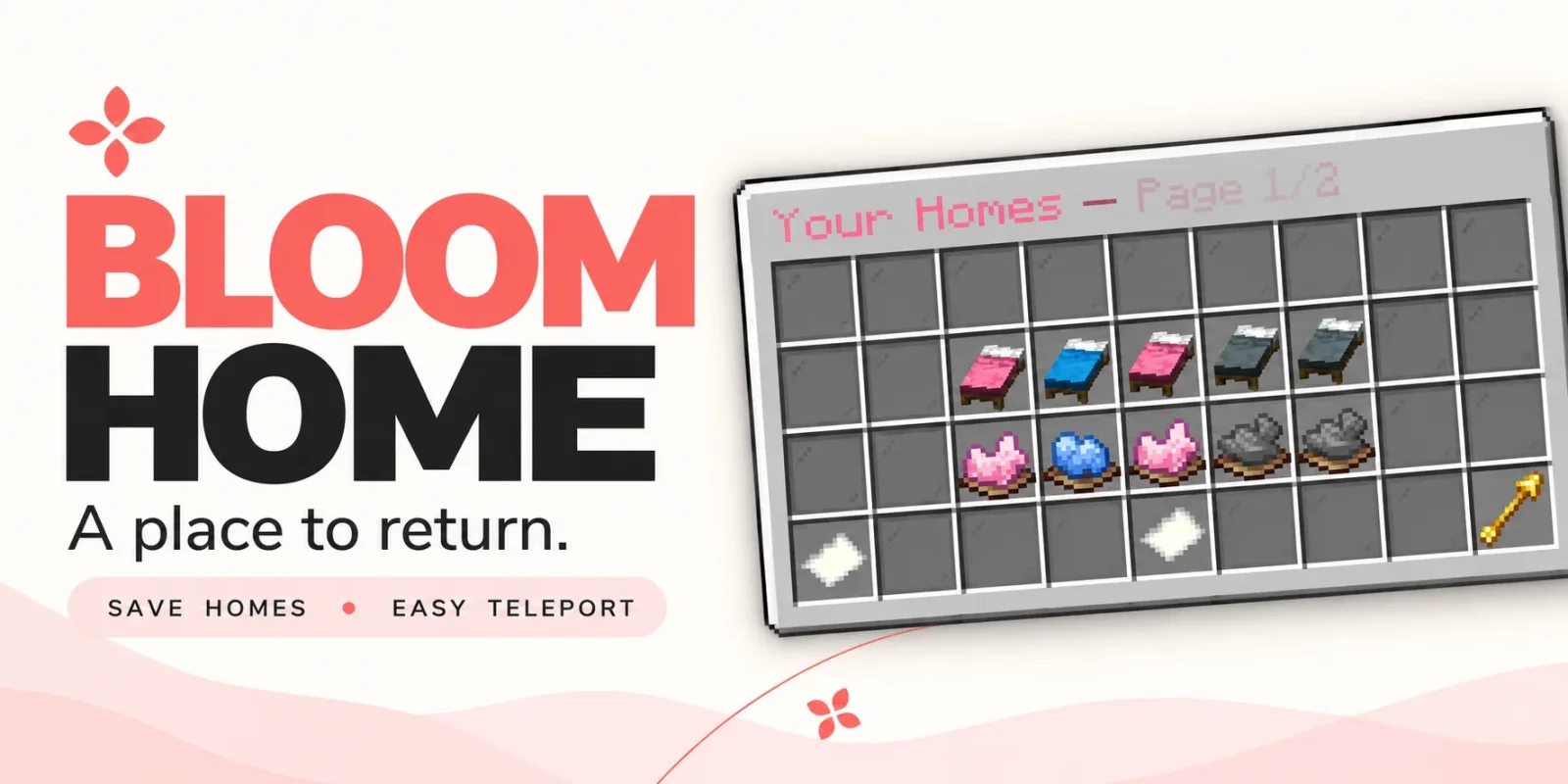
Bloom Home, Metene tarafından Paper / Spigot sunucuları için yapılmış bir eklenti. Highly Optimized and Supported Home Plugin. Folia, All Paper Forks, Spigot. 1.21.x - 26.x.
Desteklediği sürümler: Minecraft 1.21 – 26.x. Modrinth üzerinde 3 kez indirildi. Böylece burada listelenen ışınlanma ve warp eklentileri (105 adet) arasında 89. sırada yer alıyor. Son güncelleme 03.11.2026 tarihinde çıktı.
Bloom Home, 28.10.2026 tarihinden beri Modrinth üzerinde 2 sürüm yayınladı. Bunların 2 tanesi son bir yılda çıktı. En yenisi 03.11.2026 tarihinde çıkan 1.1.7. Minecraft 1.21 – 26.3 için yapıldı. Bukkit, Folia, Paper, Purpur ve Spigot üzerinde çalışır. İndirme boyutu 128 KB.
| Sürüm | Yayın tarihi | Minecraft | Tür |
|---|---|---|---|
1.1.7 | 03.11.2026 | 1.21 – 26.3 | Kararlı |
1.1.4 | 28.10.2026 | 1.21 – 26.3 | Kararlı |
Bloom Home için Modrinth sayfasında geçen komutlar:
/home/homes/sethome/delhome/bloomhomeOrada geçen yetki düğümleri (LuckPerms gibi bir eklentiyle verilir):
bloomhome.usebloomhome.admin.reloadbloomhome.limit.5bloomhome.limit.10bloomhome.limit.15bloomhome.limitbloomhome.teleport.bypassbloom.**A little charm. A place to return.
From your first shelter to your favorite hideaway, keep the places that matter close. Bloom Home combines simple home management, soft pink menus, and gentle sounds to make returning home feel welcoming.
Save your spot. Make it yours. Come home.
Open /home to manage your saved locations through a clean, easy-to-use menu.
Click an available bed to save your current location. Your next home is ready.
Left-click a saved bed to return home, or use /home .
A gentle 3-second countdown appears before teleporting. Moving cancels the countdown, and server owners can customize the delay.
Give selected players or ranks instant travel with the teleport bypass permission.
A cozy cabin? A mountain retreat? Your favorite fishing spot?
Right-click a saved bed to rename it and make your home menu feel personal.
Ready for somewhere new? Click the dye beneath a saved home to open its deletion confirmation menu. Cancel or close the confirmation to keep your home.
Players start with 3 home slots by default. Server owners can change that starting allowance and grant additional homes through permissions.
Use limits such as 5, 10, 15, or any other positive number to suit your ranks.
The highest granted limit applies when it exceeds the configured default. Limits do not stack.
Locked slots can send a customizable, clickable store link in private chat, helping players discover your server’s upgrades.
English and Turkish translations are included, with editable messages and menu text.
Customize the experience to match your server:
Command · Description
/home · Open the home menu.
/homes · Alias for /home.
/home · Teleport to a saved home, with a countdown unless bypassed.
/sethome · Save your current location to an empty home slot.
/delhome · Open deletion confirmation for that home.
/bloomhome reload · Reload configuration and language files.
Players can access the home menu and player commands by default. Use permissions to grant additional slots or skip the teleport countdown.
Permission · Default · Description
bloomhome.use · Everyone · Access the home menu and player commands.
bloomhome.admin.reload · OP · Use /bloomhome reload.
bloomhome.limit.5 · Not granted · Grant a limit of 5 homes if higher than the configured default.
bloomhome.limit.10 · Not granted · Grant a limit of 10 homes if higher than the configured default.
bloomhome.limit.15 · Not granted · Grant a limit of 15 homes if higher than the configured default.
bloomhome.limit. · Not granted · Grant any positive numeric home limit, resolved at runtime.
bloomhome.teleport.bypass · Not granted · Skip the home teleport countdown.
Teleport bypass must be granted explicitly, including for OPs. Give it to the players or ranks you choose.
🌸 New adventures. Familiar places. Let your home Bloom.
Yazan: Metene. Resimli halini Modrinth sayfasında oku.
Sunucunun Minecraft 1.21 – 26.x üzerinde Paper ve Spigot çalıştırdığından emin ol.
.jar dosyasını Modrinth üzerinden indir ve sunucunun plugins klasörüne koy.
Sunucuyu yeniden başlat. /reload kullanma, birçok eklenti bununla sorun çıkarır.
Konsola /plugins yaz: Bloom Home yeşil olarak listelenmeli. Ayar dosyaları ilk açılışta plugins klasöründe oluşturulur.
Detaylı rehber: Minecraft sunucusuna eklenti nasıl kurulur
| Kaynak | İndirmeler | Sürümler | Son güncelleme | Fiyat |
|---|---|---|---|---|
| Bloom Homebaktığın | 3 | 1.21 – 26.x | 11 gün önce | Ücretsiz |
| Bloom Auto PickupMetene | 5 | 1.21 – 26.x | 1 gün önce | Ücretsiz |
 Bloom BountyMetene | 4 | 1.21 – 26.x | 11 gün önce | Ücretsiz |
 Bloom PerksMetene | 4 | 1.21 – 26.x | 10 gün önce | Ücretsiz |
Evet. Bloom Home, Minecraft 26.x sürümünü destekliyor. Desteklenen tüm sürümler: 26.x, 1.21.
Evet. Bloom Home, Modrinth üzerinden ücretsiz indirilebilir.
Bloom Home, Paper ve Spigot sunucularında çalışır.
Evet. Son güncelleme son 24 saat içinde çıktı.
En yakın olanlar Bloom Auto Pickup, Bloom Bounty ve Bloom Perks. Tüm alternatifleri karşılaştır
Bloom Auto PickupEklentiler · 1.21 – 26.xHighly Optimized and Supported Auto Pickup Plugin. Folia, All Paper Forks, Spigot. 1.21.x - 26.3
Bloom BountyEklentiler · 1.21 – 26.xHighly Optimized and Supported Bounty Plugin. Folia, All Paper Forks, Spigot. 1.21.x - 26.x
Bloom PerksEklentiler · 1.21 – 26.xHighly Optimized and Supported Perks Plugin. Folia, All Paper Forks, Spigot. 1.21.x - 26.x
 Bloom Night VisionEklentiler · 1.21 – 26.x
Highly Optimized and Supported Night Vision Plugin. Folia, All Paper Forks, Spigot. 1.21.x - 26.x
 Bloom ToolsEklentiler · 1.21 – 26.x
Highly Optimized and Supported Tools Plugin. Folia, All Paper Forks, Spigot. 1.21.x - 26.x
 Bloom SpawnersEklentiler · 1.21 – 26.x
Highly Optimized and Supported Spawner Plugin. Folia, All Paper Forks, Spigot. 1.21.x - 26.3
Yorum yazmak için giriş yap.